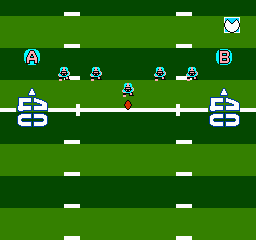
Touch Down Fever (USA)
0 1 0
Touch Down Fever (USA) is a classic NES football game with simple, arcade-style gameplay. It’s perfect for players who enjoy quick matches and easy controls. The game captures the feeling of early football video games, focusing more on fun than on realism. If you’re after a nostalgic, pick-up-and-play experience, Touch Down Fever provides a solid sports challenge that runs right in your browser.
Getting Into Touch Down Fever
The game centers on choosing a team and playing fast-paced football matches. You control your players to move the ball forward, dodge defenders, and score touchdowns. Matches are brief, usually just a few minutes, so you can jump into a quick game whenever you want. You can play against the computer or, in some versions, challenge a friend locally. This version is mainly designed for solo play.
During each game, your main task is to decide when to run, pass, or kick. Timing and positioning matter a lot to break through the defense. The gameplay is straightforward, focusing on quick decisions rather than complex strategies or playbooks. After each score or turnover, the game resets quickly, letting you play multiple rounds in a row. Its simple mechanics make it suitable for all skill levels, especially if you’re new to football games or just want a casual experience.
Standout Features
This NES game features colorful, pixelated graphics typical of its era, with clear differences between teams and players. The simple visuals help players easily identify their team and opponents, keeping the game smooth and responsive. The sound design is minimal but effective, with basic effects that give a lively football atmosphere without being overwhelming.
Progressing in Touch Down Fever is easy—each match is a standalone game, but getting good at controls and timing can help you score higher or perform better over time. The game’s replay value comes from its quick rounds and the challenge of beating your best scores or improving your team’s play. It doesn’t have deep customization or modes, but its instant gameplay makes it easy to enjoy repeatedly, especially if you want a quick dose of sports action.
Strategy and Tips
To get the most out of Touch Down Fever, focus on timing and positioning. Make quick decisions and avoid risky plays when you’re just starting out.
- Use quick passes to get past defenders, especially if you spot an opening.
- Run with your players when the defense is out of position; it’s often the fastest way to score.
- Watch the clock; quick plays can help you maximize your scoring chances in limited time.
- Practice switching between players smoothly to cover different areas of the field.
- If you’re under pressure, don’t hesitate to punt or kick the ball away to reset your position.
- Stick with simple, consistent plays rather than risky maneuvers until you get a feel for the game’s pace.
Quick Questions
How do I start a game in Touch Down Fever?
Select your team and click start. The game loads immediately in your browser with no extra setup needed.
What’s a common mistake beginners make?
Trying to do too much at once. Focusing on safe, simple plays like quick runs or passes usually works better than risky attempts.
Can I play Touch Down Fever on mobile or touch devices?
Yes, the game runs directly in your browser and works on most smartphones and tablets. Controls are designed for keyboard on desktop, but it’s playable on touch screens too.
Touch Down Fever offers a straightforward, fun experience for fans of vintage sports games. With its quick rounds and easy mechanics, it’s a good choice for casual play—whether you’re reliving childhood memories or testing your football skills.
Related games: you can also try Smash T.V. (USA) and Tecmo Baseball (USA), or browse all other games in the NES category.
How to Play Touch Down Fever (USA)?
Choose your team, then move players to run, pass, or kick and score touchdowns within quick matches. Focus on timing and positioning to beat the defense and improve your score.
Game Controls
Arrow keys control movement; action buttons are mapped to keyboard keys for passing, running, and kicking.
You may be interested in:
-
![Zombie Hunter (Japan) [En by KingMike v1.01]](https://www.playf2p.com/wp-content/uploads/zombie-hunter-japan-en-by-kingmike-v1-01-200x120.png) NES
♥ 2
Zombie Hunter (Japan) [En by KingMike v1.01]
NES
♥ 2
Zombie Hunter (Japan) [En by KingMike v1.01] -
 NES
♥ 1
Zombie Hunter (Japan)
NES
♥ 1
Zombie Hunter (Japan) -
 NES
♥ 1
Zoids Mokushiroku (Japan)
NES
♥ 1
Zoids Mokushiroku (Japan) -
 NES
♥ 2
Zoids 2 – Zenebas no Gyakushuu (Japan)
NES
♥ 2
Zoids 2 – Zenebas no Gyakushuu (Japan) -
 NES
♥ 1
Zoids – Chuuou Tairiku no Tatakai (Japan)
NES
♥ 1
Zoids – Chuuou Tairiku no Tatakai (Japan) -
 NES
♥ 11
Zippy Race (Japan)
NES
♥ 11
Zippy Race (Japan) -
 NES
♥ 1
Zhen Ben Xi You Ji (Asia) (Unl)
NES
♥ 1
Zhen Ben Xi You Ji (Asia) (Unl) -
 NES
♥ 1
Zenbei!! Pro Basket (Japan)
NES
♥ 1
Zenbei!! Pro Basket (Japan)
Comments (0)
No comments yet. Be the first to comment!