Draw Climber 2 Game
The game loads when you press the "Play" button.
The game loads when you press the "Play" button.
Draw Climber 2 Game is a playful arcade game that tests your creativity and quick thinking. It’s designed to be simple and engaging, inviting players to draw legs that help moving blocks get past obstacles in a race against another block. Whether you’re stopping by for a quick challenge or enjoy puzzle-like mechanics, Draw Climber 2 offers a lighthearted experience you can enjoy right in your browser. It works well for all ages, combining drawing with strategic planning in a straightforward gameplay loop.
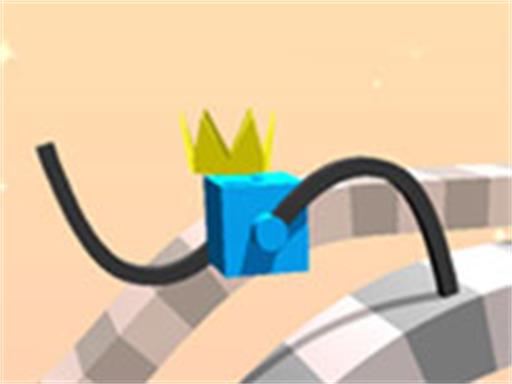
Playing Draw Climber 2 is about balancing creativity with problem-solving. When you start, you’ll see a block that needs to move forward through levels filled with different hurdles. Your job is to draw legs that will carry the block across the terrain. The game is perfect for short sessions, making it easy to jump in whenever you’ve got a few minutes. The main idea is to create custom legs, see how they perform, and tweak your approach based on the obstacles ahead. You’ll race against an AI or another player’s block, which keeps each run fresh and encourages you to improve your drawing skills and strategy over time.
The gameplay in Draw Climber 2 is simple but addictive. Each level gives you a visual cue or idea of what kind of legs to draw to help your block move forward. Using your mouse or finger, you draw a set of legs directly onto the screen. After drawing, the game animates the movement, and your block tries to jump over hurdles or climb slopes based on what you’ve designed. If it clears the obstacle, you move on to the next challenge. If not, you can quickly adjust your drawing and try again. It’s a process of trial and error that helps you learn and get better with each attempt.
Different modes and levels keep things interesting. As you progress, obstacles become tougher and require more clever leg designs. The game often pits you against a rival block, with the goal to outperform it by overcoming hurdles more efficiently. The pace encourages quick thinking and adaptability, making each session feel dynamic. You can experiment with different shapes, lengths, and joint points to find the best fit for each level. Since Draw Climber 2 runs in your browser, you can start a new race whenever you’re ready for fresh challenges or to beat your previous best.
The minimalistic visual style of Draw Climber 2 stands out. The graphics are clean and simple, focusing on the drawing mechanic and the movement of the blocks. This clarity keeps the gameplay straightforward and accessible, without cluttering the screen with unnecessary details. As you move through levels, the environments introduce different themes and obstacles, adding variety and keeping the visuals interesting without overwhelming you.
Your progression depends on how well you adapt and improve your drawings. Each level presents new challenges, and the game rewards creative solutions. Replay value is high since no two runs are exactly alike. You can always tweak your drawings and try different leg configurations to get better results. It also encourages experimentation—trying out different designs helps you see what works best, making each run feel like a new puzzle. Its mechanics are simple but become more challenging as you go, keeping you motivated to improve your skills.
If you want to get better at Draw Climber 2, focusing on a few practical strategies can help. Remember, each obstacle is a new puzzle, and quick thinking makes a difference. Here are some tips to keep in mind:
How do I get started with Draw Climber 2 Game?
Just click or tap to draw your legs on the screen, and the game will animate your block’s movement through the levels filled with obstacles. It’s designed to be intuitive, so experiment with different leg shapes to see what works best.
What is a common mistake beginners make in Draw Climber 2?
Many new players try to draw overly complex or fragile legs that break or fail to support the block. Starting with simple, sturdy designs helps you learn what works before moving on to more intricate shapes.
Can I play Draw Climber 2 on my phone or tablet?
Yes, the game works well on mobile devices with touch controls. You can play directly in your browser without downloading anything, making it easy to enjoy on the go.
Draw Climber 2 offers a charming mix of creativity and challenge, perfect for anyone who enjoys drawing and puzzle-solving in an arcade style. Its straightforward gameplay and rewarding progression system make it a fun game for casual players and puzzle fans alike. Whether racing against a friend or trying to beat your high score, this free browser game provides plenty of moments to enjoy and challenge your thinking.
Related games: you can also try Rubic Cube and Pixelia, or browse all other games in the Arcade category.
Draw legs to help your block jump over obstacles and reach the end of each level. Adjust your drawings quickly to beat obstacles and compete against other players or AI.
Use the mouse or finger to draw legs; no keyboard needed.