Bigfoot (Europe)
0 4 3
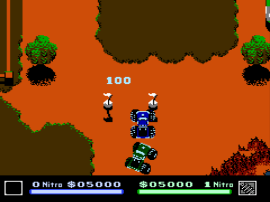
Bigfoot (Europe) is a classic NES racing game that puts you behind the wheel of a vehicle navigating tricky terrains. It’s a game that appeals to those who enjoy simple, old-school driving action on a console from the 8-bit era. Now, you can play it instantly in your browser, offering a nostalgic feel for fans of vintage gaming and racing mechanics.
Getting Into Bigfoot
The main gameplay in Bigfoot involves controlling a vehicle as it speeds across different outdoor tracks. Your aim is to reach the end of each course without crashing or running out of time. You pick a track and then maneuver through twists, turns, and obstacles that test your reflexes and precision. There’s no complicated story or character customization, just the pure challenge of racing and driving.
The pacing encourages quick decisions, with each race lasting just a few minutes. You can try multiple runs back-to-back, aiming to beat your best times or improve your handling on increasingly tough tracks. There’s no multiplayer option, so the focus is on your skills and getting better at each course. The controls are simple and responsive, making it easy for newcomers to pick up, while still rewarding players who get better at steering.
Standout Features
Visually, Bigfoot captures the pixelated charm of NES racing games, with colorful tracks and blocky vehicles that evoke nostalgia. The visuals are straightforward, keeping the focus on gameplay rather than flashy graphics. Progress depends on completing tracks and honing your driving skills. Each successful run motivates replaying to beat your best times or explore new courses.
The game’s replay value comes from its simple mechanics and the challenge of mastering each track. The difficulty gradually increases, encouraging you to improve your driving lines and reaction times. Without complex unlocks or story modes, the enjoyment comes from honing your skills and setting personal records, making it a good choice for quick sessions or casual play.
Strategy and Tips
Start by focusing on smooth, controlled steering instead of aggressive acceleration. Precise handling helps avoid crashes and saves seconds.
- Get familiar with each track’s layout to anticipate sharp turns and obstacles.
- Use gentle inputs to stay in control, especially around tight corners.
- Avoid oversteering; small adjustments help keep your vehicle steady and faster.
- Practice braking before turns to improve your maneuvering and prevent sliding off the track.
- Watch your time and try to shave seconds off your best runs by refining your route.
- If the game feels tough at first, focus on one track until you can complete it consistently before moving to the harder ones.
Quick Questions
How do I get started with Bigfoot?
Pick a track from the menu and start steering to get a feel for the controls and terrain. Practice each course to learn its unique challenges.
What’s a common mistake beginners make?
Many players tend to oversteer or accelerate too quickly, losing control early on. Focus on smooth, deliberate movements.
Can I play Bigfoot on mobile or touch devices?
This version runs in your browser, so you can use your mouse or keyboard. Touch controls aren’t supported directly, but they might work on some devices with browser support for such inputs.
Bigfoot offers a straightforward racing challenge that rewards precision and practice. Its simplicity means it’s easy to pick up, but tough enough to keep you trying to improve your times. Mastering each track is key, and the retro style keeps it appealing for players of all ages.
Related games: you can also try Battle City (Japan) [Hack by AnS v0.999] (~Binary City) and Adventures of Lolo 2 (Europe), or browse all other games in the NES category.
How to Play Bigfoot (Europe)?
Drive your vehicle through outdoor tracks, avoiding obstacles and sharp turns to reach the finish line as quickly as possible. Practice smooth steering and learn each course to improve your times.
Game Controls
Arrow keys control steering and acceleration; other keys handle braking and gear changes.
You may be interested in:
-
![Zombie Hunter (Japan) [En by KingMike v1.01]](https://www.playf2p.com/wp-content/uploads/zombie-hunter-japan-en-by-kingmike-v1-01-200x120.png) NES
♥ 2
Zombie Hunter (Japan) [En by KingMike v1.01]
NES
♥ 2
Zombie Hunter (Japan) [En by KingMike v1.01] -
 NES
♥ 1
Zombie Hunter (Japan)
NES
♥ 1
Zombie Hunter (Japan) -
 NES
♥ 1
Zoids Mokushiroku (Japan)
NES
♥ 1
Zoids Mokushiroku (Japan) -
 NES
♥ 2
Zoids 2 – Zenebas no Gyakushuu (Japan)
NES
♥ 2
Zoids 2 – Zenebas no Gyakushuu (Japan) -
 NES
♥ 1
Zoids – Chuuou Tairiku no Tatakai (Japan)
NES
♥ 1
Zoids – Chuuou Tairiku no Tatakai (Japan) -
 NES
♥ 11
Zippy Race (Japan)
NES
♥ 11
Zippy Race (Japan) -
 NES
♥ 1
Zhen Ben Xi You Ji (Asia) (Unl)
NES
♥ 1
Zhen Ben Xi You Ji (Asia) (Unl) -
 NES
♥ 1
Zenbei!! Pro Basket (Japan)
NES
♥ 1
Zenbei!! Pro Basket (Japan)
Comments (0)
No comments yet. Be the first to comment!