Blackjack (USA) (Unl)
0 1 1
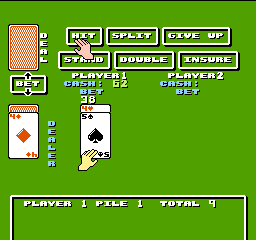
Blackjack (USA) (Unl) is a straightforward card game that has found its way onto the NES, offering a digital version of the classic casino experience. With simple rules and quick rounds, it’s easy to pick up, even if you’re new to card games. You can play this NES classic directly in your browser, making it a handy way to practice your luck and strategy without any fuss.
What Is Blackjack?
Blackjack is a card game in the gambling genre where the goal is to beat the dealer by having a hand value closer to 21 without going over. Players decide whether to hit, stand, or sometimes double down, based on their current hand and the dealer’s visible card. It combines chance and strategy, relying on probability and careful choices to increase your chances of winning.
The game moves quickly, with rounds that test your ability to read the table and make smart bets. The rules are simple—get as close to 21 as possible without going over—so beginners can learn fast. More experienced players can also use advanced strategies to improve their odds. This format has stayed popular for decades and remains one of the most recognizable casino card games around.
What Keeps You Coming Back
This game is engaging because of its straightforward gameplay and the opportunity to develop strategies. Even after a few rounds, players learn when to hit or stand based on the dealer’s visible card, making every decision meaningful. The quick feedback from wins or losses keeps the game lively and encourages trying again to refine your tactics.
The simple interface of this NES version keeps the focus on playing. Its fast rounds mean you can enjoy multiple sessions during a short break, and the rules are easy enough to pick up quickly. Whether aiming for a high score or practicing your basic strategy, Blackjack offers enough variation to stay interesting over many plays.
Handy Tips
Here are a few tips to get the most out of this classic game:
- Think about the dealer’s visible card when deciding whether to hit or stand. A low card might mean you want to hit, while a high card suggests standing could be safer.
- Don’t hesitate to double down if your initial two cards total 9, 10, or 11 and the dealer shows a weak card.
- Avoid taking risks with high-value hands that could push you over 21, which means an immediate loss.
- Use basic strategy charts to help make smarter decisions based on the dealer’s up-card.
- Keep track of your bankroll and set limits to prevent losing more than you’re comfortable with during a session.
- If you’re unsure, playing conservatively can help you last longer and learn more about the odds.
Player FAQ
Is Blackjack easy to learn for beginners?
Yes, the rules are simple, so new players can pick it up quickly. Basic strategy is straightforward, and understanding how to play your hand doesn’t take long.
Can younger players enjoy Blackjack?
While it’s a classic card game, Blackjack involves gambling elements that might not be suitable for children. Still, the game itself is straightforward and can be played casually without real money, which makes it suitable for older teens interested in learning the rules.
Do I need an internet connection to play this version of Blackjack?
No, since it runs directly in your browser, you can play offline whenever you like. It’s a reliable way to practice or pass the time without needing an internet connection.
This version of Blackjack offers a familiar experience for fans of the game, with the added convenience of playing right in your browser. Its simple mechanics and strategic options make it a good choice for casual players and newcomers alike.
Related games: you can also try Attack Animal Gakuen (Japan) [En by PentarouZero v1.0] (~Attack Animal Academy) and Tetris (USA), or browse all other games in the NES category.
How to Play Blackjack (USA) (Unl)?
Try to beat the dealer by getting your hand value close to 21 without going over. Decide to hit or stand based on your cards and the dealer’s visible card, aiming to win each round.
Game Controls
Arrow keys act as the D-pad; Enter is Start; on-screen mapped keys handle the action buttons
You may be interested in:
-
![Zombie Hunter (Japan) [En by KingMike v1.01]](https://www.playf2p.com/wp-content/uploads/zombie-hunter-japan-en-by-kingmike-v1-01-200x120.png) NES
♥ 2
Zombie Hunter (Japan) [En by KingMike v1.01]
NES
♥ 2
Zombie Hunter (Japan) [En by KingMike v1.01] -
 NES
♥ 1
Zombie Hunter (Japan)
NES
♥ 1
Zombie Hunter (Japan) -
 NES
♥ 1
Zoids Mokushiroku (Japan)
NES
♥ 1
Zoids Mokushiroku (Japan) -
 NES
♥ 2
Zoids 2 – Zenebas no Gyakushuu (Japan)
NES
♥ 2
Zoids 2 – Zenebas no Gyakushuu (Japan) -
 NES
♥ 1
Zoids – Chuuou Tairiku no Tatakai (Japan)
NES
♥ 1
Zoids – Chuuou Tairiku no Tatakai (Japan) -
 NES
♥ 11
Zippy Race (Japan)
NES
♥ 11
Zippy Race (Japan) -
 NES
♥ 1
Zhen Ben Xi You Ji (Asia) (Unl)
NES
♥ 1
Zhen Ben Xi You Ji (Asia) (Unl) -
 NES
♥ 1
Zenbei!! Pro Basket (Japan)
NES
♥ 1
Zenbei!! Pro Basket (Japan)
Comments (0)
No comments yet. Be the first to comment!