Gemfire (USA)
0 2 0
Gemfire (USA) is a classic NES game that combines strategy and role-playing elements, featuring tactical battlefield management alongside kingdom-building. Originally released during the NES era, it appeals to players who enjoy making careful decisions and taking on a bit of adventure. Its turn-based gameplay and empire management make it a rewarding experience for those who like planning and resource management.
Getting Into Gemfire
The game revolves around managing a kingdom set in a medieval-inspired world. You control a town and expand your territory by deploying troops, capturing enemy towns, and growing your economy. Each turn involves deciding where to send your armies, which towns to strengthen, and how to allocate your resources. The gameplay combines tactical battles with kingdom development, relying on thoughtful planning and reacting to changing battlefield conditions.
Usually, a session starts with evaluating your holdings and enemy positions. You send troops to attack or defend and resolve battles in a turn-based manner. After combat, you might gain new towns or resources, which you reinvest into your kingdom. Progress depends on expanding your territory, boosting your military, and managing your economy efficiently. The game offers different scenarios or modes, presenting varied challenges and victory goals, so no two playthroughs are alike.
Standout Features
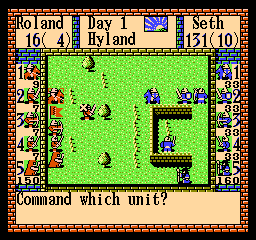
Graphically, Gemfire has simple yet clear visuals typical of NES strategy games. Towns and armies are shown with straightforward sprites, prioritizing clarity over detail. Despite modest graphics, the interface effectively displays essential information like troop numbers, resources, and territorial boundaries, supporting strategic planning.
Success in Gemfire depends on how well you expand your influence and adapt your tactics. Each victory or setback influences future scenarios, encouraging multiple playthroughs. Its replay value comes from different strategies—focusing on military conquest, economic growth, or a balanced approach—and the variety of scenarios that challenge different aspects of managing your kingdom.
Strategy and Tips
If you’re just starting, it’s key to understand resource management and troop placement. Here are some tips:
- Prioritize defending your core territory before launching big offensives.
- Balance your troop deployment between attacking and defending to avoid spreading yourself too thin.
- Target towns that give you important resources or strategic advantages.
- Invest in upgrading towns to boost resource income.
- Watch enemy movements and adjust your tactics rather than sticking to a single plan.
- Save resources for critical battles or emergencies; overexpanding can leave you vulnerable.
Quick Questions
How do I get started if I’m new to Gemfire?
Start with the simplest scenario, focusing on expanding gradually and getting a feel for how resources and troops work together.
What’s a common mistake beginners make?
Overextending forces without securing your core territory can lead to early losses, so it’s best to build up your defenses first.
Can I play Gemfire on mobile or touch devices?
This version runs directly in your browser, so you can play on most devices, including touchscreens, without any extra setup.
Gemfire offers a strategic challenge that rewards careful planning and tactical thinking. Its straightforward mechanics hide depth that can keep players coming back for more. Playing this NES classic in your browser makes it easy to enjoy anytime, and mastering its systems can be quite satisfying. Give it a try and see how well you can build and defend your kingdom in Gemfire.
Related games: you can also try Digger T. Rock – The Legend of the Lost City (USA) and Datach – Ultraman Club – Supokon Fight! (Japan), or browse all other games in the NES category.
How to Play Gemfire (USA)?
Manage your kingdom by deploying troops, capturing towns, and balancing resources to expand your territory and defeat enemies in turn-based battles.
Game Controls
Arrow keys move your cursor; Enter or space select actions; other keys handle commands.
You may be interested in:
-
![Zombie Hunter (Japan) [En by KingMike v1.01]](https://www.playf2p.com/wp-content/uploads/zombie-hunter-japan-en-by-kingmike-v1-01-200x120.png) NES
♥ 2
Zombie Hunter (Japan) [En by KingMike v1.01]
NES
♥ 2
Zombie Hunter (Japan) [En by KingMike v1.01] -
 NES
♥ 1
Zombie Hunter (Japan)
NES
♥ 1
Zombie Hunter (Japan) -
 NES
♥ 1
Zoids Mokushiroku (Japan)
NES
♥ 1
Zoids Mokushiroku (Japan) -
 NES
♥ 2
Zoids 2 – Zenebas no Gyakushuu (Japan)
NES
♥ 2
Zoids 2 – Zenebas no Gyakushuu (Japan) -
 NES
♥ 1
Zoids – Chuuou Tairiku no Tatakai (Japan)
NES
♥ 1
Zoids – Chuuou Tairiku no Tatakai (Japan) -
 NES
♥ 11
Zippy Race (Japan)
NES
♥ 11
Zippy Race (Japan) -
 NES
♥ 1
Zhen Ben Xi You Ji (Asia) (Unl)
NES
♥ 1
Zhen Ben Xi You Ji (Asia) (Unl) -
 NES
♥ 1
Zenbei!! Pro Basket (Japan)
NES
♥ 1
Zenbei!! Pro Basket (Japan)
Comments (0)
No comments yet. Be the first to comment!