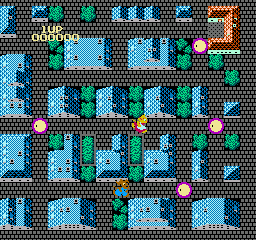
Onyanko Town (Japan)
0 5 0
Onyanko Town (Japan) is a lesser-known NES game that delivers simple action wrapped in nostalgic pixel art. As part of the 8-bit era, it captures the charm and challenge typical of early console titles, inviting players into a small, pixelated world that feels like a throwback to simpler gaming days. Its clean visuals and chiptune sounds evoke the style of that time, making it familiar for fans and newcomers alike who want to experience a piece of retro gaming right in their browser.
Step Into the World of Onyanko Town
The graphics feature blocky, colorful sprites against plain backgrounds, making everything easy to see and read quickly. The mood is light and straightforward, focusing on action rather than storytelling. The sounds are classic NES chiptunes that loop gently in the background, keeping the nostalgic feel alive while maintaining a lively pace. Overall, it offers uncomplicated fun, with no overwhelming mechanics—just pixelated action on a small screen.
Since Onyanko Town runs directly in your browser, it starts instantly without downloads or setup. Its simple presentation makes it easy to pick up and play, whether you have a few minutes or want to settle in for a longer session. The game’s simplicity encourages quick reflexes and timing, with no need for complex stories or mechanics. It’s a cozy, pixelated universe where the focus is on reacting fast and enjoying the retro look.
How the Gameplay Hooks You
At its core, Onyanko Town keeps players engaged with short, repeatable challenges. The pacing is quick: actions happen fast, requiring focus and precise timing. Progress depends on mastering each stage’s rhythm, with players coming back to improve or explore new parts of the game. Its design makes each session satisfying without demanding a lot of time—perfect for quick, focused play.
The game encourages players to sharpen their skills over time, offering clear feedback and gradually increasing difficulty. Its setup balances risk and reward, so a successful move feels good. Being a compact NES title, it suits those who enjoy quick, challenge-based gameplay that respects your time while giving a nostalgic taste of 8-bit action.
Pro Tips for Onyanko Town
Getting the most out of Onyanko Town means reacting quickly and learning each stage’s rhythm. Here are some tips:
- Time your moves carefully—fast reactions are crucial to stay alive.
- Watch enemy patterns so you can predict their moves and plan your approach.
- Practice each level to improve your score and unlock new sections more easily.
- Keep moving to avoid standing still too much, and retreat if needed.
- Be patient; some parts require multiple attempts to master timing and positioning.
Frequently Asked Questions
Does Onyanko Town become repetitive after a while?
The simple action can get predictable, but the increasing difficulty and short levels keep it engaging for quick play sessions.
Is it more suited for quick sessions or a long playthrough?
The game is ideal for short bursts, making it perfect for quick gaming moments rather than long marathons.
Is Onyanko Town suitable for players of all ages?
Yes, its straightforward mechanics and pixel art style make it accessible for everyone, and many younger players will find it fun and challenging.
Playing Onyanko Town in your browser offers a little piece of NES history, with its focus on action and nostalgic visuals. It’s a compact game that respects your time and rewards quick reflexes, making it a good choice for fans of retro gaming who want a quick, satisfying challenge. Its simple design means anyone can jump right in and enjoy a taste of classic NES action without fuss.
Related games: you can also try 1943 – The Battle of Midway (USA) and Akumajou Special – Boku Dracula-kun (Japan) [En by Vice v1.04] (~I'm Kid Dracula!!), or browse all other games in the NES category.
How to Play Onyanko Town (Japan)?
Move quickly to avoid enemies and survive as long as possible, mastering each stage's rhythm through precise timing and quick reactions.
Game Controls
Arrow keys act as the D-pad; Enter is Start; on-screen mapped keys handle the action buttons.
You may be interested in:
-
![Zombie Hunter (Japan) [En by KingMike v1.01]](https://www.playf2p.com/wp-content/uploads/zombie-hunter-japan-en-by-kingmike-v1-01-200x120.png) NES
♥ 2
Zombie Hunter (Japan) [En by KingMike v1.01]
NES
♥ 2
Zombie Hunter (Japan) [En by KingMike v1.01] -
 NES
♥ 1
Zombie Hunter (Japan)
NES
♥ 1
Zombie Hunter (Japan) -
 NES
♥ 1
Zoids Mokushiroku (Japan)
NES
♥ 1
Zoids Mokushiroku (Japan) -
 NES
♥ 2
Zoids 2 – Zenebas no Gyakushuu (Japan)
NES
♥ 2
Zoids 2 – Zenebas no Gyakushuu (Japan) -
 NES
♥ 1
Zoids – Chuuou Tairiku no Tatakai (Japan)
NES
♥ 1
Zoids – Chuuou Tairiku no Tatakai (Japan) -
 NES
♥ 11
Zippy Race (Japan)
NES
♥ 11
Zippy Race (Japan) -
 NES
♥ 1
Zhen Ben Xi You Ji (Asia) (Unl)
NES
♥ 1
Zhen Ben Xi You Ji (Asia) (Unl) -
 NES
♥ 1
Zenbei!! Pro Basket (Japan)
NES
♥ 1
Zenbei!! Pro Basket (Japan)
Comments (0)
No comments yet. Be the first to comment!