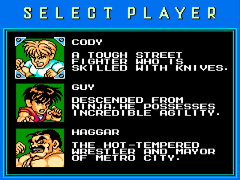
Mighty Final Fight (Europe)
0 4 1
Mighty Final Fight (Europe) is a classic NES action-brawler that captures the essence of arcade-style street fighting and beat-em-up gameplay. Originally a coin-op hit, this NES adaptation offers a straightforward, punch-and-kick street brawl experience with pixelated visuals that evoke nostalgia. It’s built around fast-paced combat, simple controls, and a strong sense of justice as you fight through gangs and thugs. For anyone looking for old-school fighting action without fuss, it’s easy to run directly in your browser, letting you relive a piece of NES history without any extra setup.
Why Mighty Final Fight Is Worth Playing
Visually, Mighty Final Fight stays true to the 8-bit era with colorful sprites and animations that, while simple, create a gritty urban feel. Its pixel art might seem modest compared to today’s standards, but each enemy and stage feels distinct enough to recognize threats quickly. The soundtrack features upbeat chiptunes that keep the pace lively, even if the sound design isn’t complex. The gameplay is straightforward: timing your punches and kicks correctly is key to defeating waves of enemies.
What keeps players coming back is its challenge and pacing. Each stage gets tougher, demanding quick reflexes and smart use of your moves. Its simplicity makes it accessible for casual players, but learning enemy patterns and mastering timing offers a real sense of achievement. The single-player focus makes it perfect for quick sessions, and the arcade style offers a nostalgic reminder of NES’s knack for delivering tough, fun experiences. Despite its age, the game still feels fresh as a pure action experience, free from complicated mechanics or storylines—just pure brawling.
Tips to Get Ahead
Fighting games on the NES often rely on precise timing, so take time to learn enemy attack patterns.
- Jumping kicks are useful for hitting enemies from a distance before they can react.
- Save your special moves for tougher foes or bosses when you can.
- Pay attention to visual cues to block or dodge enemy attacks and avoid damage.
- Clear enemies quickly to keep from getting overwhelmed.
- Look for signs indicating when enemies are about to attack—that helps you counter effectively.
- If you’re stuck, focus on enemies that threaten you most and clear the way first.
Things to Know Before You Start
Is Mighty Final Fight difficult for newcomers?
The game leans toward the challenging side typical of NES action games, but paying attention to enemy cues and timing makes it manageable. Expect to lose some lives early as you get used to the rhythm of combat.
How long does a session of Mighty Final Fight last?
Most runs take around 10-20 minutes, depending on your skill. It’s meant for quick plays rather than long sessions, making it great for casual gaming or a nostalgic break.
Is Mighty Final Fight suitable for casual players or only dedicated fans?
Its simple controls and arcade style make it accessible, but mastering its challenges can appeal to more serious fans of NES action games. It offers immediate fun with room to improve and develop skills.
Jump into the punchy chaos of Mighty Final Fight
Playing Mighty Final Fight gives you a taste of NES-era arcade fighting, and the browser version makes that experience easy to access. Its straightforward combat, nostalgic pixel art, and challenging gameplay make it a good choice for fans of classic brawlers. Whether you want a quick session or aim to master the timing, this game has enough punch to keep you hooked. See how far you can go in this mighty final fight.
Related games: you can also try Banana Prince (Germany) and Gremlins 2 – The New Batch (USA), or browse all other games in the NES category.
How to Play Mighty Final Fight (Europe)?
Fight through waves of enemies using punches and kicks, avoiding damage and defeating bosses to progress through stages. Learn enemy patterns and time your attacks for the best results.
Game Controls
Arrow keys act as the D-pad; Enter is Start; on-screen mapped keys handle the action buttons
You may be interested in:
-
![Zombie Hunter (Japan) [En by KingMike v1.01]](https://www.playf2p.com/wp-content/uploads/zombie-hunter-japan-en-by-kingmike-v1-01-200x120.png) NES
♥ 2
Zombie Hunter (Japan) [En by KingMike v1.01]
NES
♥ 2
Zombie Hunter (Japan) [En by KingMike v1.01] -
 NES
♥ 1
Zombie Hunter (Japan)
NES
♥ 1
Zombie Hunter (Japan) -
 NES
♥ 1
Zoids Mokushiroku (Japan)
NES
♥ 1
Zoids Mokushiroku (Japan) -
 NES
♥ 2
Zoids 2 – Zenebas no Gyakushuu (Japan)
NES
♥ 2
Zoids 2 – Zenebas no Gyakushuu (Japan) -
 NES
♥ 1
Zoids – Chuuou Tairiku no Tatakai (Japan)
NES
♥ 1
Zoids – Chuuou Tairiku no Tatakai (Japan) -
 NES
♥ 11
Zippy Race (Japan)
NES
♥ 11
Zippy Race (Japan) -
 NES
♥ 1
Zhen Ben Xi You Ji (Asia) (Unl)
NES
♥ 1
Zhen Ben Xi You Ji (Asia) (Unl) -
 NES
♥ 1
Zenbei!! Pro Basket (Japan)
NES
♥ 1
Zenbei!! Pro Basket (Japan)
Comments (0)
No comments yet. Be the first to comment!