Miracle Piano Teaching System, The (USA)
0 2 3
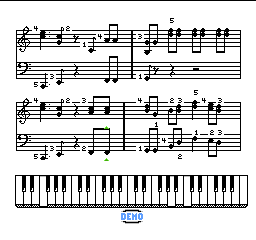
Miracle Piano Teaching System, The (USA) is a classic NES title designed as an educational game. Its main goal is to teach music, offering an interactive way to learn piano through guided lessons and exercises. As a product of the 8-bit era, it combines the nostalgic feel of the NES with a unique approach that mixes gaming with music education, making it stand out from typical entertainment titles.
Miracle Piano Teaching System, The: Gameplay Overview
The game acts like a virtual piano teacher, guiding players through lessons that include reading musical notation, practicing scales, and playing simple melodies. The gameplay involves following on-screen prompts that match notes on the virtual keyboard, with players trying to reproduce these sequences to improve their skills. The NES controller is used to interact, and the game provides immediate feedback on accuracy to support learning.
During play, there are a series of exercises that get more challenging over time, aimed at developing hand coordination and reading music. The setup mimics a real piano lesson but in an interactive, game-like format. It encourages repetition and practice, which are key to mastering musical skills, and the interface is simple enough for players of various ages.
Modes, Levels and Progression
The game offers a clear progression system based on different lesson modes, each focusing on areas like note recognition, rhythm, and melody. These modes add variety and depth, letting players focus on specific skills or move through more difficult exercises. Each lesson builds on the last, helping players gradually get comfortable with musical concepts.
The content isn’t extensive but is well-organized, with exercises that can be repeated to reinforce learning. It doesn’t have traditional levels or worlds, but progress is shown through completing lessons and exercises. The replay value comes from practicing different skills and improving accuracy, making it useful for beginners or anyone looking to strengthen their basics.
Winning Strategies
Focusing on accuracy and patience during exercises can help you improve faster.
- Repeat lessons often to build muscle memory and confidence.
- Pay close attention to the on-screen prompts and listen carefully to the notes.
- Take things slowly at first to make sure you get the notes right before speeding up.
- Take breaks if you start making a lot of mistakes to avoid frustration.
- Practice the easier exercises regularly before moving on to harder ones.
- Stick to daily practice sessions to reinforce what you’ve learned and improve coordination.
Common Questions About Miracle Piano Teaching System, The
How does the difficulty change as I go?
The exercises get tougher over time, starting with simple note recognition and moving toward more complex melodies and rhythms, matching your growing skills.
What kind of modes or lessons are included?
There are different lesson modes focused on note reading, rhythm, and melody, giving some variety within its educational framework.
How much replay value does it have for ongoing learning?
Exercises can be repeated to sharpen skills, making it useful for ongoing practice, especially for beginners or those reviewing basics. However, it doesn’t cover as much ground as modern music learning tools.
The Miracle Piano Teaching System remains a simple blend of education and entertainment. It offers a straightforward way to practice piano fundamentals on the NES. Its clear structure makes it a decent choice for anyone interested in learning music in a casual, game-like setting, and it’s available to play for free in your browser.
Related games: you can also try Gekitou Pro Wrestling!! – Toukon Densetsu (Japan) and Hunt for Red October, The (USA) (Rev A), or browse all other games in the NES category.
How to Play Miracle Piano Teaching System, The (USA)?
Follow on-screen prompts to play notes on the virtual piano, practicing scales and melodies. Repeat exercises to improve accuracy and musical skills, progressing through lessons to become more confident at reading music.
Game Controls
Arrow keys and other keyboard buttons are used to interact with the game and play notes.
You may be interested in:
-
![Zombie Hunter (Japan) [En by KingMike v1.01]](https://www.playf2p.com/wp-content/uploads/zombie-hunter-japan-en-by-kingmike-v1-01-200x120.png) NES
♥ 2
Zombie Hunter (Japan) [En by KingMike v1.01]
NES
♥ 2
Zombie Hunter (Japan) [En by KingMike v1.01] -
 NES
♥ 1
Zombie Hunter (Japan)
NES
♥ 1
Zombie Hunter (Japan) -
 NES
♥ 1
Zoids Mokushiroku (Japan)
NES
♥ 1
Zoids Mokushiroku (Japan) -
 NES
♥ 2
Zoids 2 – Zenebas no Gyakushuu (Japan)
NES
♥ 2
Zoids 2 – Zenebas no Gyakushuu (Japan) -
 NES
♥ 1
Zoids – Chuuou Tairiku no Tatakai (Japan)
NES
♥ 1
Zoids – Chuuou Tairiku no Tatakai (Japan) -
 NES
♥ 11
Zippy Race (Japan)
NES
♥ 11
Zippy Race (Japan) -
 NES
♥ 1
Zhen Ben Xi You Ji (Asia) (Unl)
NES
♥ 1
Zhen Ben Xi You Ji (Asia) (Unl) -
 NES
♥ 1
Zenbei!! Pro Basket (Japan)
NES
♥ 1
Zenbei!! Pro Basket (Japan)
Comments (0)
No comments yet. Be the first to comment!