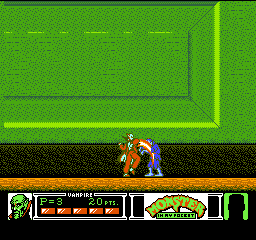
Monster in My Pocket (USA)
1 12 1
Monster in My Pocket (USA) is a classic NES action-platformer that brings a nostalgic touch to fans of retro gaming. This game offers straightforward gameplay wrapped in a monster-themed setting, appealing to those who enjoy classic side-scrolling adventures. If you’re into collecting, battling, or exploring vintage NES titles, this game provides a solid dose of action and challenge in a pixelated package.
Getting Into Monster in My Pocket
The game is a side-scrolling platformer where players control a character fighting through levels filled with monsters. The main activities involve running, jumping, and attacking enemies while moving forward. The difficulty increases gradually, encouraging players to improve their skills as they face more complex platform arrangements and enemy patterns. Sessions usually involve progressing from one level to the next, aiming to defeat monsters and avoid hazards.
Monster in My Pocket has a simple mode—there are no branching stories or multiplayer options. You begin each level with the goal of clearing it by defeating enemies and reaching the end. The design emphasizes learning enemy patterns and timing attacks, making each playthrough a balancing act between speed and caution. It’s a game that’s best enjoyed in shorter bursts, especially since the challenge can be tough for newcomers.
Standout Features
The visuals on this NES classic display clear pixel art with monsters that are easy to recognize and distinct, despite the limited color palette. The character sprites and backgrounds lean into a spooky, fun aesthetic that fits the monster theme well. Progression takes you through different themed levels, each with its own monsters and obstacles, giving a sense of variety as you go along.
Replay value comes from the game’s challenge and simplicity. Since there are no complex upgrades or branching paths, players tend to focus on improving their skills and completing levels more efficiently. The difficulty curve and straightforward gameplay make it a title that rewards repeated attempts, especially for players wanting to beat their previous scores or make it further each time.
Strategy and Tips
Getting started well means learning enemy attack patterns early on. Timing your jumps and attacks is essential for surviving longer and finishing levels faster.
- Memorize enemy placements so you can anticipate attacks and avoid taking damage.
- Keep moving steadily—stopping often makes you more vulnerable to hits.
- Use the environment to your advantage, like jumping over hazards or positioning yourself for effective attacks.
- Practice levels to sharpen your reflexes and reduce mistakes in tougher sections.
- Be patient and don’t rush through levels; waiting can help prevent costly errors.
- If available, use power-ups or special moves to get past tricky spots more easily.
Quick Questions
How do I get started if I’ve never played before?
Start a new game and spend some time learning enemy patterns and the level layout. Practice helps a lot.
What’s a common mistake beginners make?
Many rush through levels without paying attention to enemy behavior, leading to unnecessary hits and frustration.
Can I play Monster in My Pocket on mobile or touch devices?
This NES game runs directly in your browser, so you can play it on desktops, tablets, and smartphones without extra setup or emulators.
Monster in My Pocket offers a straightforward, challenging experience rooted in classic NES action and platforming. Its monster-themed visuals and simple gameplay make it a fun choice for fans of vintage titles looking for quick, engaging sessions. Playing it here means you can enjoy this NES classic anytime without hassle, bringing a piece of retro gaming history right to your browser.
Related games: you can also try Dezaemon (Japan) [En by Aeon Genesis v1.1] and Hydlide (USA), or browse all other games in the NES category.
How to Play Monster in My Pocket (USA)?
Move forward, jump over obstacles, and attack monsters to clear each level. Learn enemy patterns and timing to survive longer and progress through increasingly difficult stages.
Game Controls
Arrow keys control movement; attack and jump are mapped to specific keys on the keyboard.
You may be interested in:
-
![Zombie Hunter (Japan) [En by KingMike v1.01]](https://www.playf2p.com/wp-content/uploads/zombie-hunter-japan-en-by-kingmike-v1-01-200x120.png) NES
♥ 2
Zombie Hunter (Japan) [En by KingMike v1.01]
NES
♥ 2
Zombie Hunter (Japan) [En by KingMike v1.01] -
 NES
♥ 1
Zombie Hunter (Japan)
NES
♥ 1
Zombie Hunter (Japan) -
 NES
♥ 1
Zoids Mokushiroku (Japan)
NES
♥ 1
Zoids Mokushiroku (Japan) -
 NES
♥ 2
Zoids 2 – Zenebas no Gyakushuu (Japan)
NES
♥ 2
Zoids 2 – Zenebas no Gyakushuu (Japan) -
 NES
♥ 1
Zoids – Chuuou Tairiku no Tatakai (Japan)
NES
♥ 1
Zoids – Chuuou Tairiku no Tatakai (Japan) -
 NES
♥ 11
Zippy Race (Japan)
NES
♥ 11
Zippy Race (Japan) -
 NES
♥ 1
Zhen Ben Xi You Ji (Asia) (Unl)
NES
♥ 1
Zhen Ben Xi You Ji (Asia) (Unl) -
 NES
♥ 1
Zenbei!! Pro Basket (Japan)
NES
♥ 1
Zenbei!! Pro Basket (Japan)
Comments (0)
No comments yet. Be the first to comment!