Moon Crystal (Japan)
0 2 0
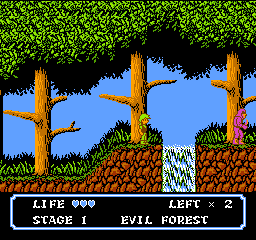
Moon Crystal (Japan) is a classic NES action and platformer that delivers a simple yet engaging experience. Designed for fans of old-school platforming, it challenges players to move through levels filled with enemies and obstacles, all within the familiar NES style. If you enjoy retro games that focus on timing and recognizing patterns, this game offers plenty of that. It runs right in your browser, so you can jump in without any downloads or setup.
Getting Into Moon Crystal
The main gameplay of Moon Crystal centers on jumping and moving through side-scrolling levels that test your reflexes and timing. You control a character who must avoid enemies, dodge hazards, and sometimes confront foes to progress. Usually, you pick a stage and navigate it while collecting items or power-ups—if available—while trying not to lose lives. The structure is straightforward, so replaying levels to improve your score or finish objectives is common. As a classic NES game, expect a level of difficulty that calls for patience and precise movements.
Levels get tougher as you go, with enemies moving faster or appearing more often. The game doesn’t have complicated story elements or modes; it’s mainly about platforming challenges. Your goal is to reach the end of each stage by jumping over pits, avoiding enemies, and timing your moves carefully. The mechanics are simple but require good spatial awareness and quick reactions, especially in later levels where hazards become less predictable.
Standout Features
Visually, Moon Crystal sticks to the pixel art style typical of NES platformers, with colorful sprites and simple backgrounds that keep the focus on gameplay. Its design makes it easy to spot enemies and interactive objects. The difficulty gradually increases, with each level offering new layouts and enemy placements that help keep the game interesting. You can replay levels to master enemy patterns and improve your times or scores, which adds to its replayability.
The challenge encourages multiple attempts, rewarding players who learn enemy movements and develop better timing. It doesn’t have branching paths or hidden secrets, but the straightforward setup invites you to sharpen your skills and beat your previous bests. As a compact NES experience, Moon Crystal works well for short gaming sessions or for those wanting to improve their platforming reflexes.
Strategy and Tips
Getting comfortable with Moon Crystal involves understanding enemy patterns and timing your jumps carefully. Patience is crucial when navigating tricky sections, especially in later levels.
- Start slow to learn enemy movements before increasing your speed.
- Use precise jumps to avoid falling into pits or getting hit.
- Watch enemy patterns; most follow predictable paths or timings.
- Take advantage of safe spots or pauses to plan your next move.
- Practice levels repeatedly to memorize layouts and improve reactions.
- Don’t rush; rushing can lead to mistakes and losing lives.
Quick Questions
How should I start playing Moon Crystal?
Focus on learning each level’s layout and enemy behavior. Take your time to find safe routes and perfect your timing.
What’s a common mistake beginners make?
Trying to rush through levels without studying enemy movements often leads to unnecessary deaths and frustration.
Can I play Moon Crystal on a mobile device?
Yes, since it runs directly in your browser, it works on mobile and touch screens, though getting used to the controls might take a bit of practice.
Moon Crystal offers a straightforward but satisfying platforming challenge based on NES-style design. Its clear visuals and classic gameplay make it a fun pick for fans of retro action. Playing online makes it easy to enjoy a nostalgic moon crystal adventure anytime you like.
Related games: you can also try Banana Prince (Germany) and Defender of the Crown (Europe), or browse all other games in the NES category.
How to Play Moon Crystal (Japan)?
Jump over obstacles, avoid enemies, and reach the end of each level by timing your moves carefully. Collect items and replay levels to improve your score and master enemy patterns.
Game Controls
Arrow keys act as the D-pad; Enter is Start; on-screen mapped keys handle the action buttons.
You may be interested in:
-
![Zombie Hunter (Japan) [En by KingMike v1.01]](https://www.playf2p.com/wp-content/uploads/zombie-hunter-japan-en-by-kingmike-v1-01-200x120.png) NES
♥ 2
Zombie Hunter (Japan) [En by KingMike v1.01]
NES
♥ 2
Zombie Hunter (Japan) [En by KingMike v1.01] -
 NES
♥ 1
Zombie Hunter (Japan)
NES
♥ 1
Zombie Hunter (Japan) -
 NES
♥ 1
Zoids Mokushiroku (Japan)
NES
♥ 1
Zoids Mokushiroku (Japan) -
 NES
♥ 2
Zoids 2 – Zenebas no Gyakushuu (Japan)
NES
♥ 2
Zoids 2 – Zenebas no Gyakushuu (Japan) -
 NES
♥ 1
Zoids – Chuuou Tairiku no Tatakai (Japan)
NES
♥ 1
Zoids – Chuuou Tairiku no Tatakai (Japan) -
 NES
♥ 11
Zippy Race (Japan)
NES
♥ 11
Zippy Race (Japan) -
 NES
♥ 1
Zhen Ben Xi You Ji (Asia) (Unl)
NES
♥ 1
Zhen Ben Xi You Ji (Asia) (Unl) -
 NES
♥ 1
Zenbei!! Pro Basket (Japan)
NES
♥ 1
Zenbei!! Pro Basket (Japan)
Comments (0)
No comments yet. Be the first to comment!