Qix (USA)
0 4 3
Qix (USA) is a classic NES action game where players draw lines to split the screen into sections, all while dodging enemy lines and obstacles. Since its original release, it’s been a favorite for those who enjoy quick reflexes mixed with strategic territory control. Now, you can play it right in your browser without needing to download anything. If you like games that challenge your timing and planning, Qix offers a simple yet addictive experience suitable for all levels.
Getting Into Qix
The main idea is to draw lines that divide the screen into smaller parts, aiming to claim most of the area without losing your line. You move a small marker along the edges of your drawn segments, trying to enclose parts of the playfield by connecting points with your line. When you finish a section, it fills in, gradually taking over more of the screen and bringing you closer to winning.
During each round, you’ll encounter moving enemies called Sparx, bouncing unpredictably around the playfield. If they cross your line or catch you while you’re drawing, you lose a life. As you progress through levels, the game gets tougher, with more aggressive Sparx and faster movements. Balancing the speed of your drawing with avoiding hazards is key, and quick decisions can make all the difference.
Standout Features
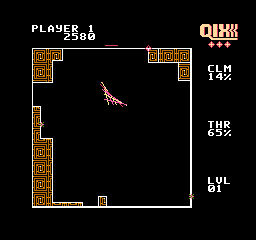
This NES classic keeps visuals simple—black and white with just a few colors—focusing on gameplay rather than fancy graphics. The animation of Sparx and the filling process clearly show your progress and build tension, especially as the screen fills up and enemies become more frantic. The goal is to clear levels by claiming a set percentage of the screen, encouraging repeated tries to beat your high score.
The game’s challenge comes from the increasing difficulty and the risk-reward of drawing large sections versus playing it safe. Each session offers a new chance to improve your previous best. Its minimal design keeps it accessible and engaging, no matter your skill level, while maintaining enough tension to keep you coming back.
Strategy and Tips
Focus on controlling your movement and watching enemy patterns. Timing your line draws carefully can prevent accidental collisions and help you cover more area. Here are some tips:
- Start with small, quick lines to test how enemies move before trying bigger enclosures.
- Keep an eye on Sparx and anticipate their bouncing patterns to avoid running into them.
- Draw lines toward the edges first—this often reduces risk and creates safe zones.
- If enemies bunch up, play conservatively and wait for an opening to enclose more space.
- Practice quick, confident lines; hesitation can lead to reckless moves and losing lives.
- Try to finish sections efficiently; rushing increases the chance of collision.
Quick Questions
How do I get started if I’ve never played Qix before?
Start a game and try drawing lines to claim parts of the screen while avoiding Sparx. Take it slow at first to learn enemy movements and your control timing.
What’s a common mistake beginners make?
Many players try to draw large sections right away, which can lead to collisions. Starting with smaller, safe claims helps build confidence and skills.
Can I play Qix on a mobile device or touchscreen?
Yes, since it runs in your browser, you can play on phones and tablets. Just keep in mind that precise control might take some getting used to on smaller screens.
Qix remains a straightforward challenge that tests both reflexes and strategic thinking. Its simple mechanics and increasing difficulty make it great for quick sessions. If territory control and avoiding obstacles appeal to you, this NES classic offers plenty of chances to sharpen your skills and beat your high scores.
Related games: you can also try Battletank (USA) and Ballblazer (Japan), or browse all other games in the NES category.
How to Play Qix (USA)?
Draw lines to split the screen into sections, avoiding moving enemies called Sparx. Enclose areas to claim territory and fill the screen without losing your line or getting caught.
Game Controls
Arrow keys move your marker; other keys handle drawing and actions.
You may be interested in:
-
![Zombie Hunter (Japan) [En by KingMike v1.01]](https://www.playf2p.com/wp-content/uploads/zombie-hunter-japan-en-by-kingmike-v1-01-200x120.png) NES
♥ 2
Zombie Hunter (Japan) [En by KingMike v1.01]
NES
♥ 2
Zombie Hunter (Japan) [En by KingMike v1.01] -
 NES
♥ 1
Zombie Hunter (Japan)
NES
♥ 1
Zombie Hunter (Japan) -
 NES
♥ 1
Zoids Mokushiroku (Japan)
NES
♥ 1
Zoids Mokushiroku (Japan) -
 NES
♥ 2
Zoids 2 – Zenebas no Gyakushuu (Japan)
NES
♥ 2
Zoids 2 – Zenebas no Gyakushuu (Japan) -
 NES
♥ 1
Zoids – Chuuou Tairiku no Tatakai (Japan)
NES
♥ 1
Zoids – Chuuou Tairiku no Tatakai (Japan) -
 NES
♥ 11
Zippy Race (Japan)
NES
♥ 11
Zippy Race (Japan) -
 NES
♥ 1
Zhen Ben Xi You Ji (Asia) (Unl)
NES
♥ 1
Zhen Ben Xi You Ji (Asia) (Unl) -
 NES
♥ 1
Zenbei!! Pro Basket (Japan)
NES
♥ 1
Zenbei!! Pro Basket (Japan)
Comments (0)
No comments yet. Be the first to comment!