Quest of Ki, The (Japan)
0 2 0
Quest of Ki, The (Japan) is a classic NES puzzle-platformer that blends thoughtful gameplay with charming pixel art. It offers a straightforward yet challenging experience, making it a good choice for players who enjoy puzzles and precise platforming. If you’re feeling nostalgic for NES titles or want a game that tests your reflexes and problem-solving skills, Quest of Ki, The is easy to play directly in your browser.
Getting Into Quest of Ki, The
The gameplay centers on navigating levels filled with obstacles, enemies, and puzzles that need quick thinking and good timing. You control a character who moves through various stages, often solving puzzles to move forward while avoiding hazards like spikes, moving platforms, and enemies. The game isn’t about complex combat but focuses on accurate jumps, timing, and strategic movement.
Most play sessions involve choosing a level and guiding your character through it by making well-timed jumps and solving environmental puzzles. The difficulty gradually increases, encouraging you to learn enemy patterns and improve your timing. Being a puzzle-platformer, it often requires analyzing each part before proceeding, which makes repeated attempts worthwhile. The game runs smoothly in the browser, so you can jump right in without any downloads or setup.
Standout Features
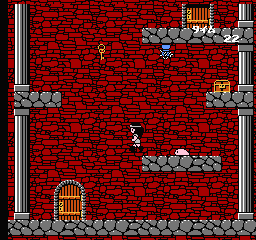
Visually, Quest of Ki, The features colorful pixel art typical of late NES titles, with clear sprites and well-designed backgrounds. Its simple design helps you spot hazards and puzzle elements easily, supporting quick reflexes and planning. The levels are arranged to introduce new mechanics gradually and increase in complexity, keeping things interesting.
Replay value comes from the challenge of mastering levels and trying to beat your best times. Since it involves puzzle-solving within a platforming setup, you might find yourself replaying stages to refine your approach or find hidden paths. While simple in scope, the game’s design encourages trying again, especially if you’re aiming for perfect runs or high scores.
Strategy and Tips
Getting started with Quest of Ki, The is pretty straightforward, but a few tips can help you get better faster. Focus on learning the timing of jumps and enemy movements early on. Patience is key—rushing often leads to mistakes. Remember, each level is solvable with careful observation and timing.
- Watch enemy movements and environmental cues before rushing into tricky sections.
- Use brief pauses to plan your next move, especially in puzzle areas.
- Practice tough sections multiple times to memorize enemy patterns and platform timings.
- Look for visual signals that show when hazards will appear or change.
- If you make a mistake, don’t hesitate to restart the level—learning from errors is part of the process.
Quick Questions
How do I know when to jump in a tricky part?
Observe enemy patterns and environmental signals; timing your jump after a hazard moves away is usually safest.
What’s the best way to get faster at levels?
Practice each section repeatedly, focusing on memorizing enemy movements and jump timings to reduce hesitation.
Can I play this comfortably on mobile or touch devices?
Since it works in your browser, you can play Quest of Ki, The on mobile, but precise timing might be harder without a physical controller.
Quest of Ki, The offers a tight blend of puzzles and platforming that makes each level a small challenge. Its simple design means you can pick it up quickly, but mastering it takes practice. Playing this NES classic directly in your browser gives you a smooth, accessible experience focused on skill and strategy.
Related games: you can also try Faxanadu (USA) (Rev A) [Graphic Hack by Safaribans v20070422] (Uncensored Edition) and God Slayer – Haruka Tenkuu no Sonata (Japan), or browse all other games in the NES category.
How to Play Quest of Ki, The (Japan)?
Navigate through levels by jumping over obstacles, avoiding enemies, and solving puzzles to reach the end. Focus on timing your jumps and movements carefully to progress and complete each stage.
Game Controls
Arrow keys control movement; jump and action keys are mapped to keyboard buttons.
You may be interested in:
-
![Zombie Hunter (Japan) [En by KingMike v1.01]](https://www.playf2p.com/wp-content/uploads/zombie-hunter-japan-en-by-kingmike-v1-01-200x120.png) NES
♥ 2
Zombie Hunter (Japan) [En by KingMike v1.01]
NES
♥ 2
Zombie Hunter (Japan) [En by KingMike v1.01] -
 NES
♥ 1
Zombie Hunter (Japan)
NES
♥ 1
Zombie Hunter (Japan) -
 NES
♥ 1
Zoids Mokushiroku (Japan)
NES
♥ 1
Zoids Mokushiroku (Japan) -
 NES
♥ 2
Zoids 2 – Zenebas no Gyakushuu (Japan)
NES
♥ 2
Zoids 2 – Zenebas no Gyakushuu (Japan) -
 NES
♥ 1
Zoids – Chuuou Tairiku no Tatakai (Japan)
NES
♥ 1
Zoids – Chuuou Tairiku no Tatakai (Japan) -
 NES
♥ 11
Zippy Race (Japan)
NES
♥ 11
Zippy Race (Japan) -
 NES
♥ 1
Zhen Ben Xi You Ji (Asia) (Unl)
NES
♥ 1
Zhen Ben Xi You Ji (Asia) (Unl) -
 NES
♥ 1
Zenbei!! Pro Basket (Japan)
NES
♥ 1
Zenbei!! Pro Basket (Japan)
Comments (0)
No comments yet. Be the first to comment!