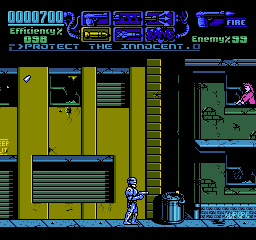
RoboCop 3 (USA)
1 3 2
RoboCop 3 (USA) is a classic NES game that combines action with driving and racing elements, all in an arcade-style package. Fans of both genres will appreciate its straightforward gameplay and nostalgic graphics. If you enjoy shooting, driving, and a bit of platforming, RoboCop 3 offers a compact challenge that works well for quick sessions or longer gaming marathons.
Getting Into RoboCop 3
This NES game puts you in the shoes of RoboCop, fighting crime through a mix of combat and driving. The gameplay shifts between shooting enemies in side-scrolling levels and taking control of vehicles, often involving high-speed chases or obstacle courses. Managing your resources is important, as both fighting and driving demand quick reflexes and good control. The game guides you through a series of levels, with objectives like defeating enemies or reaching certain points.
In a typical play session, you’ll switch between shooting at enemies and hopping into vehicles for chase scenes. These parts usually have different controls but are connected by the overall pace and challenge. The difficulty gradually increases as enemies get tougher and chase sections require tighter timing. The game’s short levels make it easy to pick up for a quick play, but mastering the mechanics can keep you coming back, especially if you’re aiming for high scores or trying to finish all the levels.
Standout Features
The graphics stay true to the NES style, with pixelated sprites and a limited color palette that gives off a gritty cyberpunk vibe. Action sequences are emphasized, with distinct enemy types and vehicle models that stand out despite the hardware limits. As you move through the game, the varied environments and obstacles add some replay value.
Completing levels unlocks the next challenge, and high scores encourage players to replay and improve. The mix of shooting and driving keeps gameplay interesting, with enough variety to stay engaging. While it’s relatively short compared to modern games, mastering its mechanics and chasing high scores can make it appealing for those who like to improve their skills or complete all objectives.
Strategy and Tips
Getting started is simple, but focusing on efficiency in both modes helps a lot.
- Be accurate with your shots to save ammo and avoid taking damage.
- Learn the timing for vehicle maneuvers to dodge obstacles and keep up speed.
- Use cover during combat to stay safe from enemy fire.
- Practice switching quickly between shooting and driving to stay ahead of threats.
- Watch your health and grab health pickups when you can.
- Aim to finish levels quickly, especially chase scenes, to boost your score.
Quick Questions
How do I start playing RoboCop 3?
Once loaded, the game starts right away. Just follow the prompts on screen and use the controls to move RoboCop or operate vehicles.
What’s a common mistake beginners make?
Many underestimate enemy fire or forget to conserve ammo and health, which can lead to early losses. Focus on accuracy and managing your resources well.
Can I play RoboCop 3 on mobile or touch devices?
Yes, it runs in your browser, so you can play on smartphones or tablets with touchscreen controls, though aiming and driving might be trickier than on a traditional controller or keyboard.
RoboCop 3 provides a short, action-packed experience on the NES with a good balance of shooting and driving. Mastering both aspects takes some practice, but it’s a solid choice for fans of straightforward, nostalgic gaming. As you go through it, the variety and challenge tend to keep things interesting, whether you’re aiming for a high score or just a quick run. It’s a fun example of NES-era design that’s easy to pick up and play, and you can try it right in your browser whenever you want a blast from the past.
Related games: you can also try Faxanadu (USA) [Graphic Hack by Safaribans v20070422] (Uncensored Edition) and Baken Hisshou Gaku – Gate In (Japan), or browse all other games in the NES category.
How to Play RoboCop 3 (USA)?
Control RoboCop to fight enemies and complete levels by switching between shooting and driving segments, aiming for high scores and level progression.
Game Controls
Arrow keys act as the D-pad; Enter is Start; action buttons are on-screen mapped keys.
You may be interested in:
-
![Zombie Hunter (Japan) [En by KingMike v1.01]](https://www.playf2p.com/wp-content/uploads/zombie-hunter-japan-en-by-kingmike-v1-01-200x120.png) NES
♥ 2
Zombie Hunter (Japan) [En by KingMike v1.01]
NES
♥ 2
Zombie Hunter (Japan) [En by KingMike v1.01] -
 NES
♥ 1
Zombie Hunter (Japan)
NES
♥ 1
Zombie Hunter (Japan) -
 NES
♥ 1
Zoids Mokushiroku (Japan)
NES
♥ 1
Zoids Mokushiroku (Japan) -
 NES
♥ 2
Zoids 2 – Zenebas no Gyakushuu (Japan)
NES
♥ 2
Zoids 2 – Zenebas no Gyakushuu (Japan) -
 NES
♥ 1
Zoids – Chuuou Tairiku no Tatakai (Japan)
NES
♥ 1
Zoids – Chuuou Tairiku no Tatakai (Japan) -
 NES
♥ 11
Zippy Race (Japan)
NES
♥ 11
Zippy Race (Japan) -
 NES
♥ 1
Zhen Ben Xi You Ji (Asia) (Unl)
NES
♥ 1
Zhen Ben Xi You Ji (Asia) (Unl) -
 NES
♥ 1
Zenbei!! Pro Basket (Japan)
NES
♥ 1
Zenbei!! Pro Basket (Japan)
Comments (0)
No comments yet. Be the first to comment!