Sansuu 3 Nen – Keisan Game (Japan)
0 2 1
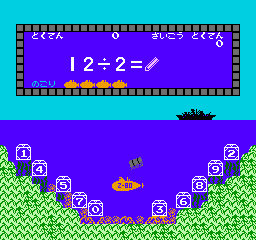
Sansuu 3 Nen – Keisan Game (Japan) is a familiar NES title that combines early educational tools with simple gameplay. It’s made to help young learners practice basic arithmetic, which makes it suitable for children, teachers, or anyone brushing up on addition, subtraction, multiplication, and division skills. As a product of the NES era, it offers a straightforward way to reinforce math fundamentals through engaging activities. Playing it now in your browser gives a nostalgic look at how educational games were integrated into home entertainment systems.
Getting Into Sansuu 3 Nen – Keisan Game
The main gameplay involves solving math problems shown on screen. Players are presented with basic arithmetic questions and need to input the correct answer before time runs out. The game is simple, with no complicated storylines or levels—just a steady stream of math exercises aimed at third-grade learners. Sessions are brief, making it easy to do quick practice or take short breaks, and players can repeat problems to improve accuracy and speed.
There are no fancy modes or options to customize. Instead, the focus is on answering questions correctly to move forward. As players improve, the difficulty may increase slightly, with more complex problems or less response time. The interface is straightforward, designed to be accessible with minimal instructions—so anyone can jump in and start practicing right away.
Standout Features
This NES classic features simple, pixel-based visuals typical of the era, with bright colors and clear numeric displays. The graphics are minimal, keeping attention on the questions and making it easier for young players to read and respond. Progress depends on getting answers right, encouraging repeated play to improve scores and response times. While it doesn’t have levels or unlockables, trying to get better accuracy and faster responses can help build confidence in basic math skills.
Since the game is rooted in educational content, it works well in classrooms or homeschooling setups. Despite its simplicity, it can be a helpful supplement for children learning math or for adults who want to maintain basic arithmetic skills. Its straightforward design means it plays nicely on any device that can run a browser emulator, with no downloads or setup required. As a nostalgic piece of NES history, it’s a quick way to combine learning with retro gaming charm.
Strategy and Tips
If you want to improve your practice with this game, keep these tips in mind:
- Prioritize accuracy; your speed will improve naturally as you get more comfortable with the questions.
- Try to recognize common sums and differences quickly to save time.
- Use the replay feature to practice problem types where you tend to make mistakes.
- Short practice sessions can help build confidence without feeling overwhelming.
- Watch the timer, but don’t rush so much that you make careless errors.
- If the game feels too fast at first, slow down until you get used to it.
Quick Questions
How do I get started with the game?
Just load the page and start answering the math questions as they appear—no setup needed.
What if I make a mistake or get stuck?
The game shows the correct answer after a mistake, so you can learn and try again.
Can I play this on my phone or tablet?
Yes, since it runs in your browser, Sansuu 3 Nen – Keisan Game works on mobile devices with touch support, making practice easy anywhere.
With its simple style and nostalgic NES look, sansuu 3 nen – keisan game provides a practical way to practice basic math skills while enjoying a piece of gaming history. Its clarity makes it accessible for all ages, and repeated practice can lead to steady progress. Playing it in your browser offers quick, hassle-free access to a classic educational game that still holds relevance today.
Related games: you can also try Cosmic Wars (Japan) and Hoshi wo Miru Hito (Japan), or browse all other games in the NES category.
How to Play Sansuu 3 Nen – Keisan Game (Japan)?
Solve math problems shown on the screen by typing the correct answer quickly before time runs out. Keep answering correctly to improve your score and response time.
Game Controls
Arrow keys act as the D-pad; Enter is Start; on-screen mapped keys handle the action buttons.
You may be interested in:
-
![Zombie Hunter (Japan) [En by KingMike v1.01]](https://www.playf2p.com/wp-content/uploads/zombie-hunter-japan-en-by-kingmike-v1-01-200x120.png) NES
♥ 2
Zombie Hunter (Japan) [En by KingMike v1.01]
NES
♥ 2
Zombie Hunter (Japan) [En by KingMike v1.01] -
 NES
♥ 1
Zombie Hunter (Japan)
NES
♥ 1
Zombie Hunter (Japan) -
 NES
♥ 1
Zoids Mokushiroku (Japan)
NES
♥ 1
Zoids Mokushiroku (Japan) -
 NES
♥ 2
Zoids 2 – Zenebas no Gyakushuu (Japan)
NES
♥ 2
Zoids 2 – Zenebas no Gyakushuu (Japan) -
 NES
♥ 1
Zoids – Chuuou Tairiku no Tatakai (Japan)
NES
♥ 1
Zoids – Chuuou Tairiku no Tatakai (Japan) -
 NES
♥ 11
Zippy Race (Japan)
NES
♥ 11
Zippy Race (Japan) -
 NES
♥ 1
Zhen Ben Xi You Ji (Asia) (Unl)
NES
♥ 1
Zhen Ben Xi You Ji (Asia) (Unl) -
 NES
♥ 1
Zenbei!! Pro Basket (Japan)
NES
♥ 1
Zenbei!! Pro Basket (Japan)
Comments (0)
No comments yet. Be the first to comment!