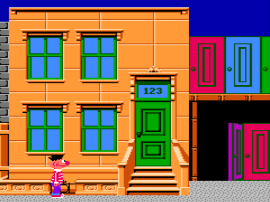
Sesame Street – Big Bird’s Hide & Speak (USA)
0 1 0
Sesame Street – Big Bird’s Hide & Speak (USA) is a simple NES game that combines educational content with easy gameplay, suited for young players and fans of vintage titles. Because it’s an emulated NES game played right in your browser, there’s no need to download or install anything—just open it up and start playing. It’s a good choice for parents who want a gentle, learning-focused game or for those nostalgic for early Nintendo titles.
Getting Into Sesame Street – Big Bird’s Hide & Speak
The main idea is helping Big Bird find hidden objects and identify them through spoken clues. Players move through different scenes, searching for items that Big Bird needs to talk about or find. The game promotes listening skills and vocabulary, making each session both fun and educational.
When playing, you see a scene with various objects or characters. You pick the right item based on spoken prompts, which can be on-screen or spoken aloud. As you go, the game gets a little trickier, gradually increasing in difficulty but staying accessible for young children. Since it’s meant to be relaxed, sessions usually last a few minutes, with a focus on completing tasks rather than high scores or time limits.
Standout Features
The visuals are colorful with simple sprites that remind you of the Sesame Street TV show. The scenes are clear and easy to understand, helping children focus without distraction. The animation is minimal but gets the point across, emphasizing the educational aspects over flashy graphics. The design is straightforward, making it easy for new players to jump in and enjoy.
The game gets a bit more challenging as more objects are introduced and clues become slightly more complex. Replayability comes from the variety of scenes and the opportunity to improve recognition and response speed. Since it’s mainly about learning and interaction, kids can play it repeatedly to reinforce vocabulary and listening skills, making it good for short, frequent play sessions.
Strategy and Tips
Starting with simple scenes and familiar objects helps kids get comfortable with how the game works. Listening carefully to each spoken clue is key to making the right choice and keeping the game smooth.
- Encourage kids to listen carefully before choosing objects to avoid mistakes.
- If unsure, review the scene or ask guiding questions to help identify the item.
- Try scenes multiple times to get better at recognizing objects and reacting faster.
- Focus on vocabulary building rather than speed or scores, thanks to the game’s simple style.
- Pause between scenes to talk about the objects and reinforce what’s learned.
- Keep play sessions short to keep young children engaged and avoid frustration.
Quick Questions
How do I get started with Sesame Street – Big Bird’s Hide & Speak?
Just load the game in your browser, and it starts right away—no setup needed. Follow the prompts on-screen and start playing.
What’s a common mistake for beginners?
Many players miss paying enough attention to the spoken clues, which can lead to wrong choices. Listening carefully can help avoid that.
Can I play this on mobile or touch devices?
Yes. Since it runs directly in the browser, it works on most devices, including phones and tablets, with controls adapted for touch screens.
Sesame Street – Big Bird’s Hide & Speak offers a gentle, engaging way for kids to learn and for nostalgic players to enjoy. Its simple gameplay and focus on interaction make it a nice addition to your NES collection you can play directly in your browser.
Related games: you can also try Cross Fire (USA) (Proto) and M82 Game Selectable Working Product Display (Europe), or browse all other games in the NES category.
How to Play Sesame Street – Big Bird’s Hide & Speak (USA)?
Help Big Bird find hidden objects by listening to spoken clues and selecting the correct items in each scene. Complete tasks to reinforce vocabulary and listening skills, with gradually increasing difficulty.
Game Controls
Arrow keys control movement; other keys select and confirm choices.
You may be interested in:
-
![Zombie Hunter (Japan) [En by KingMike v1.01]](https://www.playf2p.com/wp-content/uploads/zombie-hunter-japan-en-by-kingmike-v1-01-200x120.png) NES
♥ 2
Zombie Hunter (Japan) [En by KingMike v1.01]
NES
♥ 2
Zombie Hunter (Japan) [En by KingMike v1.01] -
 NES
♥ 1
Zombie Hunter (Japan)
NES
♥ 1
Zombie Hunter (Japan) -
 NES
♥ 1
Zoids Mokushiroku (Japan)
NES
♥ 1
Zoids Mokushiroku (Japan) -
 NES
♥ 2
Zoids 2 – Zenebas no Gyakushuu (Japan)
NES
♥ 2
Zoids 2 – Zenebas no Gyakushuu (Japan) -
 NES
♥ 1
Zoids – Chuuou Tairiku no Tatakai (Japan)
NES
♥ 1
Zoids – Chuuou Tairiku no Tatakai (Japan) -
 NES
♥ 11
Zippy Race (Japan)
NES
♥ 11
Zippy Race (Japan) -
 NES
♥ 1
Zhen Ben Xi You Ji (Asia) (Unl)
NES
♥ 1
Zhen Ben Xi You Ji (Asia) (Unl) -
 NES
♥ 1
Zenbei!! Pro Basket (Japan)
NES
♥ 1
Zenbei!! Pro Basket (Japan)
Comments (0)
No comments yet. Be the first to comment!