Sesame Street 123 (USA)
0 1 0
Sesame Street 123 (USA) is a charming piece of NES history, capturing the playful spirit of the beloved children’s TV show in a simple, accessible format. This classic from the NES era offers a lighthearted gaming experience that’s perfect for young players and nostalgic adults alike, wrapped in bright visuals and familiar characters. Running directly in your browser, this game provides a low-pressure environment to enjoy a few minutes or longer sessions of educational fun.
Step Into the World of Sesame Street 123
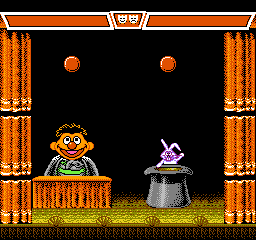
The game’s visuals draw heavily from the colorful, cartoonish style of the original Sesame Street TV program. Expect cheerful, animated backgrounds filled with oversized alphabet blocks, numbers, and friendly street scenes. The soundtrack echoes the familiar tunes of the show, with simple melodies that reinforce a joyful, educational atmosphere. Character sprites resemble the beloved Muppets, with their exaggerated features and bright costumes, creating a warm, welcoming environment that invites players to explore and learn. As the game runs on an NES emulator embedded in the browser, it offers instant access with no downloads required, making it easy to jump right into the playful setting.
How the Gameplay Hooks You
The game’s core loop is straightforward: players engage in mini-challenges designed to teach basic skills like counting and letter recognition. These challenges are short, often consisting of simple tasks that increase in difficulty as you go, maintaining a steady pace that keeps young players interested without overwhelming them. The game’s rhythm allows for quick retries, perfect for short sessions or casual play, while still offering enough variety to keep things fresh. Its focus on familiar Sesame Street themes makes each mini-game feel like an extension of the show, encouraging repeated attempts to master each task and see progress.
Pro Tips for Sesame Street 123
Getting the most out of this classic involves a few simple strategies to keep gameplay smooth and enjoyable.
- Take your time with each mini-challenge, especially when learning new tasks.
- Use repeated attempts to improve your score and remember what each challenge requires.
- Watch for visual and audio cues, which help guide you through the challenges and support learning.
- If the game has a pause option, use it to take short breaks during longer sessions for better focus.
- Familiarize yourself with the different tasks to anticipate what’s coming next and react more quickly.
- Encourage kids to join in—it can be a fun shared learning experience.
Frequently Asked Questions
Question?
Does the game have many different challenges, or does it get repetitive?
While the mini-games focus on core skills, the variety of tasks helps keep things interesting, and simple mechanics make short play sessions engaging.
Question?
Is Sesame Street 123 suitable for very young children or absolute beginners?
Yes, its straightforward tasks and familiar characters make it accessible for kids just starting with numbers and letters, with no complicated controls involved.
Question?
Can I play Sesame Street 123 for a long time without it feeling dull?
It’s designed for quick, repeated attempts rather than marathon sessions, making it ideal for short, frequent plays rather than long gaming stretches.
Sesame Street 123 offers a gentle, educational experience that captures the essence of the beloved TV show. Its approachable gameplay and cheerful visuals make it a fun way to revisit or introduce children to Sesame Street—all playable right in your browser for immediate enjoyment.
Related games: you can also try Gradius (ArchiMENdes Hen) (Japan) and Parasol Stars – Rainbow Islands II – The Story of Bubble Bobble III (Europe) (Beta), or browse all other games in the NES category.
How to Play Sesame Street 123 (USA)?
Complete simple mini-games to practice counting and letter recognition, aiming to improve your score with each attempt. Focus on following visual and audio cues to succeed and learn.
Game Controls
Arrow keys control movement; Enter or spacebar confirm actions; keyboard acts as the game controller.
You may be interested in:
-
![Zombie Hunter (Japan) [En by KingMike v1.01]](https://www.playf2p.com/wp-content/uploads/zombie-hunter-japan-en-by-kingmike-v1-01-200x120.png) NES
♥ 2
Zombie Hunter (Japan) [En by KingMike v1.01]
NES
♥ 2
Zombie Hunter (Japan) [En by KingMike v1.01] -
 NES
♥ 1
Zombie Hunter (Japan)
NES
♥ 1
Zombie Hunter (Japan) -
 NES
♥ 1
Zoids Mokushiroku (Japan)
NES
♥ 1
Zoids Mokushiroku (Japan) -
 NES
♥ 2
Zoids 2 – Zenebas no Gyakushuu (Japan)
NES
♥ 2
Zoids 2 – Zenebas no Gyakushuu (Japan) -
 NES
♥ 1
Zoids – Chuuou Tairiku no Tatakai (Japan)
NES
♥ 1
Zoids – Chuuou Tairiku no Tatakai (Japan) -
 NES
♥ 11
Zippy Race (Japan)
NES
♥ 11
Zippy Race (Japan) -
 NES
♥ 1
Zhen Ben Xi You Ji (Asia) (Unl)
NES
♥ 1
Zhen Ben Xi You Ji (Asia) (Unl) -
 NES
♥ 1
Zenbei!! Pro Basket (Japan)
NES
♥ 1
Zenbei!! Pro Basket (Japan)
Comments (0)
No comments yet. Be the first to comment!