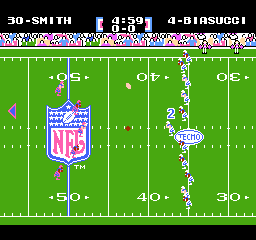
Tecmo Super Bowl (USA)
0 23 5
Tecmo Super Bowl (USA) is a beloved NES game that brings the thrill of American football to life with simple gameplay and familiar teams. It’s a favorite among sports fans and retro gamers, offering a straightforward yet strategic football experience you can enjoy right in your browser. If you’re into classic sports titles and want to revisit the NES era, this game offers a genuine taste of 8-bit football action without any downloads or setup.
Getting Into Tecmo Super Bowl
As a sports game on the NES, Tecmo Super Bowl puts two players (or a player versus the computer) in control of teams in a traditional football match. The main gameplay involves selecting a team, setting formations, and calling plays on offense or defense. The pace is steady, with each game lasting a quarter, so it’s easy to jump in for quick sessions or longer matches.
Players call plays from a menu, then watch their team execute the chosen actions. The game focuses on timing, play-calling, and reacting to the opponent’s strategy. Unlike modern titles, it’s about making smart decisions rather than mastering complex controls. Its simple mechanics make it accessible for newcomers while still offering enough depth to keep seasoned players interested. You can concentrate on game flow and tactics without feeling overwhelmed.
Standout Features
This NES classic showcases pixel-perfect visuals that faithfully recreate the look of the original hardware, complete with team logos, player numbers, and basic animations that bring the football universe to life. While it might not have cutting-edge graphics, the clarity of the sprites makes gameplay easy to follow and enjoyable.
Replaying Tecmo Super Bowl offers plenty of variety thanks to different teams and game modes. Whether you prefer quick matches or full seasons, the game encourages repeated playthroughs. Its simple yet strategic setup, including play selection and defensive arrangements, keeps things fresh and competitive. There’s no storyline or unlockables, but the fun of outsmarting your opponent keeps the game engaging over time.
Strategy and Tips
Getting the most out of Tecmo Super Bowl involves grasping some basic strategies and play-calling. Here are a few tips to help you improve:
- Start with familiar plays to build confidence, then try trick plays or more complex formations as you get comfortable.
- Watch the game clock and plan your plays so you don’t run out of time or give away turnovers.
- Set up strong defenses by adjusting your line and coverage based on what your opponent tends to do.
- Use quick passes early on to gain yards safely and set up longer throws later in the game.
- Practice timing your runs and passes to avoid mistakes like fumbles or interceptions.
- Keep an eye on player stamina and substitutions, especially if your team tends to wear down quickly with certain plays.
Quick Questions
How do I start a new game in Tecmo Super Bowl?
Just select the ‘Start’ option from the main menu, then pick your team and game settings to get going.
What’s a common mistake beginners make?
Many try to manually control every player, which can be overwhelming. Instead, focus on calling plays and let the AI handle movement.
Can I play Tecmo Super Bowl on mobile or touch devices?
Yes, since the game runs in your browser, it works well with touch controls, making it easy to play on any device.
Playing Tecmo Super Bowl here means enjoying a faithful recreation of the NES football classic right in your browser, with no downloads needed. Its simple gameplay combined with strategic depth makes it a great pick for fans of vintage sports games and NES titles alike.
Related games: you can also try Advanced Dungeons & Dragons – Dragon Strike (USA) and F-1 Race (Japan), or browse all other games in the NES category.
How to Play Tecmo Super Bowl (USA)?
Choose a team, call plays on offense or defense, and try to outscore your opponent within four quarters. Focus on timing, strategy, and reacting to the game flow to win.
Game Controls
Arrow keys act as the D-pad; Enter is Start; on-screen mapped keys handle the action buttons.
You may be interested in:
-
![Zombie Hunter (Japan) [En by KingMike v1.01]](https://www.playf2p.com/wp-content/uploads/zombie-hunter-japan-en-by-kingmike-v1-01-200x120.png) NES
♥ 2
Zombie Hunter (Japan) [En by KingMike v1.01]
NES
♥ 2
Zombie Hunter (Japan) [En by KingMike v1.01] -
 NES
♥ 1
Zombie Hunter (Japan)
NES
♥ 1
Zombie Hunter (Japan) -
 NES
♥ 1
Zoids Mokushiroku (Japan)
NES
♥ 1
Zoids Mokushiroku (Japan) -
 NES
♥ 2
Zoids 2 – Zenebas no Gyakushuu (Japan)
NES
♥ 2
Zoids 2 – Zenebas no Gyakushuu (Japan) -
 NES
♥ 1
Zoids – Chuuou Tairiku no Tatakai (Japan)
NES
♥ 1
Zoids – Chuuou Tairiku no Tatakai (Japan) -
 NES
♥ 11
Zippy Race (Japan)
NES
♥ 11
Zippy Race (Japan) -
 NES
♥ 1
Zhen Ben Xi You Ji (Asia) (Unl)
NES
♥ 1
Zhen Ben Xi You Ji (Asia) (Unl) -
 NES
♥ 1
Zenbei!! Pro Basket (Japan)
NES
♥ 1
Zenbei!! Pro Basket (Japan)
Comments (0)
No comments yet. Be the first to comment!