Teenage Mutant Ninja Turtles – Tournament Fighters (USA)
1 18 6
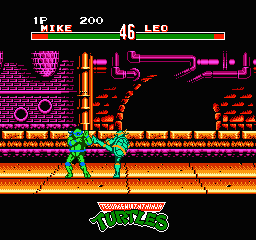
Teenage Mutant Ninja Turtles – Tournament Fighters is a fighting game that puts the heroes from the TMNT universe into one-on-one battles. This NES classic keeps things simple but engaging, letting players choose their favorite turtle or villain and face off in pixel art fights that remind us of the arcade days. The pixel graphics and chiptune soundtrack evoke the early ’90s, giving fans a nostalgic feeling while providing solid gameplay rooted in fighting game mechanics.
Fans of old-school NES fighters will enjoy how Teenage Mutant Ninja Turtles – Tournament Fighters focuses on timing and pattern recognition. The visuals stay true to the era, with colorful sprites and stage backgrounds that fit with the turtles’ universe. The action moves quickly but remains manageable, making it easy for newcomers to pick up, yet still offering enough challenge to keep experienced players interested. Its simple mechanics and familiar characters make it a good choice for quick matches or longer sessions with friends.
Why Teenage Mutant Ninja Turtles – Tournament Fighters Is Worth Playing
This game stands out because it adapts the fighting genre well within the NES’s hardware limits. The pixel art, though straightforward, captures the spirit of the Teenage Mutant Ninja Turtles. Each character has unique animations and moves, and the stages are lively and varied, adding visual interest to every fight. The sound, featuring classic chiptune tunes, matches the fast pace of gameplay and makes you want to keep playing.
What keeps players coming back are the tight controls and the roster of characters, both heroes and villains. The game doesn’t have complicated combos or lengthy move lists, but it rewards good timing and strategic use of character-specific attacks. Its simplicity makes it easy to learn but still offers a challenge to get better at. The multiplayer mode is especially fun, turning matches into quick, competitive bouts that test your reflexes and focus.
Tips to Get Ahead
Start by learning each character’s moves to understand their strengths and weaknesses.
- Use quick, jab attacks early to test your opponent’s defenses and find openings.
- Pay attention to patterns; many characters have predictable attack sequences you can punish.
- Practice blocking and countering to reduce damage and set up your own attacks.
- Position yourself smartly; controlling the stage can give you an advantage and limit your opponent’s options.
- Don’t overlook special moves—if available, they can turn things around in a tight spot.
Things to Know Before You Start
Q: How difficult is Teenage Mutant Ninja Turtles – Tournament Fighters for beginners?
The game is pretty accessible, but it can get tough against skilled opponents, especially in multiplayer battles. Expect to do some trial and error to master timing and movement.
Q: How long does a typical match last?
Most fights are quick, often just a few minutes. It’s good for short sessions or longer ones if you want to practice against friends or AI.
Q: Is Teenage Mutant Ninja Turtles – Tournament Fighters good for casual players?
Yes, thanks to its simple controls and straightforward gameplay. But if you want to master it, you’ll need some dedication, which makes it appealing for fans who enjoy fighting games on a deeper level.
Jump into Teenage Mutant Ninja Turtles – Tournament Fighters and see if your skills match those of the turtles. It’s a classic fighting game with quick, fun battles and a nostalgic pixel art style—great for a quick gaming session that recalls the NES era.
Related games: you can also try Double Dragon II – The Revenge (Europe) and Takeshi no Sengoku Fuuunji (Japan), or browse all other games in the NES category.
How to Play Teenage Mutant Ninja Turtles – Tournament Fighters (USA)?
Choose your favorite turtle or villain and fight against an opponent using simple attacks and counters. Win by depleting their health bar through timing and pattern recognition in quick matches.
Game Controls
Arrow keys act as the D-pad; Enter is Start; action buttons are mapped to keyboard keys.
You may be interested in:
-
![Zombie Hunter (Japan) [En by KingMike v1.01]](https://www.playf2p.com/wp-content/uploads/zombie-hunter-japan-en-by-kingmike-v1-01-200x120.png) NES
♥ 2
Zombie Hunter (Japan) [En by KingMike v1.01]
NES
♥ 2
Zombie Hunter (Japan) [En by KingMike v1.01] -
 NES
♥ 1
Zombie Hunter (Japan)
NES
♥ 1
Zombie Hunter (Japan) -
 NES
♥ 1
Zoids Mokushiroku (Japan)
NES
♥ 1
Zoids Mokushiroku (Japan) -
 NES
♥ 2
Zoids 2 – Zenebas no Gyakushuu (Japan)
NES
♥ 2
Zoids 2 – Zenebas no Gyakushuu (Japan) -
 NES
♥ 1
Zoids – Chuuou Tairiku no Tatakai (Japan)
NES
♥ 1
Zoids – Chuuou Tairiku no Tatakai (Japan) -
 NES
♥ 11
Zippy Race (Japan)
NES
♥ 11
Zippy Race (Japan) -
 NES
♥ 1
Zhen Ben Xi You Ji (Asia) (Unl)
NES
♥ 1
Zhen Ben Xi You Ji (Asia) (Unl) -
 NES
♥ 1
Zenbei!! Pro Basket (Japan)
NES
♥ 1
Zenbei!! Pro Basket (Japan)
Comments (0)
No comments yet. Be the first to comment!