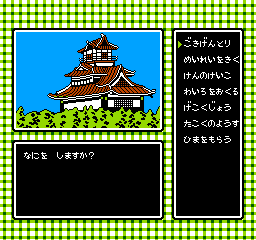
Takeshi no Sengoku Fuuunji (Japan)
0 1 0
Takeshi no Sengoku Fuuunji (Japan) is a classic NES game that combines strategy and action, making it a good pick for fans of retro titles. This NES game has been made playable in your browser, so you can enjoy its quirky gameplay without needing downloads or emulators. If you like vintage games that mix planning with quick reflexes, this title offers a nostalgic challenge rooted in the NES era.
Getting Into Takeshi no Sengoku Fuuunji
The gameplay centers on managing a military campaign set in feudal Japan. You control a character who moves through different stages, fighting battles and making strategic choices. The game has a simple loop: move your character, face enemies, and move on to harder levels. Sessions tend to be short but demand focus, as each encounter needs quick thinking and precise timing.
This game doesn’t rely on complicated menus or deep storylines. Instead, it offers a steady series of battles and choices, making it easy for newcomers to pick up while giving experienced players room to refine their tactics. The levels are linear, each presenting new challenges and encouraging players to learn from mistakes and try different strategies to succeed.
Standout Features
Visually, Takeshi no Sengoku Fuuunji has pixel art typical of early NES titles, with simple but expressive sprites and backgrounds. The graphics are clear enough to tell characters and enemies apart, which helps in planning your moves during the fast-paced combat. The difficulty increases with each level, rewarding players who learn enemy patterns and adjust their strategies. Even without flashy effects, its charm comes from its straightforward design and nostalgic feel.
Replay value comes from its tough gameplay and the need to master timing and positioning. Each attempt can teach you something new, and many players return to improve their scores or complete levels more efficiently. Its simplicity makes it easy to pick up but hard to master, especially as the challenge gets tougher in later stages. Short play sessions make it perfect for quick plays, with enough variation to keep things interesting over multiple tries.
Strategy and Tips
Getting started is simple—focus on learning enemy patterns and timing your attacks. Practice helps, especially since the game’s difficulty can surprise beginners.
- Move quickly and position yourself well to avoid damage.
- Watch enemy attack patterns to find the best moments to strike.
- Save resources and special moves for tougher enemies or bosses.
- Take your time with levels; patience can prevent costly mistakes.
- If you’re stuck, try different routes or strategies.
- Keep an eye on your health and back off if you’re overwhelmed, then come back with a fresh plan.
Quick Questions
How do I get started with this game?
Just click to start playing—it runs right in your browser, no setup needed. Focus on understanding enemy movements early to build confidence.
What’s the most common mistake beginners make?
Many rush into fights without watching enemy patterns, which can cause unnecessary damage and frustration. Take your time to learn each level’s rhythm.
Can I play Takeshi no Sengoku Fuuunji on mobile or touch devices?
Yes, since it runs in your browser, it should work well on mobile devices with touch screens, though controls may feel less precise than on a keyboard or gamepad.
Takeshi no Sengoku Fuuunji offers a straightforward but tough experience rooted in NES gameplay. It’s easy to pick up, but getting good at it takes patience. Playing in your browser keeps the nostalgic spirit alive and provides a quick dose of vintage fun whenever you want a retro challenge.
Related games: you can also try Casino Derby (Japan) and Life Force (USA), or browse all other games in the NES category.
How to Play Takeshi no Sengoku Fuuunji (Japan)?
Move your character through levels, fight enemies, and make strategic choices to advance. Learn enemy patterns and time your attacks to progress through increasing difficulty.
Game Controls
Arrow keys for movement; action buttons mapped to keyboard keys for attacking and interacting.
You may be interested in:
-
![Zombie Hunter (Japan) [En by KingMike v1.01]](https://www.playf2p.com/wp-content/uploads/zombie-hunter-japan-en-by-kingmike-v1-01-200x120.png) NES
♥ 2
Zombie Hunter (Japan) [En by KingMike v1.01]
NES
♥ 2
Zombie Hunter (Japan) [En by KingMike v1.01] -
 NES
♥ 1
Zombie Hunter (Japan)
NES
♥ 1
Zombie Hunter (Japan) -
 NES
♥ 1
Zoids Mokushiroku (Japan)
NES
♥ 1
Zoids Mokushiroku (Japan) -
 NES
♥ 2
Zoids 2 – Zenebas no Gyakushuu (Japan)
NES
♥ 2
Zoids 2 – Zenebas no Gyakushuu (Japan) -
 NES
♥ 1
Zoids – Chuuou Tairiku no Tatakai (Japan)
NES
♥ 1
Zoids – Chuuou Tairiku no Tatakai (Japan) -
 NES
♥ 11
Zippy Race (Japan)
NES
♥ 11
Zippy Race (Japan) -
 NES
♥ 1
Zhen Ben Xi You Ji (Asia) (Unl)
NES
♥ 1
Zhen Ben Xi You Ji (Asia) (Unl) -
 NES
♥ 1
Zenbei!! Pro Basket (Japan)
NES
♥ 1
Zenbei!! Pro Basket (Japan)
Comments (0)
No comments yet. Be the first to comment!