Top Gun – The Second Mission (USA)
0 2 1
Getting Into Top Gun – The Second Mission
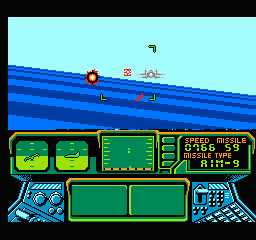
Top Gun – The Second Mission is a classic NES game that puts players in the cockpit for intense aerial combat. It combines action, simulation, and flight simulator elements, challenging players to pilot fighter jets through various missions, avoiding enemy fire and completing objectives. The game is easy to pick up, making it accessible for newcomers, yet it offers enough challenge to keep experienced players engaged.
A typical session involves choosing a mission and then taking control of the aircraft from a side view. You’ll fly through enemy territory, dodge incoming fire, and target enemy planes or ground targets. The controls are designed to be intuitive, requiring quick reflexes and precise movements, especially in later stages. Success depends on managing altitude, speed, and maneuvering, all while keeping track of your mission goals.
Gameplay is divided into individual missions, each with its own layout and enemy formations. You’ll spend some time learning enemy patterns and planning your route, but the game encourages experimentation. The pace is fast, with an emphasis on timing and positioning, and each run offers a chance to improve your score or complete objectives more efficiently.
Standout Features
This NES classic features colorful pixel-art graphics that capture the excitement of aerial combat. While simple compared to today’s visuals, they effectively convey a sense of speed and danger, with enemy planes and explosions adding to the excitement. The sound design complements the action with energetic beeps and boops that enhance immersion without overwhelming the experience.
Progression depends on completing missions, each more difficult than the last. The game encourages replaying to master enemy patterns, improve your score, or try different routes. Since it’s relatively short, replay value comes from honing your skills and aiming for higher achievements within each mission. It’s a game that rewards precision and quick thinking, whether you’re playing for a quick session or aiming to refine your tactics.
Strategy and Tips
Getting comfortable with flying and combat mechanics is key. Keep your altitude and speed steady, and use enemy fire as a cue to dodge instead of panicking. Practice targeting enemies efficiently to avoid unnecessary damage.
- Focus on your targets—take out enemy planes before they get too close.
- Use the edges of the screen for quick escapes or repositioning if needed.
- If the game tracks fuel or ammunition, conserve resources where possible.
- Learn enemy attack patterns to anticipate their moves and avoid surprises.
- If overwhelmed, don’t hesitate to slow down or reposition for a better shot.
Quick Questions
How do I get started with Top Gun – The Second Mission?
Just pick a mission from the main menu and start flying. The controls are simple, so you’ll be in the air quickly.
What’s a common mistake beginners make?
Many players overreact to enemy fire, which can cause unnecessary crashes. Staying calm and focusing on dodging rather than fighting back immediately can help you survive longer.
Can I play Top Gun – The Second Mission on a mobile device or touchscreen?
Yes, since the game runs in your browser, you can play it on most devices with a touchscreen. Just keep in mind that precise control might take some practice on smaller screens.
Top Gun – The Second Mission offers a straightforward yet challenging flight combat experience that’s easy to get into but takes practice to master. Its simple gameplay and retro NES graphics make it perfect for quick play sessions or working on your skills. Playing it here gives instant access to the action, making it a good choice for fans of vintage arcade-style flight games.
Related games: you can also try Battle Fleet (Japan) and Super Pitfall 30th Anniversary Edition (Portuguese), or browse all other games in the NES category.
How to Play Top Gun – The Second Mission (USA)?
Pilot your fighter jet through missions, dodging enemy fire and destroying targets to complete objectives and improve your score.
Game Controls
Arrow keys control movement; action buttons are mapped to specific keys for firing and other commands.
You may be interested in:
-
![Zombie Hunter (Japan) [En by KingMike v1.01]](https://www.playf2p.com/wp-content/uploads/zombie-hunter-japan-en-by-kingmike-v1-01-200x120.png) NES
♥ 2
Zombie Hunter (Japan) [En by KingMike v1.01]
NES
♥ 2
Zombie Hunter (Japan) [En by KingMike v1.01] -
 NES
♥ 1
Zombie Hunter (Japan)
NES
♥ 1
Zombie Hunter (Japan) -
 NES
♥ 1
Zoids Mokushiroku (Japan)
NES
♥ 1
Zoids Mokushiroku (Japan) -
 NES
♥ 2
Zoids 2 – Zenebas no Gyakushuu (Japan)
NES
♥ 2
Zoids 2 – Zenebas no Gyakushuu (Japan) -
 NES
♥ 1
Zoids – Chuuou Tairiku no Tatakai (Japan)
NES
♥ 1
Zoids – Chuuou Tairiku no Tatakai (Japan) -
 NES
♥ 11
Zippy Race (Japan)
NES
♥ 11
Zippy Race (Japan) -
 NES
♥ 1
Zhen Ben Xi You Ji (Asia) (Unl)
NES
♥ 1
Zhen Ben Xi You Ji (Asia) (Unl) -
 NES
♥ 1
Zenbei!! Pro Basket (Japan)
NES
♥ 1
Zenbei!! Pro Basket (Japan)
Comments (0)
No comments yet. Be the first to comment!