Top Gun (Japan)
0 4 1
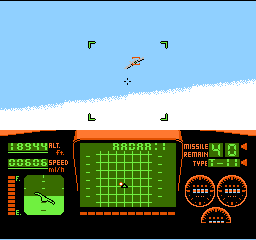
Top Gun (Japan) is a classic NES game you can play right in your browser, offering simple yet fun action rooted in arcade-style flight combat. Fans of retro shooters and flight simulators will find this game easy to pick up but challenging to master, capturing the feel of 8-bit aerial battles. If you like fast-paced missions and straightforward controls, Top Gun provides a nostalgic ride that’s easy to learn but tough to perfect.
Getting Into Top Gun
The game puts you in the cockpit of a fighter jet, with missions to complete. You’ll be flying, dodging enemy fire, and shooting down targets. Your goal is to finish each mission without losing all your health, which drops when you’re hit or crash. After a briefing screen, you take off into a scrolling battlefield where enemies appear in waves.
During gameplay, you move your aircraft around the screen, firing missiles or bullets at enemies while avoiding incoming shots. The game progresses by completing a mission, then moving on to the next with a bit more difficulty. The controls are simple enough for newcomers, but learning enemy patterns and managing your ammo can make later stages more demanding. The pace is quick, so success depends on reflexes and smart shooting.
Standout Features
Graphically, Top Gun captures the NES’s pixel art style with detailed aircraft sprites and distinct enemy designs. The backgrounds are minimal but effective, emphasizing speed and flight. As you advance, enemies become trickier, with faster attack waves and more complex formations, keeping things interesting. Replaying levels helps you improve your skills and rack up higher scores, giving you reason to try again and again.
The game’s progression is tied to completing missions, each ramping up the difficulty with sharper enemies and tighter time limits. Although it’s a straightforward shooter, it encourages players to refine flying and shooting strategies. The replay value lies in beating high scores and surviving longer, with each run revealing new enemy patterns and pitfalls.
Strategy and Tips
If you’re new to the game, focus on learning enemy attack patterns and saving missiles for tough enemies or large groups. Moving your aircraft around to dodge bullets is key, especially in later levels when enemies fire more aggressively.
- Stay mobile to avoid enemy fire; standing still makes you an easy target.
- Use your missiles wisely; don’t waste them on small groups or weaker enemies.
- Learn enemy attack timings to better predict and dodge shots.
- Prioritize surviving over scoring at first; high scores come with better survival skills.
- Practice each mission to memorize enemy spawn points and attack sequences.
Quick Questions
How should I get started if I’ve never played before?
Start by focusing on avoiding enemy fire and getting comfortable with the controls. Then, work on shooting enemies efficiently as you go through missions.
What’s a common mistake beginners make?
Many players stay still or fire wildly without paying attention to enemy patterns, making them vulnerable to attacks.
Can I play this game on mobile or touch devices?
Since it runs in your browser, you can play it on a mobile device with a touchscreen, but precise control might be more difficult than using a keyboard or gamepad.
All in all, Top Gun offers a simple but engaging flight combat experience. Its challenge and straightforward gameplay make it suitable for quick action sessions with a classic NES vibe. Whether you’re trying to beat your high score or just enjoy some nostalgic shooting, this game stays true to its arcade roots and makes for a fun browser game.
Related games: you can also try Rockman 2020 New Year's Hack and Family Trainer 1 – Athletic World (Japan), or browse all other games in the NES category.
How to Play Top Gun (Japan)?
Fly your fighter jet through scrolling levels, dodge enemy fire, and shoot down targets to complete missions. Survive as long as possible while improving your score.
Game Controls
Arrow keys control movement; action buttons fire missiles and bullets; start and pause are on-screen or mapped keys.
You may be interested in:
-
![Zombie Hunter (Japan) [En by KingMike v1.01]](https://www.playf2p.com/wp-content/uploads/zombie-hunter-japan-en-by-kingmike-v1-01-200x120.png) NES
♥ 2
Zombie Hunter (Japan) [En by KingMike v1.01]
NES
♥ 2
Zombie Hunter (Japan) [En by KingMike v1.01] -
 NES
♥ 1
Zombie Hunter (Japan)
NES
♥ 1
Zombie Hunter (Japan) -
 NES
♥ 1
Zoids Mokushiroku (Japan)
NES
♥ 1
Zoids Mokushiroku (Japan) -
 NES
♥ 2
Zoids 2 – Zenebas no Gyakushuu (Japan)
NES
♥ 2
Zoids 2 – Zenebas no Gyakushuu (Japan) -
 NES
♥ 1
Zoids – Chuuou Tairiku no Tatakai (Japan)
NES
♥ 1
Zoids – Chuuou Tairiku no Tatakai (Japan) -
 NES
♥ 11
Zippy Race (Japan)
NES
♥ 11
Zippy Race (Japan) -
 NES
♥ 1
Zhen Ben Xi You Ji (Asia) (Unl)
NES
♥ 1
Zhen Ben Xi You Ji (Asia) (Unl) -
 NES
♥ 1
Zenbei!! Pro Basket (Japan)
NES
♥ 1
Zenbei!! Pro Basket (Japan)
Comments (0)
No comments yet. Be the first to comment!