Total Recall (USA)
0 4 1
Total Recall (USA) is a classic NES game you can play right in your browser, mixing action, driving, and platforming. If you like games that test your reflexes and coordination across different styles, this one offers a good dose of retro fun. Its simple controls and varied gameplay make it accessible without needing to learn complicated mechanics.
Getting Into Total Recall
The gameplay of Total Recall combines three main styles: action, driving, and platforming. During a typical run, you’ll switch between these modes as you go through levels filled with obstacles, enemies, and hazards. The goal is to complete objectives within a time limit or reach checkpoints, which keeps you on your toes and encourages quick reactions and strategic movement.
Most sessions involve side-scrolling sections, racing parts, and some combat or puzzle-like challenges. Each mode has its own controls and pace, so you need to adapt quickly. The game isn’t focused on complex stories or multiple endings; instead, it’s about immediate gameplay and mastering its mechanics. That makes it good for quick bursts of play or longer sessions where you try to beat your best times or scores.
Standout Features
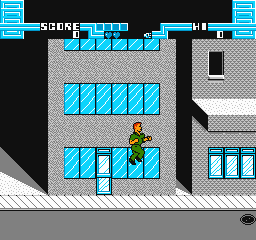
Visually, Total Recall features pixel art typical of its time, with clear differences between gameplay modes, helping you identify obstacles and enemies easily. The level design offers variety, with each section bringing new challenges and environments to keep things fresh. Even if it’s not graphically elaborate, the animations are smooth enough for fast-paced action, and the color palette sticks to NES standards.
Progression is straightforward — finishing a level unlocks the next, with difficulty increasing gradually to test your timing and precision. You can keep playing to get better at each mode, beat your best times, or try to finish without losing lives. Since it’s a short but challenging game, many players go back to improve their skills or explore different routes, making it rewarding for those who enjoy honing their abilities.
Strategy and Tips
If you’re new to Total Recall, spend some time learning the controls for each mode and practice switching between them smoothly. Patience and careful observation will help you avoid mistakes that cost lives or time.
- Learn enemy patterns and level layouts to plan your route more efficiently.
- Use checkpoints wisely; don’t rush through sections where you can take your time and stay safe.
- In driving parts, stay in control and avoid crashes to save time and lives.
- Practice each mode separately to sharpen your reflexes and timing for tougher sections.
- If you get stuck, try memorizing sequences or patterns rather than rushing blindly forward.
- Be mindful of your lives, especially in later levels that tend to be more demanding.
Quick Questions
How do I get started if I’ve never played before?
Just press start or select to begin, and get familiar with the basic movement and actions in each mode during the early levels.
What’s a common mistake beginners make?
Many rush through levels without paying attention to enemy patterns or hazards, which often leads to losing lives unnecessarily.
Can I play Total Recall comfortably on mobile or touch devices?
Since it runs in your browser here, it works on mobile browsers too, but the controls are designed for keyboard or controller, so gameplay might feel less precise on touch screens.
Playing Total Recall gives a feel for how NES titles combined different gameplay styles. Its mix of action, driving, and platforming keeps things interesting, and getting good at it can be pretty satisfying. This browser version makes it easy to jump in and enjoy a bit of that classic NES nostalgia.
Related games: you can also try Challenge of the Dragon (Asia) (Unl) (Sachen) (NES) and Battletoads changed colors, or browse all other games in the NES category.
How to Play Total Recall (USA)?
Switch between action, driving, and platforming levels to complete objectives before time runs out, avoiding enemies and hazards while reaching checkpoints and finishing each stage.
Game Controls
Arrow keys for movement; action buttons for jumping, shooting, or driving; use keyboard controls as mapped.
You may be interested in:
-
![Zombie Hunter (Japan) [En by KingMike v1.01]](https://www.playf2p.com/wp-content/uploads/zombie-hunter-japan-en-by-kingmike-v1-01-200x120.png) NES
♥ 2
Zombie Hunter (Japan) [En by KingMike v1.01]
NES
♥ 2
Zombie Hunter (Japan) [En by KingMike v1.01] -
 NES
♥ 1
Zombie Hunter (Japan)
NES
♥ 1
Zombie Hunter (Japan) -
 NES
♥ 1
Zoids Mokushiroku (Japan)
NES
♥ 1
Zoids Mokushiroku (Japan) -
 NES
♥ 2
Zoids 2 – Zenebas no Gyakushuu (Japan)
NES
♥ 2
Zoids 2 – Zenebas no Gyakushuu (Japan) -
 NES
♥ 1
Zoids – Chuuou Tairiku no Tatakai (Japan)
NES
♥ 1
Zoids – Chuuou Tairiku no Tatakai (Japan) -
 NES
♥ 11
Zippy Race (Japan)
NES
♥ 11
Zippy Race (Japan) -
 NES
♥ 1
Zhen Ben Xi You Ji (Asia) (Unl)
NES
♥ 1
Zhen Ben Xi You Ji (Asia) (Unl) -
 NES
♥ 1
Zenbei!! Pro Basket (Japan)
NES
♥ 1
Zenbei!! Pro Basket (Japan)
Comments (0)
No comments yet. Be the first to comment!