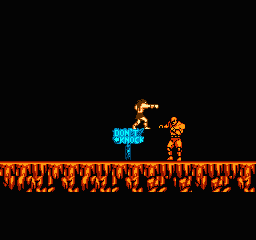
Werewolf – The Last Warrior (USA)
1 3 2
Werewolf – The Last Warrior (USA) is a classic NES game that combines action with platforming elements, making it easy for players to pick up and enjoy. This NES title offers a mix of combat, exploration, and challenge, all wrapped in a retro style that runs right in your browser on this site. Its simple controls and clear goals make it a good choice for fans of old-school platformers and action games alike.
What Is Werewolf – The Last Warrior?
Werewolf – The Last Warrior is an action-platformer where players navigate a dangerous world full of enemies and obstacles. The game focuses on combat and movement, requiring jumps, attacks, and dodging through various levels. The main goal is to defeat enemies, avoid hazards, and move forward through stages that test your timing and reflexes.
This game offers a straightforward experience typical of early NES titles, with clear goals and a challenging feel. Its design encourages players to get better at the game and memorize enemy patterns to progress. As a piece of NES history, it has pixel art, simple sound effects, and tight controls suited for quick, arcade-style action.
What Keeps You Coming Back
Werewolf – The Last Warrior stands out because of its level design and pacing. The difficulty gradually increases, rewarding players who practice and learn enemy placements. Its variety of stages and enemy types help keep things interesting, encouraging repeated tries to master each part.
Replaying the game comes from the challenge and the desire to improve scores or finish stages faster. Since it’s a shorter, intense game, finishing it gives a real sense of achievement. The pixel art style and classic mechanics also appeal to nostalgic players, making it enjoyable to revisit long after the first playthrough.
Handy Tips
Getting familiar with enemy patterns helps you stay alive longer. Practice timing your jumps and attacks for better control. Use the environment to your advantage, blocking or dodging hazards when you can. Keep an eye on your health and try to defeat enemies quickly so you don’t get overwhelmed. If a stage feels tough, try a different approach or focus on avoiding damage until you understand enemy movements. Patience makes a big difference here.
- Learn enemy attack patterns to react faster.
- Use jumps to dodge attacks and reach higher platforms.
- Save your health by avoiding fights you don’t need to engage in.
- Clear each stage carefully instead of rushing through.
- Practice tricky sections to memorize enemy placements and timings.
Player FAQ
Is Werewolf – The Last Warrior easy for beginners?
The game is pretty straightforward but takes some practice to master enemy patterns and timing. It’s accessible for new players but can be tough in some parts or higher levels.
Can younger players enjoy Werewolf – The Last Warrior?
Yes, it’s suitable for kids interested in action platformers, although some sections might be challenging for very young children. Its simple controls make it easy for most players to pick up and play.
Do I need an internet connection to play Werewolf – The Last Warrior?
No, you can play it directly in your browser on this site, so once it’s loaded, you don’t need an internet connection. It’s a good choice for quick sessions without downloads or installations.
Werewolf – The Last Warrior is a solid example of NES action-platformers, offering accessible gameplay with enough challenge to keep players coming back. Its pixel art and straightforward mechanics make it a memorable part of any retro collection, all playable right in your browser for free.
Related games: you can also try Buggy Popper (Japan) and Dragon Quest III – Soshite Densetsu e… (Japan) (Rev B), or browse all other games in the NES category.
How to Play Werewolf – The Last Warrior (USA)?
Navigate through levels by jumping and attacking enemies, aiming to defeat all foes and reach the end of each stage. Avoid hazards and learn enemy patterns to progress and complete the game.
Game Controls
Arrow keys control movement; attack and jump are mapped to specific keys on the keyboard.
You may be interested in:
-
![Zombie Hunter (Japan) [En by KingMike v1.01]](https://www.playf2p.com/wp-content/uploads/zombie-hunter-japan-en-by-kingmike-v1-01-200x120.png) NES
♥ 2
Zombie Hunter (Japan) [En by KingMike v1.01]
NES
♥ 2
Zombie Hunter (Japan) [En by KingMike v1.01] -
 NES
♥ 1
Zombie Hunter (Japan)
NES
♥ 1
Zombie Hunter (Japan) -
 NES
♥ 1
Zoids Mokushiroku (Japan)
NES
♥ 1
Zoids Mokushiroku (Japan) -
 NES
♥ 2
Zoids 2 – Zenebas no Gyakushuu (Japan)
NES
♥ 2
Zoids 2 – Zenebas no Gyakushuu (Japan) -
 NES
♥ 1
Zoids – Chuuou Tairiku no Tatakai (Japan)
NES
♥ 1
Zoids – Chuuou Tairiku no Tatakai (Japan) -
 NES
♥ 11
Zippy Race (Japan)
NES
♥ 11
Zippy Race (Japan) -
 NES
♥ 1
Zhen Ben Xi You Ji (Asia) (Unl)
NES
♥ 1
Zhen Ben Xi You Ji (Asia) (Unl) -
 NES
♥ 1
Zenbei!! Pro Basket (Japan)
NES
♥ 1
Zenbei!! Pro Basket (Japan)
Comments (0)
No comments yet. Be the first to comment!