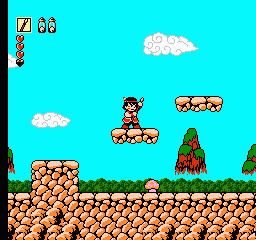
Whomp’Em (USA)
1 3 2
Whomp’Em (USA) is a classic NES game that’s surprisingly accessible and easy for new players to pick up. Its straightforward gameplay and simple mechanics make it a fun experience without a steep learning curve. As a NES title, it has that nostalgic 8-bit feel, and you can enjoy it right in your browser without any downloads or installations. It’s a solid choice for anyone wanting to enjoy a retro platformer with quick sessions and a bit of a challenge.
What Is Whomp’Em?
Whomp’Em is a platformer where the main goal is to move through levels filled with obstacles and enemies. It’s a side-scrolling game that asks players to jump across platforms, avoid dangers, and defeat enemies to move forward. The focus is on quick reflexes and timing, making each level a test of skill rather than complex mechanics. It doesn’t have elaborate stories or character customization, but it offers a straightforward, focused platforming experience.
The gameplay revolves around mastering the controls to move through levels efficiently while avoiding damage. The difficulty gradually increases, encouraging players to learn enemy patterns and level layouts. Its simple design promotes replayability, as players try to improve their times or finish levels with fewer hits. Whomp’Em’s straightforward style means both casual players and more dedicated gamers can find enjoyment in its challenge.
What Keeps You Coming Back
The game’s appeal mainly comes from its tight, responsive controls and the satisfaction of overcoming tricky sections. The levels are designed with care, offering just enough challenge to keep things interesting without becoming frustrating. The replay value comes from trying to beat your best times, exploring different routes, or simply getting better at dodging enemies and hazards. Each session feels rewarding as your skills improve and you go further.
Beyond the gameplay, Whomp’Em offers a nostalgic trip back to the NES era—its pixel art, chiptune soundtrack, and classic platformer feel evoke memories of early gaming. The simple design makes it perfect for short bursts, but it also encourages repeated attempts to beat personal records or find hidden secrets. This mix of challenge and nostalgia keeps players coming back for more.
Handy Tips
Getting the most out of Whomp’Em can be easier with a few quick tips:
- Learn enemy patterns so you can anticipate their movements and avoid unnecessary hits.
- Use jumps carefully; timing is key for crossing gaps and dodging hazards.
- Explore levels thoroughly to find safer or faster routes.
- Memorize level layouts, especially in later stages.
- Focus on smooth, consistent movements instead of rushing through levels.
- If you get stuck, replay sections to improve your timing and reactions.
Player FAQ
Is Whomp’Em easy enough for kids or total beginners?
Yes, it’s accessible for younger players or those new to platformers thanks to its simple controls and straightforward gameplay. Still, mastering timing and avoiding hazards can be a challenge.
Can I play Whomp’Em offline or on any device?
Since it runs right in your browser, you can play it on any device with internet access and a compatible browser. Once loaded, no internet connection is needed, making it easy to play anywhere.
Is Whomp’Em good for short gaming breaks?
Definitely. Its levels are designed for quick play sessions, so you can jump in, finish a level, and then pick it up again later without losing progress.
The NES has given us many memorable titles, and Whomp’Em fits right in. Its simple but challenging gameplay makes players want to improve their scores or just enjoy the retro platforming style. For fans of classic NES games, this browser version offers a fun way to experience Whomp’Em whenever you like.
Related games: you can also try Pac-Man (Japan) and Cyberball (USA), or browse all other games in the NES category.
How to Play Whomp’Em (USA)?
Move through levels by jumping and avoiding enemies, aiming to reach the end with the fewest hits and best time. Learn enemy patterns and timing to improve your skills and beat your previous records.
Game Controls
Arrow keys act as the D-pad; Enter is Start; on-screen mapped keys handle the action buttons
You may be interested in:
-
![Zombie Hunter (Japan) [En by KingMike v1.01]](https://www.playf2p.com/wp-content/uploads/zombie-hunter-japan-en-by-kingmike-v1-01-200x120.png) NES
♥ 2
Zombie Hunter (Japan) [En by KingMike v1.01]
NES
♥ 2
Zombie Hunter (Japan) [En by KingMike v1.01] -
 NES
♥ 1
Zombie Hunter (Japan)
NES
♥ 1
Zombie Hunter (Japan) -
 NES
♥ 1
Zoids Mokushiroku (Japan)
NES
♥ 1
Zoids Mokushiroku (Japan) -
 NES
♥ 2
Zoids 2 – Zenebas no Gyakushuu (Japan)
NES
♥ 2
Zoids 2 – Zenebas no Gyakushuu (Japan) -
 NES
♥ 1
Zoids – Chuuou Tairiku no Tatakai (Japan)
NES
♥ 1
Zoids – Chuuou Tairiku no Tatakai (Japan) -
 NES
♥ 11
Zippy Race (Japan)
NES
♥ 11
Zippy Race (Japan) -
 NES
♥ 1
Zhen Ben Xi You Ji (Asia) (Unl)
NES
♥ 1
Zhen Ben Xi You Ji (Asia) (Unl) -
 NES
♥ 1
Zenbei!! Pro Basket (Japan)
NES
♥ 1
Zenbei!! Pro Basket (Japan)
Comments (0)
No comments yet. Be the first to comment!