Yo! Noid (USA)
0 16 2
Yo! Noid (USA) is a classic NES game that combines action and platforming into a lively challenge. Originally released during the NES era, it invites players to guide a nimble hero through colorful levels filled with enemies and obstacles. Fans of retro platformers will appreciate its straightforward gameplay, which emphasizes timing and precision. If you enjoy navigating tricky environments and mastering quick reflexes, Yo! Noid offers a nostalgic yet engaging experience that runs directly in your browser, no downloads needed.
Getting Into Yo! Noid
The main gameplay involves controlling a small, quick character through side-scrolling stages. Each level mixes jumping puzzles, enemy encounters, and platforming sections that require careful timing. The game has a simple loop: move through stages, avoid or defeat enemies, and reach the end to keep progressing. It’s designed for quick, intense sessions that test your reflexes and patience.
During each run, you’ll encounter different platform layouts, with enemies that can be jumped on or avoided. Power-ups sometimes appear to help clear obstacles or deal with foes more easily. The mechanics are straightforward—no complex systems, just pure action. It rewards quick thinking and precise movements, fitting both short play sessions and longer attempts to beat your best score.
Standout Features
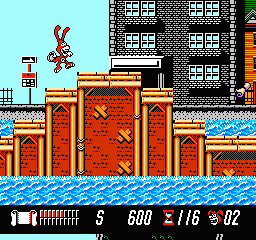
Visually, Yo! Noid uses bright, colorful sprites typical of NES pixel art. The levels are designed with clear visual cues to help identify hazards and pathways quickly. Progress feels satisfying as each stage introduces new challenges, keeping things fresh from start to finish. The bosses and enemies are animated simply but effectively, adding to the charm of its retro style.
Replay value comes from its challenge-driven design—players often retry levels to improve timing or finish faster. The stages are short enough to restart quickly, encouraging repeated attempts. While it doesn’t have branching paths or multiple endings, mastering tricky sections provides a sense of achievement that keeps players coming back. Its straightforward gameplay makes it easy to pick up but hard to master, giving it lasting appeal for fans of old-school games.
Strategy and Tips
Getting comfortable with Yo! Noid means learning enemy patterns and timing your jumps carefully. Here are some tips to help you along:
- Take a moment to observe enemy movements before rushing ahead—patience pays off.
- Use jumps to avoid enemies rather than confront them directly when possible.
- Find safe spots or platforms where enemies can’t reach you, especially in tricky sections.
- Practice your timing to land jumps accurately on platforms and prevent falls.
- Move carefully through complex areas—rushing often leads to mistakes.
- If you’re stuck, try memorizing enemy patterns and level layouts to plan your route better.
Quick Questions
How do I get started with Yo! Noid?
Use your keyboard or game controls to move the character and start progressing through levels, which load instantly in your browser.
What’s a common mistake beginners make?
Many try to rush through levels without paying attention to enemy patterns, which can lead to unnecessary falls or hits.
Can I play Yo! Noid comfortably on mobile or touch devices?
Yes, since it runs in your browser, you can play on mobile devices with touch controls, though precise timing might take some getting used to on smaller screens.
Yo! Noid offers a classic platforming challenge wrapped in a colorful, nostalgic package. Its simple gameplay and quick levels make it a good choice for casual retro gaming, especially if you enjoy action-packed platformers. Give it a try and see how far you can go—yo! noid.
Related games: you can also try Twin Eagle – Revenge Joe's Brother (Japan) and Contra Hardest Mode, or browse all other games in the NES category.
How to Play Yo! Noid (USA)?
Guide Noid through colorful levels by jumping over enemies and obstacles, reaching the end of each stage. Avoid enemies or jump on them to clear the path and progress through increasingly challenging screens.
Game Controls
Arrow keys control movement; jump and action buttons are mapped to specific keyboard keys.
You may be interested in:
-
![Zombie Hunter (Japan) [En by KingMike v1.01]](https://www.playf2p.com/wp-content/uploads/zombie-hunter-japan-en-by-kingmike-v1-01-200x120.png) NES
♥ 2
Zombie Hunter (Japan) [En by KingMike v1.01]
NES
♥ 2
Zombie Hunter (Japan) [En by KingMike v1.01] -
 NES
♥ 1
Zombie Hunter (Japan)
NES
♥ 1
Zombie Hunter (Japan) -
 NES
♥ 1
Zoids Mokushiroku (Japan)
NES
♥ 1
Zoids Mokushiroku (Japan) -
 NES
♥ 2
Zoids 2 – Zenebas no Gyakushuu (Japan)
NES
♥ 2
Zoids 2 – Zenebas no Gyakushuu (Japan) -
 NES
♥ 1
Zoids – Chuuou Tairiku no Tatakai (Japan)
NES
♥ 1
Zoids – Chuuou Tairiku no Tatakai (Japan) -
 NES
♥ 11
Zippy Race (Japan)
NES
♥ 11
Zippy Race (Japan) -
 NES
♥ 1
Zhen Ben Xi You Ji (Asia) (Unl)
NES
♥ 1
Zhen Ben Xi You Ji (Asia) (Unl) -
 NES
♥ 1
Zenbei!! Pro Basket (Japan)
NES
♥ 1
Zenbei!! Pro Basket (Japan)
Comments (0)
No comments yet. Be the first to comment!