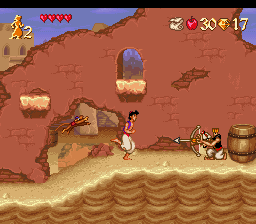
Aladdin (Germany)
0 3 0
Aladdin (Germany) is a classic SNES game that brings the beloved Disney character’s adventures right to your browser. This platformer mixes action and exploration, making it a good choice for fans of retro games who enjoy a straightforward yet engaging challenge. Its nostalgic charm is perfect for those who appreciate pixel art and the tight controls typical of the SNES era.
Getting Into Aladdin
The main gameplay involves moving through levels filled with enemies, traps, and jumping puzzles. Each stage has its own environment and obstacles, and players control Aladdin as he jumps, climbs, and fights his way forward. Quick reflexes and precise timing are often needed. Progressing usually means defeating enemies, avoiding hazards, and collecting items that help you survive or uncover secrets.
Most players spend time exploring each level carefully, mastering jumps and attacks, and noticing enemy patterns. The game encourages trial and error, with checkpoints placed after tough sections. Its difficulty level is typical for SNES platformers, requiring patience and good hand-eye coordination. Since the game follows a linear path, you’ll find yourself replaying sections to improve your timing or find hidden paths and bonuses.
Standout Features
Graphically, Aladdin captures the pixel-perfect charm of the SNES, with colorful backgrounds and detailed character sprites. Its animations are smooth, especially during fights and jumps, giving each level a lively feel. The music and sound effects match the visuals nicely, pulling players into its vibrant world.
The progression is clear and satisfying. Each level has a goal—be it defeating all enemies, reaching a specific spot, or avoiding hazards—making it easy to see how far you’ve come. You’ll find replay value in mastering levels, discovering hidden items, and trying to beat your best times. Its challenge level makes it interesting for those who like to improve their skills over multiple attempts.
Strategy and Tips
Getting started is simple since the game loads directly in your browser without any setup needed. Focus on learning enemy attack patterns early on to avoid taking unnecessary damage. Patience with timing and jumps is crucial for smooth progress. Take your time exploring levels; it can help you find useful items or shortcuts.
- Practice jumps and attacks to get better at precision.
- Use the environment—some hazards can be avoided or used to your advantage.
- Pay attention to enemy patterns so you can anticipate and counter their moves.
- Use checkpoints to save your progress after tough parts.
- Explore levels carefully for hidden items and secrets that could help later on.
- Don’t get discouraged by setbacks; replays can help sharpen your skills.
Quick Questions
How do I start playing Aladdin?
The game loads instantly in your browser, so you can jump right in without downloads or installs.
What’s a common mistake beginners make?
Trying to rush through levels without mastering jumps or enemy patterns often leads to unnecessary deaths and frustration.
Can I play Aladdin on mobile or touch devices?
Yes, since it runs in your browser, it works on touch screens, though getting used to the controls might take a little time.
Aladdin offers a faithful, challenging platforming experience that captures the feel of the SNES era. Its engaging levels, bright visuals, and rewarding gameplay make it a fun choice for fans of retro action games or anyone wanting to enjoy a timeless adventure right in their browser.
Related games: you can also try Addams Family Values (USA) (En,Fr,De) and Adventures of Dr. Franken, The (USA), or browse all other games in the SNES category.
How to Play Aladdin (Germany)?
Control Aladdin to jump, fight enemies, and avoid traps through levels. Collect items, explore, and complete each stage by reaching the goal while mastering timing and enemy patterns.
Game Controls
Arrow keys act as the D-pad; Enter is Start; action buttons are mapped to on-screen keys.








Comments (0)
No comments yet. Be the first to comment!