Animaniacs (USA)
0 63 5
Animaniacs (USA) is a classic SNES action-platformer that captures the zany humor and frantic energy of the animated series. The game offers a simple yet tough experience, great for fans of retro platformers who enjoy quick reflexes and vibrant visuals. As a SNES title, it carries the charm of 16-bit era design, making it an engaging option for anyone wanting to relive a piece of gaming history directly through their browser.
Getting Into Animaniacs
The game involves moving through levels filled with enemies, obstacles, and tight jumps. The main gameplay focuses on running, jumping, and dodging hazards while collecting items or power-ups that can help you along. Each session typically means completing one or more levels within a stage, with difficulty increasing as you progress.
This SNES classic is built around fast-paced action, requiring quick reflexes and precise timing. There are no complex mechanics like RPG elements or lots of exploration; instead, it emphasizes immediate fun. Players often retry levels to learn enemy patterns and perfect their jump timing. Its difficulty level matches other titles from that era—challenging but fair, rewarding memorization and sharp reflexes.
Standout Features
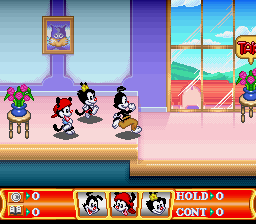
Visually, Animaniacs uses colorful sprite art that faithfully captures the show’s chaotic style. The characters are expressive, and the backgrounds are lively, reflecting the humor and zaniness of the cartoon. The level design offers variety, with each stage introducing new challenges to keep gameplay interesting. This visual style helps you spot enemies, hazards, and collectibles easily, making quick decisions during hectic moments simpler.
Progression is straightforward: finish levels to move forward, with some stages having checkpoints so you don’t have to replay everything after losing a life. The replay value comes from trying to improve your time or score, and the game’s difficulty encourages multiple attempts. Since it’s rooted in the SNES era, it doesn’t overcomplicate things, making it accessible for new players but still offering a challenge for those aiming to beat their best times.
Strategy and Tips
At the start, try memorizing enemy patterns and jump timings to avoid unnecessary mistakes. Patience can often be more effective than rushing through levels.
- Look out for power-ups or items that can help you get past tough spots.
- Be patient when approaching groups of enemies—rushing can lead to errors.
- Learn the layout of each level to anticipate hazards coming up.
- If you get stuck, take a break and return with fresh reflexes to improve your chances.
- Practicing early levels helps you get used to the game’s rhythm before moving on to harder stages.
Quick Questions
How long does it usually take to beat a level?
Most levels can be finished in a few minutes once you know enemy locations and timing.
Is it easy to start if I’ve never played a platformer from this era?
Yes, the controls are simple and straightforward, making it accessible even for newcomers to retro platformers.
Can I play Animaniacs on a mobile device or touch screen?
The game runs directly in your browser, so it’s playable on mobile devices with a touch interface, though precise timing might be trickier without a traditional controller.
Animaniacs offers a lively, action-packed platforming experience that captures the spirit of the beloved cartoon while offering solid gameplay challenges. Its colorful visuals and straightforward mechanics make it a good choice for anyone interested in classic SNES titles or nostalgic platformers. Playing this game online means you can enjoy its chaos and humor without any hassle, straight from your browser.
Related games: you can also try Aero Fighters (USA) and Angelique – Voice Fantasy (Japan), or browse all other games in the SNES category.
How to Play Animaniacs (USA)?
Move through levels by running, jumping, and avoiding enemies and hazards. Collect items and reach the end of each stage, trying to improve your time and score with quick reflexes.
Game Controls
Arrow keys act as the D-pad; Enter is Start; other keys handle action buttons.








Comments (0)
No comments yet. Be the first to comment!