Asameshimae Nyanko (Japan)
0 5 0
Getting Into Asameshimae Nyanko
Asameshimae Nyanko is a classic SNES game you can play right in your browser. It combines trivia and puzzles, asking you to organize and match items or categories. The gameplay is simple—selecting or arranging elements in a certain order or pattern—without needing complex controls or quick reflexes. The pace stays steady, making it easy for anyone to pick up, whether for a quick mental challenge or just a bit of casual fun.
Most sessions involve solving puzzles or answering trivia questions within a time limit or with limited moves. There aren’t lengthy modes or branching paths; instead, the game encourages replaying similar puzzles multiple times. You can try to beat your high score or finish faster, which keeps things interesting. The core mechanics are all about recognizing patterns and matching items efficiently. Since it’s designed to be casual, a typical play session might last from a few minutes up to half an hour, depending on how much you want to challenge yourself.
Standout Features
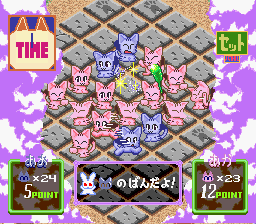
The visuals are simple but charming, fitting the pixel art style of the SNES. Bright, clear sprites help you easily tell items and categories apart, so decision-making feels quick. The interface is clean and minimal, letting you focus on the puzzles without distractions. While it’s not flashy or overly detailed, its straightforward presentation makes it inviting for short bursts of play.
Progressing in the game means completing puzzles and unlocking new challenge sets, which can be played over and over. The difficulty ramps up gradually, making it suitable for players of all ages. You might find yourself trying to improve your time, score, or accuracy across multiple attempts. Since it runs directly in your browser, you don’t need to install anything—just load it up and start playing whenever you like. Its simple mechanics and focus on pattern recognition make it easy to revisit for a quick mental refresh.
Strategy and Tips
Try to approach each puzzle with a clear plan to avoid mistakes and move quickly. Recognize patterns early to reduce the number of moves needed. Keep track of the categories or items you need to match, and focus on completing those first to make things easier.
- Begin with the easiest matches to build momentum and make room for trickier ones.
- Use a systematic approach, like scanning from top to bottom or left to right, so you don’t overlook options.
- Watch the clock or move count to pace yourself during each puzzle.
- If you get stuck, take a moment to reassess the pattern—rushing can lead to simple mistakes.
- Try puzzles multiple times to get faster and more accurate, aiming for higher scores or quicker completions.
- Practice regularly to recognize common patterns and develop quicker instincts for matching.
Quick Questions
How do I start playing Asameshimae Nyanko?
The game loads instantly in your browser. Just click to begin and follow the prompts to start a puzzle or trivia round.
What’s a common mistake beginners make?
Many new players jump into puzzles without a plan, which can lead to unnecessary moves or errors. Taking a moment to scan options first helps avoid that.
Can I play Asameshimae Nyanko on mobile or touch devices?
Yes, since it runs directly in your browser, you can play on mobile devices with touch controls. However, using a mouse or keyboard on a desktop can make it easier.
Asameshimae Nyanko offers a simple but engaging puzzle and trivia experience inspired by SNES classics. Its clean design and straightforward mechanics make it perfect for quick mental exercises. Whether you’re familiar with the original or just curious about this style of game, it’s a solid choice for short sessions involving pattern recognition and categorization.
Related games: you can also try Aretha II – Ariel no Fushigi na Tabi (Japan) (Beta1) and Aero Fighters (USA), or browse all other games in the SNES category.
How to Play Asameshimae Nyanko (Japan)?
Arrange and match items or categories to solve puzzles within a time or move limit. Recognize patterns quickly and plan your moves to improve your score and progress through challenges.
Game Controls
Arrow keys act as the D-pad; Enter is Start; on-screen mapped keys handle the action buttons.








Comments (0)
No comments yet. Be the first to comment!