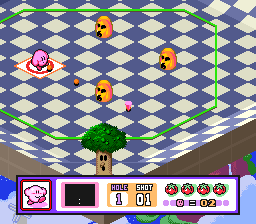
Kirby’s Dream Course (Europe)
0 9 2
Kirby’s Dream Course (Europe) combines sports and golf in a colorful, whimsical setting on the SNES. This classic offers a playful take on mini-golf, with Kirby and friends as the characters players can choose. If you enjoy light-hearted competition and puzzle-like gameplay, there’s plenty here to keep you entertained, and you can play it instantly through a browser-based emulator that runs smoothly.
Getting Into Kirby’s Dream Course
The main gameplay involves guiding Kirby through a series of imaginative courses filled with bright, cartoon-style visuals. Each course is like a mini-golf hole, where your goal is to hit Kirby into the hole with as few strokes as possible. You’ll need to think about angles, obstacles, and how hard to hit, turning each shot into a small puzzle to solve efficiently.
Games are usually played solo against the course or in multiplayer mode, where players take turns trying to beat each other’s scores. Rounds are quick, often just a few minutes, making it easy to jump in during a break. While the mechanics are simple, the game requires strategic thinking and precise shots, especially on tricky sections with moving platforms and hazards.
Standout Features
The game stands out with its lively sprite art, capturing the playful spirit of Kirby’s universe. Colorful backgrounds, goofy animations, and lively effects create a cheerful vibe that keeps things fun and light. It’s a great pick for those who like retro visuals full of personality, all packed into a small package.
Progress works straightforwardly: finish courses to unlock new ones, with each step becoming more complex and adding new obstacles. The game encourages trying to improve your scores and mastering difficult layouts. Its simple mechanics combined with strategic shot placement invite experimentation and skill refinement, making each round satisfying even after playing multiple times.
Strategy and Tips
To score well in Kirby’s Dream Course, some planning and good timing are helpful. Here are a few tips:
- Watch your shot trajectories and plan your next move ahead.
- Use the environment—bouncing Kirby off walls can help reach tight spots.
- Adjust your shot strength carefully; too much or too little can send Kirby off course or into hazards.
- Pay attention to how obstacles move and time your shots to avoid pits or blocks.
- Practice on easier courses to get a feel for shot angles and control.
- If available, try different characters; some have unique shot properties suited to certain courses.
Quick Questions
Is Kirby’s Dream Course easy for beginners?
The basic controls are simple, but really mastering the courses can take some practice, especially on the more complex ones.
How long does a typical game take?
Most courses can be finished in just a few minutes, making it perfect for quick sessions or a casual break.
Can I play Kirby’s Dream Course on mobile or touch devices?
Since it runs in your browser, it should work on touch screens, but precise control might depend on your device. Using a mouse or keyboard tends to make aiming easier.
Kirby’s Dream Course offers a charming mix of mini-golf and puzzle-solving. Its simple yet strategic gameplay makes it enjoyable whether you’re just passing the time or looking for a quick challenge. Playing this SNES classic through your browser means you can enjoy its colorful courses without any fuss—just aim to sink Kirby in as few strokes as possible.
Related games: you can also try Adventures of Tintin, The – Prisoners of the Sun (Europe) (En,Fr,De,Es) and Capcom's Soccer Shootout (USA) (Beta), or browse all other games in the SNES category.
How to Play Kirby’s Dream Course (Europe)?
Guide Kirby through colorful mini-golf courses by aiming and hitting him into the hole with minimal strokes, using obstacles and environment to your advantage. Complete courses to unlock new ones and improve your score.
Game Controls
Arrow keys move the aim; spacebar or designated key to hit; use the keyboard to control shots.








Comments (0)
No comments yet. Be the first to comment!