Mario Game (V1.0)
0 32 6
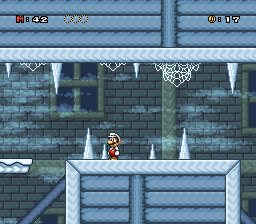
Mario Game (V1.0) is a classic SNES game emulated right in your browser, bringing a nostalgic platforming adventure directly to your screen. It’s great for fans of retro gaming or anyone wanting a simple, fun challenge without the hassle of downloads or setup. The game captures the spirit of the SNES era, with familiar gameplay that appeals to both new players and longtime fans of the console.
Getting Into Mario Game
The main idea is guiding Mario through levels filled with obstacles, enemies, and collectibles. The mechanics are straightforward—move Mario left or right, jump over hazards, and avoid enemies. You progress by completing levels within a time limit or reaching specific goals. The game encourages trial and error, rewarding players who get comfortable with timing and movement.
Most of the time, you’ll pick a level or follow a simple sequence of stages. It’s designed for quick bursts of fun—perfect whether you have a few minutes or want to spend more time trying to beat your best score. There aren’t complicated modes or mechanics; instead, it focuses on providing a clear platforming challenge. You might find yourself replaying levels to improve your time, score, or just enjoy the pixel-perfect visuals.
Standout Features
This SNES title features colorful pixel art, with bright backgrounds and familiar character sprites that bring back memories. The levels are a good mix of easier sections and more challenging parts that test your timing and precision. The progression is linear, but each stage introduces new obstacles and enemies, keeping things interesting.
The game’s controls are tight, and its simple design makes it easy to pick up. Many players go back to improve scores or find hidden secrets. It’s accessible for newcomers but offers enough challenge for those aiming for high scores. Since it runs directly in the browser, you can jump in for quick rounds or spend more time perfecting each level.
Strategy and Tips
Getting started is easy—just pick a level and begin. Focus on timing your jumps to dodge enemies and hazards. Patience and careful observation make tricky sections easier.
- Practice levels multiple times to learn enemy patterns and layout.
- Use small jumps on narrow platforms to avoid falling.
- Pick up power-ups when you see them; they can help you get past tough spots.
- Don’t rush. Taking your time can prevent mistakes.
- Try to complete levels quickly to beat your best times.
- If you’re stuck, practice the section alone to improve your skills.
Quick Questions
How do I start playing Mario Game?
The game loads instantly in your browser—just click to start, choose a level, and go. It’s made for quick play sessions.
What’s a common mistake for beginners?
Many players try to rush through without paying attention to enemy patterns or jump timing. Staying patient helps avoid unnecessary deaths.
Can I play this on mobile or touchscreen devices?
Yes, it works on mobile browsers with touch controls, though using a mouse or keyboard might give more precision.
This browser-based SNES game offers a simple, enjoyable experience for fans of the classic Mario. Its easy mechanics and charming visuals make it fun to pick up, whether you want a quick play or aim to master every stage.
Related games: you can also try Lost Vikings, The (USA) and BS Nichibutsu Mahjong (Japan), or browse all other games in the SNES category.
How to Play Mario Game (V1.0)?
Guide Mario through levels by moving left or right and jumping to avoid enemies and obstacles, aiming to complete stages quickly and improve your score or time.
Game Controls
Arrow keys control movement; jump and action keys are mapped to keyboard buttons.








Comments (0)
No comments yet. Be the first to comment!