Mega Man X3 – Zero Project V4.1
0 59 3
Mega Man X3 – Zero Project V4.1: Gameplay Overview
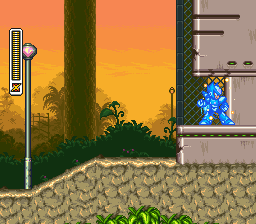
Mega Man X3 – Zero Project V4.1 is a classic SNES platformer that stays true to the original Mega Man X formula. It focuses on precise movement, quick reflexes, and smart weapon use. The gameplay has you controlling the nimble Maverick Hunter X, moving through levels filled with enemies, obstacles, and boss battles. The design encourages learning enemy patterns and managing your resources carefully, especially energy tanks and weapon ammo.
You go through a series of stages, each ending with a boss fight. Beating bosses grants you their unique weapons, which can be key for progressing or exploiting enemy weaknesses. The game features side-scrolling action, with moments that test your platforming skills and combat efficiency. The difficulty gradually ramps up, rewarding mastery of movement and weapon tactics. Playing through it in your browser makes it easy to enjoy this SNES classic without needing to install anything, keeping its nostalgic feel alive for new and returning players alike.
Modes, Levels and Progression
The game guides you through different levels, each with its own environment and enemies. It doesn’t offer multiplayer or difficulty settings, but the level design keeps things interesting—ranging from industrial zones to outdoor scenes. Each stage challenges different skills: some require precise timing and jumping, others focus on fighting groups of enemies or minibosses. You unlock new stages by defeating bosses or collecting key items.
The difficulty increases steadily, with tougher enemies and more complex platforming. Success depends on balancing attack and defense, especially with limited energy. The game encourages replaying levels, trying different weapon setups, and finishing runs with minimal damage or in less time. It’s designed to keep you trying again, refining your approach to get better with each attempt.
Winning Strategies
Knowing your weapons and enemy weaknesses makes a big difference. Memorizing attack patterns helps avoid unnecessary hits. Upgrading energy tanks can help you last longer in boss fights. Use your weapons wisely—some enemies are especially vulnerable to certain attacks, making fights simpler.
- Save your special weapon ammo for bosses rather than wasting it on weaker foes.
- Practice timing your jumps and dashes, especially in tricky platforming sections.
- Pick up energy items and save them for tough spots or boss battles.
- Learn boss attack patterns so you can find safe moments to strike back.
- Try different weapon combos to find what works best for each stage.
Common Questions About Mega Man X3 – Zero Project V4.1
How does the difficulty change as I play?
It starts off fairly approachable but gets tougher as you go, with stronger enemies and more complex levels. Boss fights demand better timing and resource management as you advance.
Are there multiple modes or difficulty levels?
No, the game doesn’t have separate difficulty settings. The challenge grows naturally through level design and enemy placement. How well you do depends on your skill and strategy.
How much replay value is there?
You can replay to improve your times, experiment with weapon setups, and try different approaches. Since it’s playable directly in your browser, there’s always a reason to give it another shot, whether to beat your best or just enjoy the challenge.
Playing Mega Man X3 – Zero Project V4.1 here gives quick access to a well-preserved SNES experience. Its levels, mechanics, and challenge level make it a solid pick for fans of classic platformers. The straightforward progression and tactical options keep it engaging for newcomers and series veterans alike.
Related games: you can also try Magical Drop 2 (Japan) and King of the Monsters (USA), or browse all other games in the SNES category.
How to Play Mega Man X3 – Zero Project V4.1?
Control Mega Man X to navigate levels, defeat bosses, and collect weapons. Use your skills to avoid enemies and obstacles while managing resources to reach the final stage.
Game Controls
Arrow keys act as the D-pad; Enter is Start; action buttons are mapped to other keys.








Comments (0)
No comments yet. Be the first to comment!