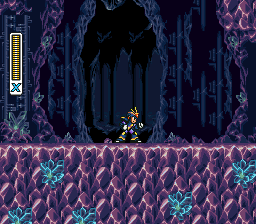
Megaman X2 – Ultimate Armor
0 70 7
Megaman X2 – Ultimate Armor is a classic SNES game that captures the feel of a beloved action platformer. Originally made for the Super Nintendo Entertainment System, this game keeps the fast-paced, challenging gameplay that defined an era. It’s a nostalgic trip for fans of the series and offers a new challenge for newcomers, playable directly in your browser without needing downloads or setup. As part of the SNES collection here, it highlights the charm of 16-bit gaming with sharp visuals, lively soundtracks, and straightforward mechanics that have stood the test of time.
Step Into the World of Megaman X2 – Ultimate Armor
This version of Megaman X2 takes players into a futuristic universe filled with mechanical enemies and boss fights that tower over you. The visuals feature bright, sprite-based designs typical of the SNES era, with detailed character animations and colorful backgrounds that give a sense of speed and urgency. The soundtrack buzzes with energetic chip tunes that boost the adrenaline with each level, matching the game’s quick pace. The atmosphere strikes a balance between tension and excitement, pushing players to perfect their timing and reflexes while navigating tricky terrains and battling tough foes. Playing in your browser means a smooth experience, with instant response that keeps the thrill of the original console alive.
How the Gameplay Hooks You
Megaman X2 – Ultimate Armor offers tight, responsive controls that reward careful timing and quick decisions. Progress involves mastering each level’s layout, beating bosses to earn new abilities, and adjusting your tactics to face harder challenges. The pacing keeps a steady rhythm, mixing intense combat with platforming sections that test your reflexes. Difficulty ramps up gradually, encouraging you to learn enemy patterns and plan your routes. Picking up new powers after each boss keeps things interesting, inviting you to experiment with different skill combinations for better results. Even short sessions can leave you with a real sense of achievement without feeling overwhelming.
Pro Tips for Megaman X2 – Ultimate Armor
Start by learning enemy attack patterns to avoid unnecessary damage.
- Focus on defeating bosses efficiently to upgrade your armor and weapons.
- Use your abilities wisely to bypass tricky sections or exploit enemy weaknesses.
- Practice each level to memorize enemy placements and safe zones for faster completion.
- Watch your health and save energy for boss fights that need precision.
- Try different weapon combos to find the most effective tactics against bosses.
Frequently Asked Questions
Is Megaman X2 – Ultimate Armor suitable for quick, short gaming sessions?
Yes, the level design allows for manageable chunks, making it good for quick play without losing progress.
Does the game get repetitive after multiple plays?
While it sticks to the core gameplay, mastering enemy patterns and boss strategies keeps it engaging across different attempts.
Can I play Megaman X2 – Ultimate Armor without prior experience?
Definitely. The controls are straightforward, and the gradual difficulty makes it accessible for players willing to learn and improve.
Playing Megaman X2 – Ultimate Armor here means experiencing a faithful browser version of a SNES classic. Its precise gameplay and bright design let both nostalgic fans and new players enjoy its challenging platforming, all in a quick, easy-to-access format. See how well you can master the ultimate armor in this timeless action platformer.
Related games: you can also try Math Blaster – Episode One (USA) and Indiana Jones' Greatest Adventures (Japan), or browse all other games in the SNES category.
How to Play Megaman X2 – Ultimate Armor?
Navigate levels, defeat bosses to gain new abilities, and defeat enemies to progress through challenging platforming and combat sections. Master timings and enemy patterns to survive and upgrade your armor.
Game Controls
Arrow keys act as the D-pad; Enter is Start; on-screen mapped keys handle the action buttons.








Comments (0)
No comments yet. Be the first to comment!