Olympic Summer Games (Europe)
0 2 0
Olympic Summer Games (Europe) is a classic SNES game emulated in your browser, bringing the excitement of Olympic competitions straight to your screen without any downloads. This title offers a straightforward sports experience rooted in the Track & Field genre, making it a fun choice for players who enjoy quick, event-based gameplay. Whether you’re reminiscing about the SNES era or just looking for a casual sports game, it’s ready to run in your browser for free.
Getting Into Olympic Summer Games
The core gameplay involves taking part in multiple Olympic-style events, each with simple, button-mashing mechanics. You pick an event—such as sprinting, pole vault, or long jump—and try to beat your previous attempts or outperform your opponent. Each event has its own controls, but all rely on timing and rhythm, often requiring rapid button presses or well-timed presses to succeed.
Matches tend to be straightforward: select an event, aim to improve your best score or time, then move on to the next. The game includes a tournament mode where you compete across several events, earning points based on how well you perform. It’s suited for quick sessions—just a few minutes of play or a series of events to beat your high score. Since it runs in a browser, sessions start instantly, with gameplay focused on the specific mechanics of each event, without complex menus or story elements to navigate.
Standout Features
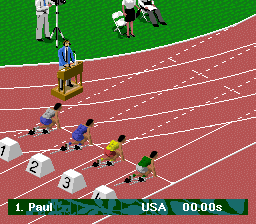
The visuals in Olympic Summer Games are typical of the SNES era: pixel art that’s bright, colorful, and easy to recognize. Each event features simple animations that clearly show what’s happening, even if they aren’t highly detailed. The focus is on clarity and speed, making it easy for newcomers to pick up and play without much fuss.
Progression comes from improving your previous attempts and performing well across multiple events. Replay value comes from trying to beat your personal best or competing against friends in quick succession. The variety of events keeps gameplay interesting, and simple, responsive controls encourage practice to master timing for each discipline. Overall, Olympic Summer Games rewards persistence and skill, even in short bursts.
Strategy and Tips
Getting the hang of Olympic Summer Games can be helped by a little planning. Focus on mastering the timing for each event’s mechanics, as accuracy can really impact your scores. Practice each event to get a feel for the rhythm needed, especially for timing button presses.
- Start with the event you find easiest to build confidence before trying harder disciplines.
- Pay attention to the visual cues on the screen that tell you when to press; those cues stay consistent across attempts.
- Don’t rush your button presses—timing usually matters more than speed for high scores.
- Use short breaks between events to reset and prepare for the next challenge.
- If you’re in a tournament, aim for consistency rather than perfecting every single attempt.
Quick Questions
How do I get started with Olympic Summer Games?
Just load the game in your browser, pick an event, and start pressing buttons to compete. It’s easy for newcomers to pick up.
What is a common mistake beginners make?
Trying to press buttons too fast without paying attention to the timing cues. Focusing on rhythm rather than speed tends to give better results.
Can I play Olympic Summer Games on mobile or touch devices?
Since it runs in your browser, it should work on mobile browsers with touch controls, but how well depends on your device.
Olympic Summer Games offers a simple, nostalgic sports experience that’s perfect for quick gaming sessions. It’s a fun way to test your timing skills and enjoy some classic SNES-style competition right in your browser.
Related games: you can also try Ghost Chaser Densei (Japan) and Bounty Sword (Japan), or browse all other games in the SNES category.
How to Play Olympic Summer Games (Europe)?
Choose an event, press buttons rapidly or at the right time to improve your score or beat opponents. Play multiple events to earn points and try to beat your best performances.
Game Controls
Keyboard controls mimic a game controller, with buttons for actions and arrow keys for movement.








Comments (0)
No comments yet. Be the first to comment!