Ongaku Tsukuru Kanaderu (Japan)
0 1 0
Ongaku Tsukuru Kanaderu (Japan) is a classic SNES game that provides a simple way to create music. It allows players to arrange musical segments to make tunes, appealing to those who enjoy auditory creativity without complicated rules. If you like straightforward gameplay combined with a nostalgic SNES look, Ongaku Tsukuru Kanaderu offers a relaxed entry into musical game design.
Getting Into Ongaku Tsukuru Kanaderu
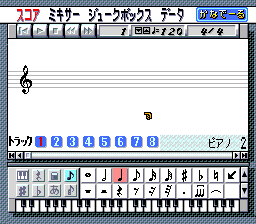
In Ongaku Tsukuru Kanaderu, the main idea is selecting and arranging musical patterns to form melodies. The game has a grid-based interface where each row corresponds to a different instrument or sound. You can place clips in various spots, changing the rhythm and harmony of your piece. Once set, the game plays back your sequence, letting you make quick adjustments and experiment with different ideas.
The game doesn’t have complex modes or storylines. Instead, a typical session involves choosing sounds, arranging them into a pattern, and listening to what you’ve made. There’s no timer putting pressure on you; you can take your time to tweak your music. This makes Ongaku Tsukuru Kanaderu good for casual play and for those new to music arrangement who don’t want to worry about technical details.
Standout Features
The visuals are simple and colorful, typical of the SNES style, with a clean grid layout that shows available sounds and where they’re placed. The interface is easy to understand, with little clutter, so new players can quickly get the hang of how to work with the musical patterns. The charm of the game lies in its straightforward design, which highlights creativity rather than flashy visuals.
Progress mainly comes from experimenting. You can build your musical ideas by layering sounds and adjusting their positions until you’re happy with the result. The game’s replay value comes from trying different arrangements or creating multiple tunes, which you can save and come back to if the game supports that. Since it doesn’t have complicated mechanics, you can jump right in and enjoy short, repeated sessions.
Strategy and Tips
Starting out is easy: try experimenting with a few sounds and listen closely to how they blend. Don’t be afraid to try unusual arrangements; sometimes, unexpected combinations turn out the best.
- Begin with a small number of sounds to keep things simple, then add more layers as you go.
- Use the playback feature often to compare different setups and see what sounds best.
- If possible, save your favorite arrangements so you can revisit and improve them later.
- Pay attention to rhythm and harmony, even in basic forms, to keep your tunes sounding cohesive.
- Try different instrument placements to find new musical ideas and textures.
Quick Questions
How do I start if I’ve never played a music game before?
Pick a few sounds and place them randomly; listen and tweak until you find a pattern you like. The interface is simple enough that exploring is the best way to learn.
What’s a common mistake beginners make?
Trying to make complex arrangements right away can be overwhelming. Start small with simple loops and build up gradually.
Can I play Ongaku Tsukuru Kanaderu on mobile or touch devices?
This version runs in your browser on the site, optimized for desktop. It doesn’t support touch controls, but you can play it on a mobile browser using a mouse or touchpad.
Ongaku Tsukuru Kanaderu gives a straightforward way to arrange music based on SNES-style design. Its focus on simplicity and creativity makes it accessible and fun for players of all levels, great for quick creative sessions or casual sound experiments. Playing in your browser makes it easy and quick to try out music ideas without needing downloads or installations.
Related games: you can also try Final Fantasy – Mystic Quest (USA) and Chou Makai Taisen! Dorabot-chan (Japan), or browse all other games in the SNES category.
How to Play Ongaku Tsukuru Kanaderu (Japan)?
Select and arrange musical clips on the grid to create melodies. Play back your pattern, tweak sounds, and experiment freely without time pressure.
Game Controls
Arrow keys move the cursor; Enter or space select and place sounds; other keys confirm or cancel actions.








Comments (0)
No comments yet. Be the first to comment!