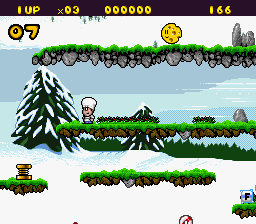
Out to Lunch (USA)
0 4 0
Out to Lunch (USA) is a charming SNES classic that combines action and platforming in a straightforward, accessible package. Its simple mechanics and playful design make it easy for new players to jump right in, yet it offers enough challenge to keep more experienced gamers engaged. Perfect for quick sessions or a casual playthrough, this game’s nostalgic appeal and easy-to-understand gameplay make it a welcome addition to any browser-based retro collection.
What Is Out to Lunch?
Out to Lunch is a platformer that tasks players with navigating a series of levels filled with obstacles, enemies, and timing-based challenges. Its core gameplay revolves around movement, jumping, and avoiding hazards, with a focus on quick reflexes and pattern recognition. The game’s design emphasizes clear objectives and tight controls, making it approachable for players of all ages and skill levels.
As a classic SNES game, Out to Lunch offers a straightforward experience rooted in early 90s action platformers. Players move through stages that test their timing and precision, aiming to reach the end without losing all their lives. Its emphasis on timing and platforming mechanics creates a gameplay rhythm that’s easy to learn but difficult to master, encouraging repeated attempts to improve your score and speedrun skills.
What Keeps You Coming Back
One of the game’s strongest points is its charming, colorful visuals that evoke nostalgia for SNES-era design while remaining fresh in a browser environment. The levels are short but packed with small secrets and clever enemy placements, rewarding players who explore thoroughly. The game’s simple mechanics combined with increasing difficulty keep players coming back to beat their best times or discover hidden paths.
Replayability also comes from its scoring system and level design. Each run feels different based on how you handle enemies and obstacles, and mastering the timing to leap over hazards adds a satisfying layer of skill-based challenge. Since it’s easy to pick up and play, players often find themselves returning for quick bursts of fun or to improve their personal bests, making Out to Lunch a surprisingly addictive experience for a browser game.
Handy Tips
Getting a good start can make a big difference in Out to Lunch. Here are some helpful pointers:
- Practice your timing for jumping and avoiding enemies to minimize mistakes.
- Pay attention to enemy patterns; most follow predictable paths you can memorize.
- Use small, controlled jumps to navigate tight spaces and avoid falling.
- Collect any available power-ups or bonus items to extend your playtime and score.
- Take breaks if you get frustrated; the game’s short levels are perfect for quick retries.
Player FAQ
Is Out to Lunch easy enough for kids or beginners?
Yes, Out to Lunch has simple controls and a gentle difficulty curve, making it suitable for younger players and newcomers to platformers.
Can I play Out to Lunch offline or does it need an internet connection?
This browser emulation of Out to Lunch runs instantly and locally in your browser, so no internet connection is needed after the page loads.
How long does a typical game session last?
Levels are short, so you can complete a run in just a few minutes, making it perfect for quick gaming sessions or practice runs.
Playing Out to Lunch on this site provides easy access to a fun, approachable SNES game that’s great for casual play. Its lighthearted action and platforming make it perfect for a quick break or a nostalgic trip back to the early 90s, all without needing to install anything. Just load it up and enjoy a slice of classic gaming right in your browser.
Related games: you can also try Darius Twin (Europe) and Darius Twin (Japan), or browse all other games in the SNES category.
How to Play Out to Lunch (USA)?
Navigate through levels by running, jumping, and avoiding enemies and hazards to reach the end as quickly as possible. Practice timing and pattern recognition to improve your score and complete levels faster.
Game Controls
Arrow keys control movement; jump and action buttons are mapped to specific keys.








Comments (0)
No comments yet. Be the first to comment!