Outer World (Japan)
0 1 0
Outer World (Japan) is a classic SNES game that takes players into a vibrant pixel-art universe filled with adventure and obstacles. Its nostalgic appeal combines with engaging platformer and action mechanics, giving a feel for gaming styles from the early 90s. As a browser-based emulator, it offers quick access without downloads or setup, so you can enjoy this vintage experience whenever the mood strikes.
Step Into the World of Outer World
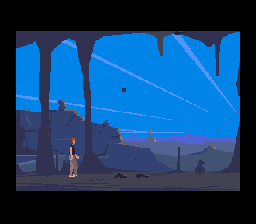
The visuals evoke the pixel-rich look typical of the SNES era, with colorful environments and character sprites standing out against detailed backgrounds. The setting blends fantasy with sci-fi elements, creating a world that feels like stepping into a living painting. The soundtrack complements this atmosphere with chiptune melodies that change dynamically as you move through different zones, adding to the sense of adventure. Though story details are sparse, the game hints at a mysterious universe full of secrets and subtle challenges.
Playing in your browser, the game captures the feeling of a vintage SNES cartridge, with responsive controls and crisp visuals that run smoothly. Its straightforward design lets players focus on navigating the environment, solving puzzles, and fighting enemies without distractions. The sound design and pixel art work together to make each session feel like flipping through a well-loved game from a past era, all instantly accessible through the emulator.
How the Gameplay Hooks You
Outer World has a simple yet addictive cycle: explore, fight, and advance through levels that get trickier as you go. The pacing balances tense action with quieter moments of exploration, encouraging you to think fast and adapt. It rewards careful observation and quick reflexes, with each stage presenting new enemies and obstacles that test your platforming and action skills. Progress feels satisfying as you unlock new areas and uncover more of the layered environment.
The game is well-suited for short play sessions, making it great for quick breaks or casual gaming. Its level design allows for easy resumption, so you can pick up where you left off without frustration. Though simple, the progression keeps things fresh with new enemies and hazards, maintaining a steady rhythm of discovery and action.
Pro Tips for Outer World
Getting the most out of the game involves paying attention to environmental clues and enemy behavior. Here are some tips to help you navigate:
- Explore all areas thoroughly; secrets and upgrades are often hidden behind destructible objects or in hidden corners.
- Learn enemy attack patterns to avoid damage more effectively.
- Save health and special items for tougher sections or boss fights.
- Use precise platforming—timing your jumps can prevent unnecessary hits.
- Listen for sound cues, as they often signal threats or important events.
- If you get stuck, revisit earlier sections for missed items or alternative routes.
Frequently Asked Questions
Is Outer World good for quick gaming sessions?
Yes, the level-based design makes it easy to pause and continue later, fitting into short play periods.
Does the game get repetitive after a while?
While it shares core platforming and action elements, the varied levels and enemies help keep things interesting across different stages.
Is the atmosphere more suited for fans of pixel art and retro soundtracks?
Definitely. The pixel visuals and chiptune music create a nostalgic mood that appeals to those who enjoy classic SNES styles.
Outer World offers a genuine taste of retro gaming, with its accessible browser emulation making it simple to experience this atmospheric adventure. If you like platformers, action titles, or exploring vintage worlds, this game provides a focused, engaging challenge wrapped in nostalgic charm.
Related games: you can also try Chrono Trigger 1.01 and Magical Pop'n (Japan), or browse all other games in the SNES category.
How to Play Outer World (Japan)?
Explore levels, defeat enemies, and solve puzzles to advance through the vibrant pixel-art world. Focus on quick reflexes and environmental clues to uncover secrets and progress smoothly.
Game Controls
Arrow keys control movement; action buttons are mapped to keyboard keys.








Comments (0)
No comments yet. Be the first to comment!