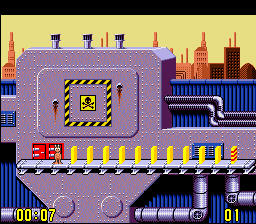
Push-Over (USA) (Beta)
0 1 0
Push-Over (USA) (Beta) is a classic SNES game emulated in the browser on this site, offering a puzzle-platform experience with a focus on physics-based block manipulation. This game appeals to players who enjoy strategic thinking and puzzle-solving with a light platforming twist, all wrapped in a retro package from the SNES era. Its straightforward mechanics and challenging levels make it a good choice for those looking for a game that still offers some mental stimulation.
Getting Into Push-Over
In Push-Over, the main gameplay involves solving puzzles by carefully arranging blocks and objects to navigate the environment and reach the exit. Each level has platforms, switches, and obstacles that require precise timing and planning. You control a character who can push blocks, but only one at a time, so sequencing your moves thoughtfully is key to avoiding dead ends or traps.
The game features a series of stages, each getting a bit trickier than the last. Players typically analyze the layout, experiment with block placement, and push blocks to activate switches or create pathways. There are no time limits, so you can take your time to find the best solution. The physics engine makes every move matter, encouraging you to think ahead before acting.
Standout Features
Visually, Push-Over captures the bright, pixel-art style typical of the SNES, with colorful backgrounds and detailed sprites that keep levels clear and easy to read. The animation is smooth, especially when moving blocks, adding to the satisfying feel of solving puzzles. As you progress, new mechanics and hazards appear, keeping gameplay interesting and engaging.
The progression system unlocks more complex puzzles, rewarding players who develop efficient strategies. Replay value comes from trying to beat levels with fewer moves or exploring different solutions. Since each stage is self-contained, you can play levels in any order, making it easy to enjoy short sessions or longer puzzle marathons. The simple mechanics mean even new players can jump right in without a steep learning curve.
Strategy and Tips
Starting with a plan is the best way to get good at Push-Over. Think about the order of pushes before you make a move, as rushing can block your progress. Pay attention to how blocks interact with switches and other elements.
- Identify problem blocks early on to prevent getting stuck later.
- Try to solve levels with the fewest pushes possible to improve your efficiency.
- If you get stuck, experimenting with different approaches or reversing moves can sometimes reveal new options.
- Using the pause feature or taking breaks can help you analyze tricky puzzles more clearly.
- Remember that some blocks might need multiple pushes to activate switches or clear paths.
Quick Questions
Can I start playing Push-Over immediately in my browser?
Yes, the game runs directly in your browser without needing downloads, so you can jump right into solving puzzles.
What is a common mistake beginners make?
Many push blocks without planning, which can lead to dead ends. Taking a moment to visualize the entire level helps avoid unnecessary moves.
Does Push-Over work well on mobile or touch devices?
The game plays smoothly in the browser, but precise control might be tricky on smaller screens. Using a mouse or keyboard usually provides a better experience.
Push-Over is a neat puzzle challenge from the SNES era, with a simple yet engaging mechanic that keeps players thinking. Its accessible gameplay and charming visuals make it a fun game to try, especially if you enjoy planning your moves through levels.
Related games: you can also try Mortal Kombat 3 (Jul 13, 1995 prototype) and Last Battle, The (Japan), or browse all other games in the SNES category.
How to Play Push-Over (USA) (Beta)?
Move your character to push blocks and activate switches, solving puzzles to reach the exit. Think ahead and plan your moves carefully, as each push affects the puzzle's layout.
Game Controls
Arrow keys control movement; other keys handle pushing blocks and interacting.








Comments (0)
No comments yet. Be the first to comment!