Sangokushi III (Japan) (Rev A)
0 1 0
Sangokushi III (Japan) (Rev A) is a well-loved SNES game that brings the legendary Chinese historical saga to your browser through a faithful emulator. Its simple interface and familiar turn-based strategy mechanics make it easy for newcomers to pick up and start playing quickly. As part of the SNES lineup, it reflects the style of the era—combining strategy and history in a way that fans of the genre will enjoy without any extra setup.
What Is Sangokushi III?
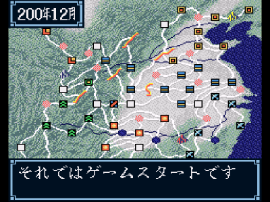
At its heart, Sangokushi III is a turn-based strategy game set during a chaotic period in ancient China, focusing on the rise and fall of warlords fighting for control. Players select a faction and lead armies across various maps, engaging in battles, diplomacy, and resource management. The game puts a strong emphasis on strategic planning and decision-making, making each campaign feel different. Its gameplay involves balancing military expansion with alliances, appealing to those who enjoy tactical thinking.
Its mechanics are simple yet deep enough to be accessible for beginners but still offer enough complexity for experienced strategists. The pacing encourages careful planning, with each move potentially shaping your campaign. Expect a game that rewards patience and strategic foresight, with different scenarios keeping things interesting. This classic provides an engaging way to experience a piece of historical strategy in a format that’s easy to learn but hard to master.
What Keeps You Coming Back
Multiple campaigns and different faction choices give Sangokushi III solid replay value. Each playthrough presents a new challenge, whether you’re aiming for conquest or diplomatic victory. The map and battle systems are simple enough for quick sessions but complex enough to encourage trying different strategies and alliances. Playing around with different approaches keeps the experience fresh.
The game’s historical flavor and straightforward graphics capture the SNES era perfectly. Its strategic depth is complemented by managing armies and forming alliances. This setup encourages players to refine tactics, test new ideas, and learn from past mistakes, making each session feel like a new challenge. The in-browser version makes it easy to jump into a quick battle or a full campaign whenever you’re ready.
Handy Tips
Start by planning your alliances early. Focus on building a strong economy to support your armies. Use diplomacy to prevent overextending your forces and keep enemies in check. Pay attention to terrain during battles—certain land types offer tactical advantages. Don’t forget about city management to keep resources flowing. And if possible, save often so you can try different strategies without losing progress.
Player FAQ
Is Sangokushi III easy for newcomers to pick up?
Yes, the mechanics are straightforward, making it accessible for new players while still offering enough depth for veterans.
Can I play Sangokushi III offline or on mobile devices?
This version runs directly on the browser, so no internet connection or mobile app is needed. It works on any device with a browser.
Is Sangokushi III suitable for younger players?
While it involves strategic warfare, its simple graphics and mechanics make it suitable for older children and teens interested in history or strategy games.
Playing Sangokushi III offers a straightforward but rewarding experience that captures classic strategy gameplay. Its ease of access and historical theme make it a good choice for casual players and strategy fans alike. With simple mechanics and in-browser play, it’s ready whenever you want to test your tactical skills or enjoy a bit of Chinese history in game form.
Related games: you can also try 90 Minutes – European Prime Goal (Europe) (Beta) and Hissatsu Pachinko Collection 2 (Japan), or browse all other games in the SNES category.
How to Play Sangokushi III (Japan) (Rev A)?
Choose a faction, manage armies, form alliances, and plan your moves carefully to conquer China or achieve diplomatic victory in this turn-based strategy game.
Game Controls
Arrow keys move the cursor; Enter selects; other keys perform actions as indicated on-screen.








Comments (0)
No comments yet. Be the first to comment!