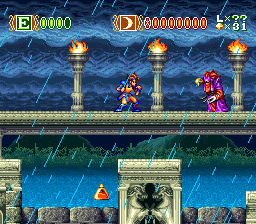
Skyblazer (Europe)
0 1 0
Skyblazer (Europe) is a classic SNES game that fans of action and platformer titles will find engaging. This side-scrolling adventure challenges players with precise jumps, combat, and exploration, all wrapped in a colorful, sprite-based presentation typical of the SNES era. If you enjoy games that combine fast-paced platforming with strategic combat, Skyblazer offers a straightforward yet rewarding experience that runs perfectly in your browser.
Getting Into Skyblazer
In Skyblazer, the core gameplay involves moving through side-scrolling levels filled with enemies, obstacles, and puzzles. You control a hero who must jump, attack, and sometimes use special abilities to defeat foes and advance. The game features a series of stages that test your skills with movement and quick reflexes, making each session a mix of combat and platforming challenges.
Most playthroughs involve selecting a level, learning its layout, and figuring out enemy patterns. The game doesn’t include complex RPG elements or branching storylines; instead, it relies on tight controls and memorization of levels. You might find yourself retrying sections to improve timing or find hidden paths. It’s best played in short bursts, as difficulty gradually increases, rewarding precision and patience over button-mashing.
Standout Features
Visually, Skyblazer captures the SNES’s colorful sprite artistry, with detailed backgrounds and well-animated characters. Each level is distinct, helping you spot hazards and enemies quickly. Its smooth scrolling and vibrant colors keep the gameplay lively without overwhelming the senses. The soundtrack adds energy with upbeat tunes that match the sense of adventure and urgency.
Progression is simple: finishing levels unlocks new stages, each one more challenging. The game encourages replay, as you might discover hidden areas or improve your times. Its level design balances challenge and reward, making it satisfying to hone your skills or explore every corner. Since it runs in-browser, trying out different strategies or revisiting levels is quick and easy, which adds to its replay value.
Strategy and Tips
Start by mastering jump timing and enemy patterns before rushing through levels. Patience helps avoid damage and keeps you ready for tougher sections.
- Practice dodging or countering enemy attacks effectively.
- Explore levels carefully for hidden paths or upgrades that can make later parts easier.
- Use platforming skills to reach high ground or safe spots during fights.
- Watch your health and use items or abilities wisely when available.
- Learn level layouts to reduce mistakes and improve your times.
- If you get stuck, try replaying earlier sections to get more familiar with enemy placements and jump sequences.
Quick Questions
What’s the best way to get started in Skyblazer?
Play through the first level to get comfortable with the controls and enemy behaviors. Practice your jumps and attacks to build confidence.
What’s a common mistake beginners make?
Many rush without paying attention to enemy patterns or miss hidden pathways, which can lead to unnecessary damage or missing secrets.
Can I play Skyblazer comfortably on mobile or touch devices?
Since it runs in-browser, it works on most devices with a browser, but precise controls might be tricky on touch screens. Using a keyboard or controller can improve the experience.
Skyblazer provides a solid action-platformer experience that’s easy to pick up but still offers enough challenge to keep you coming back. Its simple mechanics and engaging design make it a good choice for browser-based gaming, especially if you enjoy classic SNES titles.
Related games: you can also try Magical Quest Starring Mickey Mouse, The (Germany) (Rev A) and Lufia (Germany), or browse all other games in the SNES category.
How to Play Skyblazer (Europe)?
Move through side-scrolling levels, jumping and attacking enemies to progress. Learn enemy patterns and master platforming to complete stages and unlock new levels.
Game Controls
Arrow keys control movement; action buttons are mapped to keyboard keys for jumping and attacking.








Comments (0)
No comments yet. Be the first to comment!