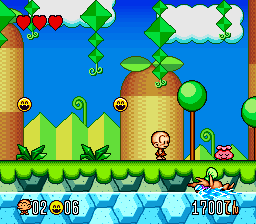
Super Genjin 2 (Japan)
0 1 0
Super Genjin 2 (Japan) is a classic SNES platformer that brings the energetic and colorful world of the original to a new level. Designed for players who enjoy nostalgic side-scrolling adventures, this game features the same charming pixel art and lively gameplay that made it popular during the SNES era. Its straightforward mechanics and bright visuals make it a great choice for both seasoned gamers and newcomers exploring retro titles in their browser.
Getting Into Super Genjin 2
The main gameplay of Super Genjin 2 involves guiding a small, energetic character through various levels filled with platforms, enemies, and obstacles. Precision jumps, timing, and quick reflexes are key as you move through each stage. It’s a classic side-scrolling platformer where you start at the beginning of each level and try to reach the end, often collecting items or defeating enemies along the way.
A typical session involves exploring each stage, avoiding hazards, and overcoming enemies using simple controls. The game doesn’t have complex mechanics or multiple modes; instead, it offers a straightforward experience with progression from one level to the next. The levels get tougher as you go, requiring good timing and strategic movement to succeed. Since it runs directly in your browser, you can jump right into the action without any setup, making it perfect for quick gaming sessions or casual play.
Standout Features
Super Genjin 2 stands out with its bright, colorful pixel art that captures the lively feel of the SNES era. The visuals are crisp and animated well, giving each stage a unique character that keeps the gameplay visually interesting. Its progression system is simple but satisfying, with players moving through increasingly challenging levels while keeping the fun, arcade-style vibe.
Replay value comes from the game’s tight controls and the challenge of perfecting runs or aiming for high scores. The straightforward design encourages players to improve timing, discover secrets, or just enjoy a quick round of platforming. The level layouts are made to encourage mastery, and the cheerful aesthetic appeals to fans of nostalgic platformers from the SNES period.
Strategy and Tips
If you’re new to Super Genjin 2, focus on getting the timing right for your jumps and attacks. Patience often beats rushing, especially in tricky sections. Here are some practical tips to help you along:
- Practice your jumps to avoid falling or hitting enemies unexpectedly.
- Look for safe spots to pause and think about your next move during difficult parts.
- Learn enemy patterns; rushing can lead to mistakes.
- Gather items or power-ups you find — they can make parts of the game easier.
- Replaying levels to improve your score or find hidden secrets can be rewarding.
- Be patient; some stages take multiple attempts to master the layout and timing.
Quick Questions
Is Super Genjin 2 easy for beginners?
It’s a simple platformer overall, but some levels can be tough until you learn enemy behaviors and level design.
How long does a typical game session last?
Most levels only take a few minutes, making it great for short, casual gaming moments.
Can I play Super Genjin 2 on a mobile device?
Yes, since it runs in your browser, it works on mobile and touch devices, though controls might not be as precise as on a keyboard or controller.
Super Genjin 2 offers a compact but fun platforming experience that captures the spirit of classic SNES games. Its colorful visuals and simple controls make it perfect for quick nostalgic hits or casual gaming in your browser. Jump in whenever you want a lively, retro adventure.
Related games: you can also try Cal Ripken Jr. Baseball (Europe) and Mechwarrior (Europe), or browse all other games in the SNES category.
How to Play Super Genjin 2 (Japan)?
Guide your character through levels by jumping over obstacles and defeating enemies, aiming to reach the end of each stage while collecting items and avoiding hazards.
Game Controls
Arrow keys for movement; specific keys for jumping and attacking, depending on the emulator setup.








Comments (0)
No comments yet. Be the first to comment!