Super Jinsei Game 3 (Japan)
0 1 0
Super Jinsei Game 3 (Japan) is a classic SNES game that captures the feel of a life simulation board game from the era of 16-bit consoles. Designed for players who enjoy strategic decisions combined with some randomness, this game offers a nostalgic experience rooted in the SNES’s rich library. As a Japanese release, it may feature Japanese text, so players unfamiliar with the language should be aware before playing.
Getting Into Super Jinsei Game 3
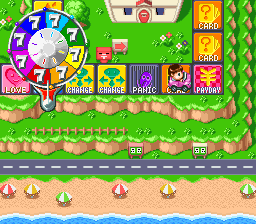
This game is about guiding a character through different stages of life, making choices that affect their career, finances, relationships, and happiness. The gameplay involves rolling dice to move across a virtual board, landing on spaces that trigger events or decisions. Each turn flows into the next, with players managing resources and responding to unexpected situations. It’s not about fast-paced action but about planning and adapting to different circumstances.
Typically, players start with a set amount of money and a basic character profile. As they play, they encounter opportunities for education, jobs, or personal growth, along with setbacks like financial losses or health issues. The pacing allows for quick sessions or longer ones, making it flexible whether you have a few minutes or want to spend more time shaping your character’s life.
Standout Features
The visuals reflect the SNES’s pixel art style, with colorful sprites and backgrounds that evoke nostalgia. While simple compared to modern graphics, they effectively communicate the game’s events and status indicators, keeping things clear without clutter. The game marks significant milestones like marriage, career changes, or retirement, which help tell the story of your character’s life.
Replay value comes from the many different paths a single life can take, depending on your choices. Strategies like prioritizing wealth or happiness offer fresh experiences each time, encouraging experimentation. The straightforward mechanics and branching scenarios make it appealing for casual players who enjoy meaningful simulation experiences.
Strategy and Tips
Having a flexible plan can help guide your character to a satisfying life. Here are some tips:
- Balance earning opportunities with personal well-being to avoid setbacks.
- Focus on key milestones like education or career early on for better long-term outcomes.
- Pay attention to events triggered by landing on certain spaces, as they often affect your resources.
- Save resources for unexpected setbacks instead of over-investing in upgrades or luxuries.
- Try different decision styles to see which routes lead to your preferred ending.
- If possible, use cautious dice rolls, especially on high-risk spaces that could cause problems.
Quick Questions
Is Super Jinsei Game 3 easy for beginners?
Yes, its simple mechanics and straightforward flow make it easy for new players to pick up, especially after some initial trial and error.
What is the typical length of a session?
A game usually takes between 10 and 30 minutes, depending on how many decisions you make and how many different paths you explore.
Can I play this game on a mobile device or touchscreen?
The game runs directly in your browser. It’s optimized for desktop, but you can play on mobile browsers too, though controls might be less precise without a keyboard.
Super Jinsei Game 3 offers a nostalgic simulation experience on the SNES platform that you can access through this browser version. Its mix of decision-making, resource management, and replayability makes it a good choice for fans of classic life sims and strategy games alike.
Related games: you can also try Battle Clash (Europe) and Radiation's Halloween Hack: Bad Fur Day Edition, or browse all other games in the SNES category.
How to Play Super Jinsei Game 3 (Japan)?
Roll the dice to move around the board, make choices about jobs, money, and relationships, and try to guide your character through a successful life. Manage resources and respond to events to reach your goals.
Game Controls
Arrow keys act as the D-pad; Enter is Start; on-screen mapped keys handle the action buttons.








Comments (0)
No comments yet. Be the first to comment!