Tom & Jerry (USA)
0 8 0
Tom & Jerry (USA) is a classic SNES game that brings the mischievous antics of the famous cartoon duo to your browser. Originally released for the Super Nintendo Entertainment System, this action game appeals to fans of retro platformers and cartoon-style chaos. Whether you’re feeling nostalgic for the 16-bit era or just curious about the franchise, this game offers straightforward gameplay filled with humorous moments and quick sessions.
Getting Into Tom & Jerry
The game focuses on simple but engaging action where players control either Tom or Jerry through a series of levels packed with obstacles and enemies. The main idea is to move around the environment, avoid hazards, and complete objectives in each stage—like catching or escaping from the other character. Levels are designed for quick play, so you can jump in for a few minutes or try to beat your high score.
Most of the gameplay involves moving across screens, dodging or trapping the other character, and using some limited tactics or items to gain an edge. Since it’s based on a classic SNES action style, expect timing challenges, simple controls, and quick reflexes. There aren’t complex modes; it’s mainly about progressing through levels or trying to beat your best time or score, making it easy to pick up for players of all skill levels.
Standout Features
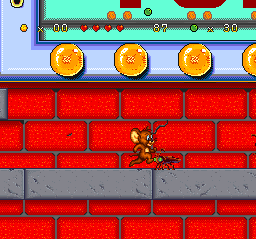
The visuals capture the cartoon style of the original Tom & Jerry cartoons, with bright, colorful sprites that reflect the playful chaos of the shows. The animations are smooth, emphasizing the slapstick humor fans will recognize. The level design is straightforward, but each stage offers enough variety to keep things interesting across sessions.
Progression depends on completing levels, with difficulty increasing as you go further. While there isn’t a deep story, the replay value comes from trying to beat your best times, score higher, or improve your performance in each stage. Because it’s browser-based, the game runs instantly and can be played repeatedly without any installation, making it easy to pick up and put down whenever you like.
Strategy and Tips
Getting started is simple—pick your character and focus on understanding the basics of movement and timing. The game rewards quick reflexes and paying attention to your opponent’s patterns.
- Keep an eye on your opponent’s movements to predict their next move and plan your actions.
- Use the environment to your advantage, like hiding behind obstacles or trapping the other character.
- Practice timing your jumps and movements to avoid hazards and set up successful captures or escapes.
- Don’t rush; patience often leads to better positioning and higher scores.
- If you get stuck on a level, try a different approach or work on improving your reaction time.
Quick Questions
How do I start playing Tom & Jerry?
You just need to load the game on this page, and it begins immediately in your browser. No downloads or setups required.
What’s a common mistake for beginners?
Trying to rush through levels without paying attention to your opponent’s patterns often leads to mistakes. Patience and watching carefully can help you improve.
Can I play this on a mobile device or touchscreen?
Yes, since it runs in your browser, you can play on mobile devices with touch controls. The gameplay might feel a bit different than with a keyboard or gamepad, but it works.
The SNES classic Tom & Jerry offers quick, fun action that captures the humor of the cartoons. Its simple controls and short levels make it perfect for casual gaming, and its nostalgic charm appeals to fans of retro platformers. Playing this game gives a taste of the SNES era’s playful design, all accessible directly in your browser.
Related games: you can also try Fun 'n Games (Europe) and SimAnt (USA), or browse all other games in the SNES category.
How to Play Tom & Jerry (USA)?
Control Tom or Jerry to avoid hazards, trap your opponent, and complete levels quickly. Focus on timing, movement, and using the environment to outsmart your opponent in short, fast-paced sessions.
Game Controls
Arrow keys for movement; action buttons mapped to keyboard keys.








Comments (0)
No comments yet. Be the first to comment!