Toys (Europe)
0 1 0
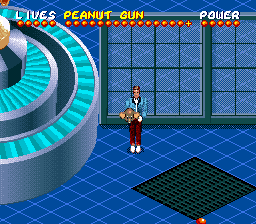
Toys (Europe) is a classic SNES game that offers a straightforward action experience set in a charming, toy-themed world. Designed for fans of old-school platformers and arcade-style gameplay, it provides a simple yet engaging challenge that’s easy to pick up and enjoy. If you like colorful visuals and classic mechanics, this game can add some fun to your retro gaming collection right in your browser.
Getting Into Toys
The main gameplay involves moving through levels filled with obstacles, enemies, and collectibles. You control a character that navigates various environments, each with a playful toy aesthetic. The game calls for quick reflexes and good timing—you’ll be jumping, dodging, and sometimes attacking to progress. Levels are usually short but tough enough to keep you coming back, whether for quick sessions or longer playtimes.
There’s no complicated story or multiple characters—just pure action. Levels tend to be linear, so you’ll probably memorize enemy locations and timing to get through more smoothly. The mechanics are simple, with tight controls and a steady difficulty curve that keeps gameplay interesting. Expect to retry sections as you improve your skills and aim for higher scores or faster finishes.
Standout Features
Toys captures the lively, colorful spirit of toy worlds with bright backgrounds and clear character sprites. The pixel art is crisp and appealing, fitting the era nicely while remaining easy to read during hectic moments. Progressing through the game means completing levels that gradually get harder, testing your reflexes and timing as you go.
Replay value comes from trying to beat your high scores or improve your times. The short levels lend themselves well to quick bursts of play, and mastering jump and attack timing adds some skill-based fun. As a classic SNES action game, Toys doesn’t rely heavily on unlockables or hidden content but rewards practice and good memory for better performance.
Strategy and Tips
When starting out, focus on learning enemy patterns and timing your jumps carefully. Patience pays off, especially in later levels with faster-moving obstacles. Rushing often leads to mistakes, so take your time to plan your moves whenever possible.
- Practice each level to memorize enemy positions and reactions, reducing unnecessary hits.
- Try to collect points or items scattered through levels, as they can boost your score or unlock bonuses.
- Keep an eye on your character’s movement speed and jump timing to avoid falling or running into enemies.
- Use the pause feature if available to think about your next move or take a break during tough sections.
- If you get stuck, replay earlier levels to sharpen your skills and reaction times.
Quick Questions
How do I get started with Toys?
The game loads instantly in your browser—just press start and begin navigating the levels. No setup needed, so you can jump right in.
What’s a common mistake beginners make?
Many players rush through levels without paying attention to enemy patterns, which often results in unnecessary hits and retries. Taking your time and observing enemy behavior can help you succeed more easily.
Can I play Toys on mobile or touch devices?
The game works in browsers on desktops, and it should run on mobile browsers with touch controls. However, using a keyboard might give better precision, as it was originally designed for the console.
Playing Toys highlights simple, action-packed gameplay with a toy-themed twist. Its straightforward approach makes it accessible for players of all ages, and short sessions make it easy to enjoy a quick burst of fun. It’s a nice piece of SNES history you can enjoy right in your browser.
Related games: you can also try Last Bible III (English v7) and Epic Tio Kart, or browse all other games in the SNES category.
How to Play Toys (Europe)?
Move through levels by jumping and attacking to avoid obstacles and enemies, collecting items, and reaching the end as quickly as possible. Practice timing and memorizing enemy patterns to improve your score.
Game Controls
Arrow keys act as the D-pad; Enter is Start; on-screen mapped keys handle the action buttons.








Comments (0)
No comments yet. Be the first to comment!