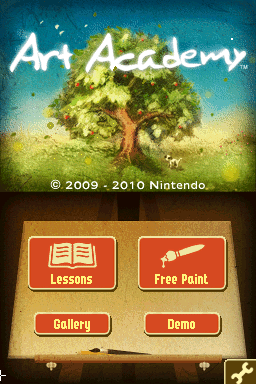
Art Academy (Europe) (En,Fr,De,Es,It) (NDSi Enhanced)
0 3 0
Art Academy (Europe) (En,Fr,De,Es,It) (NDSi Enhanced) is a classic Nintendo DS title that combines drawing tutorials with interactive gameplay. As part of the educational and creative genre, it offers players a way to learn and practice various art techniques through lessons and exercises. Originally made for the Nintendo DS, this game uses the device’s dual screens and stylus to make drawing straightforward and intuitive, making it appealing to both aspiring artists and casual players interested in digital art. Now you can play it directly in your browser, keeping the experience of the original handheld without needing hardware or downloads.
Art Academy (Europe): Gameplay Overview
The main gameplay involves completing a series of art lessons that introduce different techniques, tools, and styles gradually. Players use the touchscreen to mimic real drawing and coloring, starting with simple shapes and shading exercises and moving on to more complex compositions. Guided tutorials show techniques step-by-step, with virtual instructors demonstrating methods that players try to replicate to improve their skills. As you progress, the exercises get more challenging, encouraging precision and understanding of artistic basics like light, shadow, perspective, and color blending.
Throughout the game, there are various brushes, pencils, and coloring tools to choose from via simple menus. The stylus allows for detailed control, simulating real drawing actions, while the dual-screen setup shows a reference image on top and a drawing canvas below. This setup supports practicing and repeating techniques, making it suitable for beginners and intermediate artists. The gameplay involves completing lessons, receiving feedback, and then applying what you’ve learned in free-draw modes or mini-projects, blending structured learning with creative freedom.
Modes, Levels and Progression
Art Academy (Europe) organizes lessons into thematic chapters, each focusing on different art skills—from sketching and shading to coloring and digital effects. The progression guides players through increasingly complex tasks, ensuring foundational skills are mastered along the way. You can revisit lessons or try different styles and mediums to deepen your understanding.
Besides the main lessons, there are free-draw modes and mini-challenges that encourage experimentation and personal expression. These options add variety and help prevent the experience from feeling repetitive. They also offer chances to apply skills in open-ended projects. As you complete lessons, you unlock new tools and color palettes, expanding your creative options.
Winning Strategies
Pay attention to detail and accuracy during lessons to move forward more smoothly. Use reference images carefully and try to replicate strokes as closely as possible. Take your time—rushing can cause mistakes that slow your progress.
- Try different brushes and colors to see what works best for each technique—this helps you understand digital art tools better.
- If you’re struggling with advanced exercises, go back to earlier lessons—getting the basics right makes complex tasks easier.
- Use the undo feature often to correct mistakes and learn from them without frustration.
- Practice in free-draw mode regularly to develop your own style and reinforce techniques learned during lessons.
- Pay attention to feedback after each lesson to spot areas where you can improve and sharpen your skills.
Common Questions About Art Academy (Europe)
How does the difficulty change as you progress?
The game introduces more complex techniques and projects gradually, starting with simple shapes and shading before moving to detailed compositions. This helps players build skills step-by-step, making the difficulty manageable yet engaging for different skill levels.
What modes or levels are included?
There are structured lessons grouped into thematic chapters, along with free-draw and mini-challenge modes. This variety keeps things interesting and encourages creative exploration beyond the main instructions.
How much replay value is there?
Revisiting lessons for mastery, trying different tools, or creating original artwork in free-draw mode can keep the game engaging over time. Its layered approach to learning and creativity supports repeated play and skill development, whether for casual practice or serious art projects.
This version of art academy (europe) offers a structured yet adaptable way to explore digital art, suitable for beginners and intermediate artists alike. You can experience it directly in your browser, giving a good sense of the Nintendo DS’s creative potential.
Related games: you can also try 007 – Quantum of Solace (USA) (En,Fr) and Apollo Justice – Ace Attorney (Europe) (Es,It), or browse all other games in the Nintendo DS category.
How to Play Art Academy (Europe) (En,Fr,De,Es,It) (NDSi Enhanced)?
Complete drawing lessons by using your mouse or stylus to follow tutorials, practice techniques, and create artwork. Progress through increasingly challenging tasks to improve your art skills and explore free drawing modes.
Game Controls
Arrow keys act as the D-pad; Enter is Start; on-screen mapped keys handle the action buttons.
You may be interested in:
-
 Nintendo DS
♥ 1
Casper’s Scare School – Classroom Capers (USA)
Nintendo DS
♥ 1
Casper’s Scare School – Classroom Capers (USA) -
 Nintendo DS
♥ 1
Zunou Nouryoku Koujou Machine – Touch de Zunoo DS (Japan)
Nintendo DS
♥ 1
Zunou Nouryoku Koujou Machine – Touch de Zunoo DS (Japan) -
 Nintendo DS
♥ 1
Zunou ni Asekaku Game Series! Vol. 1 – Cool 104 Joker & Setline (Japan)
Nintendo DS
♥ 1
Zunou ni Asekaku Game Series! Vol. 1 – Cool 104 Joker & Setline (Japan) -
 Nintendo DS
♥ 9
Zuma’s Revenge (USA)
Nintendo DS
♥ 9
Zuma’s Revenge (USA) -
 Nintendo DS
♥ 1
Zubo (USA) (En,Fr,Es)
Nintendo DS
♥ 1
Zubo (USA) (En,Fr,Es) -
 Nintendo DS
♥ 1
Zubo (Europe) (En,Fr,De,Es,It,Nl,Sv)
Nintendo DS
♥ 1
Zubo (Europe) (En,Fr,De,Es,It,Nl,Sv) -
 Nintendo DS
♥ 1
Zorro – Quest for Justice (USA) (En,Fr,De,Es,It)
Nintendo DS
♥ 1
Zorro – Quest for Justice (USA) (En,Fr,De,Es,It) -
 Nintendo DS
♥ 1
Zorro – Quest for Justice (Europe) (En,Fr,De,Es,It)
Nintendo DS
♥ 1
Zorro – Quest for Justice (Europe) (En,Fr,De,Es,It)
Comments (0)
No comments yet. Be the first to comment!