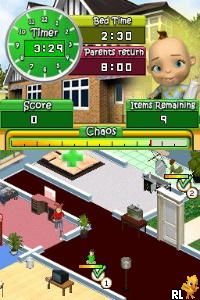
Babysitting Mania (Europe) (En,Fr,De,Es,It,Nl)
0 1 0
Babysitting Mania (Europe) (En,Fr,De,Es,It,Nl) is a straightforward Nintendo DS game that captures the busy, sometimes chaotic world of babysitting with simple, accessible gameplay. It’s easy to start playing and works directly in your browser—no downloads needed. This makes it a good choice for anyone looking for a lighthearted challenge on their browser, regardless of age.
What Is Babysitting Mania?
The game fits into the simulation and time-management categories. Your main task is to keep kids happy and safe by completing various chores within a set time. You’ll find yourself multitasking—feeding children, playing with them, tidying up, and calming tantrums—all requiring quick decisions and good timing. The pace stays steady but can pick up as more kids arrive or tasks get trickier, challenging your ability to stay organized under pressure.
Babysitting Mania offers a casual experience that focuses on fast reflexes and task management. The goals are simple: finish each child’s needs before the clock runs out. Its colorful, child-friendly visuals add to its approachable feel. While the mechanics are straightforward, the real challenge is managing multiple kids at once, making each round engaging and rewarding as you get better at babysitting.
What Keeps You Coming Back
One of the game’s strengths is how quick and bite-sized the sessions are. You can jump into a babysitting shift, wrap it up, and start fresh with a new approach. That makes it easy to play during short breaks or when you want a relaxing distraction. The variety of tasks—feeding, entertaining, cleaning—means no two rounds are exactly the same, which keeps things interesting.
There’s also a scoring system that rewards efficiency and multitasking, encouraging you to refine your strategies. As you improve, you might find new ways to handle tasks faster, keeping the game challenging without feeling frustrating. Its simple controls make it easy for younger players, but the increasing difficulty offers enough of a challenge to keep more experienced players coming back for higher scores.
Handy Tips
If you want to get better at babysitting or just have more fun, here are some quick tips:
- Focus on tasks that take longer or are more urgent to avoid running out of time.
- Keep an eye on all the children, not just the one you’re currently attending to, so you can switch tasks smoothly.
- If available, use shortcuts or quick gestures to speed up common actions like feeding or cleaning.
- Try to combine tasks or do them at the same time to save time.
- Stay calm and don’t panic if things get hectic; quick decisions make a difference.
Player FAQ
Is Babysitting Mania suitable for younger players?
Yes, it’s designed with simple controls and clear objectives that are easy to understand, making it accessible for kids.
Can I play Babysitting Mania offline?
Since it runs directly in your browser, it doesn’t need an internet connection after it loads. Perfect for quick sessions wherever you are, without extra downloads.
Is Babysitting Mania good for players who don’t speak English?
With options available in multiple languages (En,Fr,De,Es,It,Nl), it’s easy to play for speakers of those languages. The gameplay remains clear regardless of language barriers.
Babysitting Mania is a simple, fun simulation game that’s easy to get into. Its quick rounds and growing difficulty make it a satisfying choice for casual gaming, whether you’re nostalgic or trying it out for the first time. Playing online means you can enjoy this classic from the Nintendo DS anytime, right in your browser.
Related games: you can also try Active Health with Carol Vorderman (Europe) and 007 – Blood Stone (Germany), or browse all other games in the Nintendo DS category.
How to Play Babysitting Mania (Europe) (En,Fr,De,Es,It,Nl)?
Manage multiple children by completing tasks like feeding, playing, and cleaning before time runs out. Keep kids happy and organized, switching quickly between chores to earn high scores.
Game Controls
Arrow keys move; Enter or spacebar confirm actions; use shortcuts for faster task completion.
You may be interested in:
-
 Nintendo DS
♥ 1
Casper’s Scare School – Classroom Capers (USA)
Nintendo DS
♥ 1
Casper’s Scare School – Classroom Capers (USA) -
 Nintendo DS
♥ 1
Zunou Nouryoku Koujou Machine – Touch de Zunoo DS (Japan)
Nintendo DS
♥ 1
Zunou Nouryoku Koujou Machine – Touch de Zunoo DS (Japan) -
 Nintendo DS
♥ 1
Zunou ni Asekaku Game Series! Vol. 1 – Cool 104 Joker & Setline (Japan)
Nintendo DS
♥ 1
Zunou ni Asekaku Game Series! Vol. 1 – Cool 104 Joker & Setline (Japan) -
 Nintendo DS
♥ 9
Zuma’s Revenge (USA)
Nintendo DS
♥ 9
Zuma’s Revenge (USA) -
 Nintendo DS
♥ 1
Zubo (USA) (En,Fr,Es)
Nintendo DS
♥ 1
Zubo (USA) (En,Fr,Es) -
 Nintendo DS
♥ 1
Zubo (Europe) (En,Fr,De,Es,It,Nl,Sv)
Nintendo DS
♥ 1
Zubo (Europe) (En,Fr,De,Es,It,Nl,Sv) -
 Nintendo DS
♥ 1
Zorro – Quest for Justice (USA) (En,Fr,De,Es,It)
Nintendo DS
♥ 1
Zorro – Quest for Justice (USA) (En,Fr,De,Es,It) -
 Nintendo DS
♥ 1
Zorro – Quest for Justice (Europe) (En,Fr,De,Es,It)
Nintendo DS
♥ 1
Zorro – Quest for Justice (Europe) (En,Fr,De,Es,It)
Comments (0)
No comments yet. Be the first to comment!