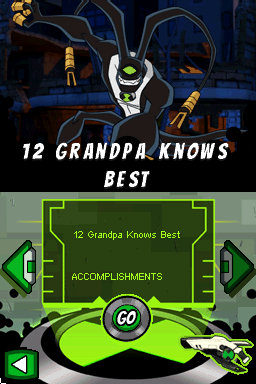
Ben 10 – Omniverse (USA) (En,Fr,Es)
0 63 8
“Ben 10 – Omniverse (USA) (En,Fr,Es)” is a classic Nintendo DS game that takes players into a world filled with adventure, alien encounters, and fast-paced action. This handheld title captures the essence of the animated series, providing a compact experience that fans and newcomers alike can enjoy. Its pixel art style and simple mechanics reflect the focus on accessible gameplay, making it a good choice for those who enjoy nostalgic gaming through a modern browser emulator.
Step Into the World of Ben 10 – Omniverse
The game puts players in a universe where Ben Tennyson uses the Omnitrix to transform into different alien forms to battle enemies and solve puzzles. The visuals match the cartoon’s bright colors, with clear sprite work and lively animations that stay true to the show’s style. Sound includes familiar voice clips and an energetic soundtrack that heightens the feeling of action. The mood balances fun with moments of tension, staying true to the show’s mix of humor and heroism.
Designed for the Nintendo DS, this game is portable and easy to pick up. Its visual cues and sound effects help players quickly recognize alien abilities and objectives, creating a smooth experience. The DS’s dual screens are used to display mission details or maps at the bottom, making navigation straightforward. Overall, it offers a colorful, lively environment that captures the series without overwhelming players with complexity.
How the Gameplay Hooks You
The game is built around short missions and combat situations that keep things moving without long pauses. Players switch between alien forms, each with its own powers, to get past obstacles or defeat enemies. The pace is quick, requiring players to think fast and adapt. Progress depends on completing missions, unlocking new abilities, and moving to more challenging levels, making each session feel like part of a bigger story.
It encourages exploration and trying out different transformations, rewarding players who learn to time their attacks well. Levels are designed for quick play sessions, making it suitable for casual gaming. The mechanics are simple, and the setting is familiar, so players can jump right in and enjoy action immediately without a steep learning curve or needing to grind.
Pro Tips for Ben 10 – Omniverse
To get the most out of the game, it helps to know when to switch alien forms for best results. Here are some tips:
- Watch the mission objectives to figure out which alien form fits each task.
- Practice quick switching between forms to handle enemy attack patterns.
- Use the bottom screen to keep track of your abilities and mission progress.
- Complete levels efficiently to unlock new alien forms and upgrades.
- Try different transformations to develop effective strategies against tougher foes.
- Replaying missions can help improve your score and earn more experience points.
Frequently Asked Questions
Can I play Ben 10 – Omniverse in short sessions?
Yes, the game’s level-based format makes it easy to play in quick bursts, with each mission taking just a few minutes.
Does the game become repetitive or too hard over time?
The variety of levels and alien forms keeps things interesting, but some players might find repeating the same missions becomes a bit dull if they do it often.
Is this game good for younger players or casual fans?
Absolutely. Its simple controls and familiar cartoon universe make it accessible and fun for players of all ages, especially those who enjoy casual challenges or are fans of the series.
Ben 10 – Omniverse offers a straightforward action experience on the Nintendo DS. Playing through this browser emulator makes it easy to enjoy a game that captures the spirit of the series, perfect for quick bursts of alien-powered adventure.
Related games: you can also try Barbie as the Island Princess (USA) and 8BallAllstars (Europe) (En,Fr,De,Es,It), or browse all other games in the Nintendo DS category.
How to Play Ben 10 – Omniverse (USA) (En,Fr,Es)?
Transform into different aliens to complete missions by battling enemies and solving puzzles. Switch forms quickly and use their unique powers to progress through levels.
Game Controls
Arrow keys to move; action buttons mapped to keyboard keys for attacks and transformations.
You may be interested in:
-
 Nintendo DS
♥ 1
Casper’s Scare School – Classroom Capers (USA)
Nintendo DS
♥ 1
Casper’s Scare School – Classroom Capers (USA) -
 Nintendo DS
♥ 1
Zunou Nouryoku Koujou Machine – Touch de Zunoo DS (Japan)
Nintendo DS
♥ 1
Zunou Nouryoku Koujou Machine – Touch de Zunoo DS (Japan) -
 Nintendo DS
♥ 1
Zunou ni Asekaku Game Series! Vol. 1 – Cool 104 Joker & Setline (Japan)
Nintendo DS
♥ 1
Zunou ni Asekaku Game Series! Vol. 1 – Cool 104 Joker & Setline (Japan) -
 Nintendo DS
♥ 9
Zuma’s Revenge (USA)
Nintendo DS
♥ 9
Zuma’s Revenge (USA) -
 Nintendo DS
♥ 1
Zubo (USA) (En,Fr,Es)
Nintendo DS
♥ 1
Zubo (USA) (En,Fr,Es) -
 Nintendo DS
♥ 1
Zubo (Europe) (En,Fr,De,Es,It,Nl,Sv)
Nintendo DS
♥ 1
Zubo (Europe) (En,Fr,De,Es,It,Nl,Sv) -
 Nintendo DS
♥ 1
Zorro – Quest for Justice (USA) (En,Fr,De,Es,It)
Nintendo DS
♥ 1
Zorro – Quest for Justice (USA) (En,Fr,De,Es,It) -
 Nintendo DS
♥ 1
Zorro – Quest for Justice (Europe) (En,Fr,De,Es,It)
Nintendo DS
♥ 1
Zorro – Quest for Justice (Europe) (En,Fr,De,Es,It)
Comments (0)
No comments yet. Be the first to comment!