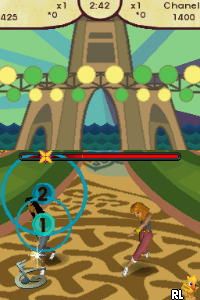
Cheetah Girls, The – Passport to Stardom (USA)
0 1 0
Cheetah Girls, The – Passport to Stardom (USA) is a classic Nintendo DS game that captures the fun and energy of the popular franchise. This game is easy to pick up and play, offering a straightforward experience that focuses on music, dance, and performance. With its accessible controls and familiar style, it appeals to both fans of the series and newcomers alike. As a Nintendo DS classic, it runs smoothly in your browser, providing a nostalgic trip back to the mid-2000s handheld gaming scene.
What Is Cheetah Girls, The – Passport to Stardom?
The game is a musical simulation set within the universe of the Cheetah Girls franchise. It puts players in the role of a young performer working toward stardom through a series of mini-games, performances, and character customization. The core gameplay revolves around rhythm-based challenges, dance routines, and fashion choices that influence your success in the game’s career progression.
Designed for a broad audience, it offers a lighthearted story of friendship and ambition. Players can guide their avatar through various scenes, from rehearsals to live performances, with tasks that involve timing button presses and matching beats. It’s simple enough for younger players but still offers enough variety and challenge to keep more experienced gamers engaged.
What Keeps You Coming Back
The game’s charm lies in its combination of mini-games and character personalization. You can unlock new outfits, accessories, and dance moves, which encourages repeated play to complete collections and perfect routines. The progression system rewards players for mastering rhythm challenges and performing well in concerts, making it more fun to keep trying.
Additionally, the game offers multiple performance scenarios and customization options, so each session feels different. The variety in dance routines and the chance to try out different styles motivate players to revisit scenes and improve their skills. Its straightforward gameplay and familiar music tracks make the experience satisfying without feeling overwhelming.
Handy Tips
If you’re just starting out, focus on mastering the rhythm mini-games early to boost your scores.
- Pay attention to visual cues and timing to hit notes accurately during dance routines.
- Try out different outfits and accessories to see what makes you feel confident and helps your scores.
- Practice performing songs multiple times to unlock new stages and customization options.
- Watch your progress bar; it’s a good way to see how well you’re doing in performances.
- Experiment with different performance styles to find what suits your playstyle best.
Player FAQ
Is Cheetah Girls, The – Passport to Stardom easy for young players?
Yes, it’s designed to be accessible for children and casual players, with simple controls and clear objectives.
Can I play Cheetah Girls, The – Passport to Stardom offline?
Yes, this game runs directly in your browser, so you don’t need an internet connection once it loads. It’s perfect for quick sessions without interruptions.
Does this game support multiple languages or require internet access for features?
This version is a basic Nintendo DS adaptation and doesn’t need an internet connection for gameplay. Language options are usually limited to the region version, typically English for the USA release.
Playing Cheetah Girls, The – Passport to Stardom offers a fun, accessible experience rooted in the Nintendo DS era. Its simple mechanics and charming style make it a good pick for fans and newcomers alike. It’s a light, engaging game that’s free in your browser, great for quick bursts of musical fun.
Related games: you can also try 7 Wonders II (Europe) and Build-A-Bear Workshop – Where Best Friends Are Made (USA) (En,Fr,Es), or browse all other games in the Nintendo DS category.
How to Play Cheetah Girls, The – Passport to Stardom (USA)?
Perform rhythm challenges and dance routines to gain points, customize your character, and progress through performances to become a star in the game.
Game Controls
Arrow keys and other keyboard buttons are used to navigate menus and perform actions.
You may be interested in:
-
 Nintendo DS
♥ 1
Casper’s Scare School – Classroom Capers (USA)
Nintendo DS
♥ 1
Casper’s Scare School – Classroom Capers (USA) -
 Nintendo DS
♥ 1
Zunou Nouryoku Koujou Machine – Touch de Zunoo DS (Japan)
Nintendo DS
♥ 1
Zunou Nouryoku Koujou Machine – Touch de Zunoo DS (Japan) -
 Nintendo DS
♥ 1
Zunou ni Asekaku Game Series! Vol. 1 – Cool 104 Joker & Setline (Japan)
Nintendo DS
♥ 1
Zunou ni Asekaku Game Series! Vol. 1 – Cool 104 Joker & Setline (Japan) -
 Nintendo DS
♥ 9
Zuma’s Revenge (USA)
Nintendo DS
♥ 9
Zuma’s Revenge (USA) -
 Nintendo DS
♥ 1
Zubo (USA) (En,Fr,Es)
Nintendo DS
♥ 1
Zubo (USA) (En,Fr,Es) -
 Nintendo DS
♥ 1
Zubo (Europe) (En,Fr,De,Es,It,Nl,Sv)
Nintendo DS
♥ 1
Zubo (Europe) (En,Fr,De,Es,It,Nl,Sv) -
 Nintendo DS
♥ 1
Zorro – Quest for Justice (USA) (En,Fr,De,Es,It)
Nintendo DS
♥ 1
Zorro – Quest for Justice (USA) (En,Fr,De,Es,It) -
 Nintendo DS
♥ 1
Zorro – Quest for Justice (Europe) (En,Fr,De,Es,It)
Nintendo DS
♥ 1
Zorro – Quest for Justice (Europe) (En,Fr,De,Es,It)
Comments (0)
No comments yet. Be the first to comment!