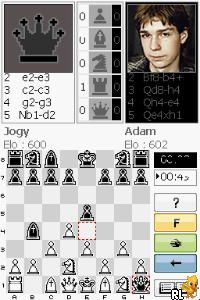
Chessmaster – The Art of Learning (Europe) (En,Fr,De,Es,It,Nl)
0 1 0
Chessmaster – The Art of Learning (Europe) (En,Fr,De,Es,It,Nl) is a well-known Nintendo DS game that provides a complete chess experience suitable for players at any level. Whether you’re aiming to sharpen your skills or just want a reliable digital version to play on the go, this game fits the bill. It includes tutorials and adjustable difficulty settings, making it accessible for beginners and satisfying for experienced players. If you want a portable chess game that runs offline, this one offers plenty of strategic depth.
Getting Into Chessmaster – The Art of Learning
The main gameplay involves playing chess against the computer or practicing through various training modes. You can pick different difficulty levels, starting easy and gradually raising the challenge as you improve. Most matches begin with quick games or tutorials, where you can learn the rules, tactics, and strategies. The interface is simple and responsive, making it easy to set up a game or access training lessons. It’s perfect for quick plays during short breaks or longer sessions if you want to study specific skills or review previous games.
There are different modes, including playing against AI at different levels or exploring lessons designed to teach key concepts. The game keeps track of your progress and gives feedback to help you see where you can improve. It encourages both casual play and focused learning, so you can practice openings, endgames, or analyze your moves. Being on the Nintendo DS, it’s easy to take with you and play whenever you want, fitting into everyday routines.
Standout Features
This title from the Nintendo DS era features clear visuals of the chessboard and pieces, so players can follow the game easily. The interface is clean, with touch controls that make moving pieces straightforward. The presentation emphasizes clarity, which is especially helpful for beginners or those learning new tactics.
The training modes include lessons that introduce ideas step-by-step. Replay value comes from its multiple difficulty options, the variety of instructional content, and the chance to analyze different positions. You can revisit lessons, face different opponents, or challenge yourself in timed matches. Since it works offline and is simple to play, you can enjoy it anytime without needing an internet connection.
Strategy and Tips
If you’re new to chess, focus on learning how to open well and control the center. Practicing tactics such as forks and pins can really improve your game. Take your time with moves and think about your opponent’s threats before responding.
- Start at an easier difficulty to learn the rules and basic tactics before trying harder levels.
- Use the tutorials to get familiar with positional ideas and endgame strategies.
- Review your games to spot mistakes and find better moves for next time.
- Learn a few opening principles instead of memorizing entire lines right away.
- Play regularly in short sessions to steadily build your strategic thinking.
Quick Questions
How do I get started with the game?
Select a mode, pick your difficulty, and start playing or practicing with tutorials.
What’s a common mistake beginners make?
Many move too quickly without considering threats or controlling the center, which can lead to early problems.
Can I play on touch devices or mobile?
This game runs on the Nintendo DS, with dual-screen touch controls. You can also play it on compatible emulators in your browser.
Chessmaster – The Art of Learning offers a practical way to enjoy and learn chess digitally. Its clear interface and various modes make it a good choice for improving your skills or playing classic matches on your Nintendo DS or through an emulator.
Related games: you can also try Ben 10 – Ultimate Alien – Cosmic Destruction (USA) (En,Fr,De,Es,It) and Age of Empires – Mythologies (USA) (En,Fr), or browse all other games in the Nintendo DS category.
How to Play Chessmaster – The Art of Learning (Europe) (En,Fr,De,Es,It,Nl)?
Play chess against the computer or practice tactics by making moves on the board. Aim to checkmate your opponent or improve your skills through lessons and different difficulty levels.
Game Controls
Arrow keys move the cursor; Enter confirms moves; other keys select options or navigate menus.
You may be interested in:
-
 Nintendo DS
♥ 1
Casper’s Scare School – Classroom Capers (USA)
Nintendo DS
♥ 1
Casper’s Scare School – Classroom Capers (USA) -
 Nintendo DS
♥ 1
Zunou Nouryoku Koujou Machine – Touch de Zunoo DS (Japan)
Nintendo DS
♥ 1
Zunou Nouryoku Koujou Machine – Touch de Zunoo DS (Japan) -
 Nintendo DS
♥ 1
Zunou ni Asekaku Game Series! Vol. 1 – Cool 104 Joker & Setline (Japan)
Nintendo DS
♥ 1
Zunou ni Asekaku Game Series! Vol. 1 – Cool 104 Joker & Setline (Japan) -
 Nintendo DS
♥ 9
Zuma’s Revenge (USA)
Nintendo DS
♥ 9
Zuma’s Revenge (USA) -
 Nintendo DS
♥ 1
Zubo (USA) (En,Fr,Es)
Nintendo DS
♥ 1
Zubo (USA) (En,Fr,Es) -
 Nintendo DS
♥ 1
Zubo (Europe) (En,Fr,De,Es,It,Nl,Sv)
Nintendo DS
♥ 1
Zubo (Europe) (En,Fr,De,Es,It,Nl,Sv) -
 Nintendo DS
♥ 1
Zorro – Quest for Justice (USA) (En,Fr,De,Es,It)
Nintendo DS
♥ 1
Zorro – Quest for Justice (USA) (En,Fr,De,Es,It) -
 Nintendo DS
♥ 1
Zorro – Quest for Justice (Europe) (En,Fr,De,Es,It)
Nintendo DS
♥ 1
Zorro – Quest for Justice (Europe) (En,Fr,De,Es,It)
Comments (0)
No comments yet. Be the first to comment!