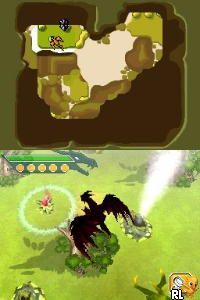
Combat of Giants – Dragons (Europe) (En,Fr,De,Es,It,Nl,Sv,No,Da)
0 2 0
Combat of Giants – Dragons (Europe) (En,Fr,De,Es,It,Nl,Sv,No,Da) is a classic Nintendo DS game that takes players into a vast universe filled with mighty dragons. Its pixelated visuals and handheld charm remind us of early 2000s portable gaming, giving a nostalgic look back at battles from the past. The game’s atmosphere combines bright creature designs with a lively soundtrack, creating an environment that encourages exploration and conquest. As a Nintendo DS classic, it runs smoothly in your browser, so you can enjoy its dragon-filled world without needing to download or install anything.
Step Into the World of Combat of Giants – Dragons
The game places you in a land where dragons are the rulers, each with unique looks and elemental powers. The visuals feature colorful, cartoon-style illustrations that show off the variety of these impressive creatures. The sound design includes energetic music and creature roars, helping to build a lively, believable universe. The overall feel balances adventure with the excitement of combat, making each fight feel meaningful. While simple in design, its presentation captures the look and feel of handheld gaming, with menus and sprites that reflect the Nintendo DS’s distinctive style. The interface is straightforward, guiding you through battles and exploration without overwhelming complexity.
How the Gameplay Hooks You
Combat of Giants – Dragons uses turn-based battles that keep the pace steady, encouraging strategic thinking over frantic button mashing. You choose your attacks and defenses, aiming to find and exploit elemental weaknesses to gain an edge. Progress comes through a series of fights and challenges that introduce new dragons and abilities, giving a sense of growth. The cycle of battling, upgrading, and exploring keeps things interesting without feeling overwhelming. Its mechanics are simple enough for quick gaming sessions, but still offer enough depth for players who enjoy tactical choices.
Pro Tips for Combat of Giants – Dragons
Getting the most out of the game involves knowing your dragons’ strengths and weaknesses.
- Use elemental advantages to deal more damage and outsmart your opponents.
- Save powerful attacks for critical moments when the tide could turn against you.
- Monitor your dragon’s health and use healing items wisely.
- Try different dragons to find the style and tactics you enjoy most.
- Practice timing defenses to block strong enemy moves effectively.
- Pay attention to terrain, as it can influence the outcome of battles.
Frequently Asked Questions
Can I play Combat of Giants – Dragons in short gaming sessions?
Absolutely. The battles are quick and self-contained, making it easy to jump in for a few minutes.
Does the game become repetitive after a while?
The gameplay stays familiar, but unlocking new dragons and tactics keeps things fresh over time.
Is Combat of Giants – Dragons good for younger players?
Its simple mechanics and fantasy setting make it accessible for many ages, though the strategic elements mean it’s not just mindless action.
Combat of Giants – Dragons offers a nostalgic yet engaging experience for fans of handheld turn-based battles and dragon worlds. Its straightforward gameplay makes it suitable for quick sessions, with a sense of adventure in every fight. This classic from the Nintendo DS era remains a charming entry in creature combat games, now easily playable in your browser for free.
Related games: you can also try Cho Geukjangpan Gaeguri Jungsa Keroro the Movie – Dragon Warriors (Korea) and Battle of Giants – Dinosaurs (USA) (En,Fr,Es), or browse all other games in the Nintendo DS category.
How to Play Combat of Giants – Dragons (Europe) (En,Fr,De,Es,It,Nl,Sv,No,Da)?
Choose your dragon, select attacks based on elemental strengths and weaknesses, and defeat opponents in turn-based battles to progress and upgrade your dragons.
Game Controls
Arrow keys for navigation; Enter or space to select actions.
You may be interested in:
-
 Nintendo DS
♥ 1
Casper’s Scare School – Classroom Capers (USA)
Nintendo DS
♥ 1
Casper’s Scare School – Classroom Capers (USA) -
 Nintendo DS
♥ 1
Zunou Nouryoku Koujou Machine – Touch de Zunoo DS (Japan)
Nintendo DS
♥ 1
Zunou Nouryoku Koujou Machine – Touch de Zunoo DS (Japan) -
 Nintendo DS
♥ 1
Zunou ni Asekaku Game Series! Vol. 1 – Cool 104 Joker & Setline (Japan)
Nintendo DS
♥ 1
Zunou ni Asekaku Game Series! Vol. 1 – Cool 104 Joker & Setline (Japan) -
 Nintendo DS
♥ 9
Zuma’s Revenge (USA)
Nintendo DS
♥ 9
Zuma’s Revenge (USA) -
 Nintendo DS
♥ 1
Zubo (USA) (En,Fr,Es)
Nintendo DS
♥ 1
Zubo (USA) (En,Fr,Es) -
 Nintendo DS
♥ 1
Zubo (Europe) (En,Fr,De,Es,It,Nl,Sv)
Nintendo DS
♥ 1
Zubo (Europe) (En,Fr,De,Es,It,Nl,Sv) -
 Nintendo DS
♥ 1
Zorro – Quest for Justice (USA) (En,Fr,De,Es,It)
Nintendo DS
♥ 1
Zorro – Quest for Justice (USA) (En,Fr,De,Es,It) -
 Nintendo DS
♥ 1
Zorro – Quest for Justice (Europe) (En,Fr,De,Es,It)
Nintendo DS
♥ 1
Zorro – Quest for Justice (Europe) (En,Fr,De,Es,It)
Comments (0)
No comments yet. Be the first to comment!