Cornelsen Trainer – Mathe – Klasse 6 (Europe) (En,De)
0 1 0
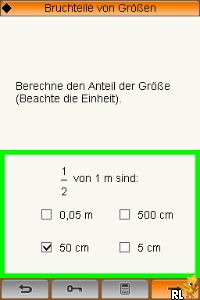
Cornelsen Trainer – Mathe – Klasse 6 (Europe) (En,De) is a classic Nintendo DS educational game designed to help students in grade 6 improve their math skills. This title is aimed at young learners looking for a practical, interactive way to practice mathematics topics. As a Nintendo DS classic, it features familiar gameplay mechanics from the handheld console era, now available to play directly in your browser without any downloads. If you’re after a straightforward, educational experience that combines learning with a bit of nostalgia, this game offers a good option.
Getting Into Cornelsen Trainer – Mathe – Klasse 6
This game works as a series of math exercises in different modes, such as quizzes and practice drills. The main gameplay involves choosing exercises based on the topic you want to work on—like fractions, algebra, or geometry—and then solving problems shown on the screen. Each session usually starts with a quick overview of the current topic, followed by questions that test your understanding. Correct answers often earn points or move you forward in the lesson, while mistakes bring up hints or explanations to help you learn more effectively.
The structure encourages repeated practice. You can focus on specific areas or do mixed exercises for a broader review. The interface is simple, with clear prompts and easy navigation, making it accessible for players of different ages and skill levels. Because it’s designed for classroom or self-study, it doesn’t have complex storylines or time limits; instead, it promotes steady, focused practice. Playing in your browser makes it easy to jump in for quick sessions, whether you’re a student or a parent looking for extra learning tools.
Standout Features
One of the most noticeable things is the simple visual design. The interface mimics a handheld console, with basic icons and a clean layout that keeps the focus on the exercises. The game covers a variety of topics aligned with sixth-grade curriculum standards, providing targeted practice that can adapt to different learning needs.
Progression is tracked through levels or stages, each focusing on different math concepts. Finishing exercises unlocks new challenges or review sections, encouraging repeated play to master each area. Its replay value comes from revisiting topics, improving scores, and reinforcing what you’ve learned through practice. Since the game is meant for educational reinforcement rather than entertainment, its value lies in offering consistent, structured practice sessions that can be tailored to the learner’s pace.
Strategy and Tips
To get the most out of this game, set a clear goal for each session—whether it’s mastering fractions or reviewing algebra. Pay attention to explanations after mistakes instead of rushing through exercises. Regular practice helps reinforce concepts and build confidence in solving different kinds of problems.
- Start with topics you find most challenging to build a strong foundation.
- If you get stuck, review hints or explanations before moving on.
- Set small, achievable goals for each session, like completing a certain number of exercises.
- Repeat exercises to improve your scores and reinforce learning, especially on difficult topics.
- Practice different topics to develop well-rounded math skills.
- Use the progress tracking to see where you need more focus and adjust your practice accordingly.
Quick Questions
How do I start playing the game?
Just load it in your browser, and it begins right away—no installation needed. You can pick practice mode or quizzes to start practicing immediately.
What’s a common mistake for beginners?
Many players rush through questions without reading instructions carefully, which can lead to errors. Take your time to understand each problem before answering.
Can I play this game on a mobile device or tablet?
Yes, since it runs in your browser, it should work well on most smartphones and tablets, especially with touch controls, making it easy to practice math on the go.
This browser version of Cornelsen Trainer – Mathe – Klasse 6 provides a practical way to strengthen sixth-grade math skills with familiar gameplay. Its straightforward approach and focus on targeted practice make it a useful tool for students and teachers alike.
Related games: you can also try Build-A-Bear Workshop – Ou Se Font les Meilleurs Amis (France) and Barbie in the 12 Dancing Princesses (Europe) (En,Fr,De,Es,It), or browse all other games in the Nintendo DS category.
How to Play Cornelsen Trainer – Mathe – Klasse 6 (Europe) (En,De)?
Choose math exercises based on your topic, solve problems to earn points, and improve your skills through repeated practice and review sections.
Game Controls
Arrow keys navigate; Enter selects and confirms answers.
You may be interested in:
-
 Nintendo DS
♥ 1
Casper’s Scare School – Classroom Capers (USA)
Nintendo DS
♥ 1
Casper’s Scare School – Classroom Capers (USA) -
 Nintendo DS
♥ 1
Zunou Nouryoku Koujou Machine – Touch de Zunoo DS (Japan)
Nintendo DS
♥ 1
Zunou Nouryoku Koujou Machine – Touch de Zunoo DS (Japan) -
 Nintendo DS
♥ 1
Zunou ni Asekaku Game Series! Vol. 1 – Cool 104 Joker & Setline (Japan)
Nintendo DS
♥ 1
Zunou ni Asekaku Game Series! Vol. 1 – Cool 104 Joker & Setline (Japan) -
 Nintendo DS
♥ 9
Zuma’s Revenge (USA)
Nintendo DS
♥ 9
Zuma’s Revenge (USA) -
 Nintendo DS
♥ 1
Zubo (USA) (En,Fr,Es)
Nintendo DS
♥ 1
Zubo (USA) (En,Fr,Es) -
 Nintendo DS
♥ 1
Zubo (Europe) (En,Fr,De,Es,It,Nl,Sv)
Nintendo DS
♥ 1
Zubo (Europe) (En,Fr,De,Es,It,Nl,Sv) -
 Nintendo DS
♥ 1
Zorro – Quest for Justice (USA) (En,Fr,De,Es,It)
Nintendo DS
♥ 1
Zorro – Quest for Justice (USA) (En,Fr,De,Es,It) -
 Nintendo DS
♥ 1
Zorro – Quest for Justice (Europe) (En,Fr,De,Es,It)
Nintendo DS
♥ 1
Zorro – Quest for Justice (Europe) (En,Fr,De,Es,It)
Comments (0)
No comments yet. Be the first to comment!